
-
ZTE certified client
- Size: 4.5M
- Language: Simplified Chinese
- Category: Network detection
- System: WinAll






ZTE certified clientThe compressed file contains two versions of the authentication client and the 64-bit WIN 7 network card auxiliary software. Friends who do not know how to use it can open the ZTE 802.1x authentication client help file at the beginning of the computer after installing the client.
Instructions for use
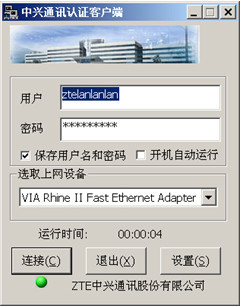
1. Start the ZTE Supplicant program. The network connection dialog box provides the user name and user password for authentication and authorization. You can choose to save the user name and password so that the saved user information can be used for authentication when the program is run again, as shown in the figure below.
Tip: The username cannot exceed 20 characters, and the password cannot exceed 20 characters.
2. Check "Automatically run at startup" to indicate that ZTE Supplicant will automatically start the next time you turn on the computer, and the main window for startup will be displayed.
3. The network card selection drop-down box displays all the network devices that can be connected in the system. You need to select the certified network device in the drop-down box.
4. Click the "Settings" button to set detailed network information in the settings dialog box.
5. After setting the relevant information, click the "Connect" button and the program starts the authentication process. During the authentication process, you may be required to confirm your username and password. You can see whether the authentication was successful or not through the connection information and connection icon.
6. Click the "Exit" button to exit the program without performing any authentication.
WinXP operating system users please note:
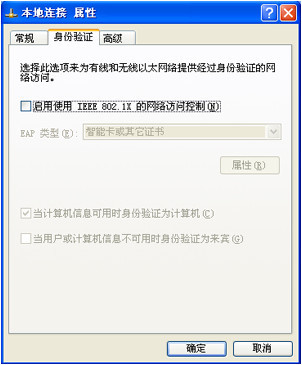
When using 802.1x authentication client software, please disable the use of IEEE 802.1x network access control in the "Authentication" dialog box in the network card properties, as shown in the figure below.
Version: Official version | Update time: 2024-12-26
Similar recommendations






Latest updates



ZTE Certified Client Review
-
1st floor Huajun netizen 2020-02-22 22:33:15ZTE certification client software is very easy to use, downloads quickly and is very convenient!
-
2nd floor Huajun netizen 2021-05-19 11:54:54The overall feeling of the ZTE certified client is good and I am quite satisfied with it. The installation and operation are very smooth! It went very smoothly following the installation step-by-step guide!
-
3rd floor Huajun netizen 2017-01-26 17:09:11The ZTE certification client is convenient, practical and powerful. The software is very easy to use!
Recommended products









- Diablo game tool collection
- Group purchasing software collection area
- p2p seed search artifact download-P2P seed search artifact special topic
- adobe software encyclopedia - adobe full range of software downloads - adobe software downloads
- Safe Internet Encyclopedia
- Browser PC version download-browser download collection
- Diablo 3 game collection
- Anxin Quote Software
- Which Key Wizard software is better? Key Wizard software collection




