
-
SRSniffer (network sniffer)
- Size: 0.09M
- Language: Simplified Chinese
- Category: Network detection
- System: Win10/Win8/Win7/Vista/WinXP






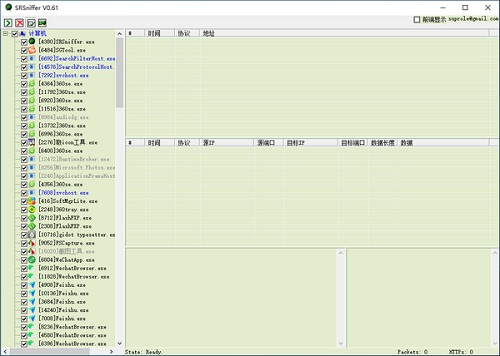
SRSniffer (network sniffer)The official version is a highly practical network sniffer. The latest version of SRSniffer (network sniffer) is a network analysis method based on the principle of passive listening, which can monitor the status of the network, data flow, and information transmitted on the network. andSRSniffer (network sniffer)It can also capture and analyze data packets transmitted on the network, and the analysis results can be used for users' network security analysis. Huajun Software Park provides the download service of SRSniffer (network sniffer). To download other versions of SRSniffer (network sniffer), please go to Huajun Software Park!

SRSniffer (network sniffer) software functions
1. Can monitor network card data packets and analyze HTTP data
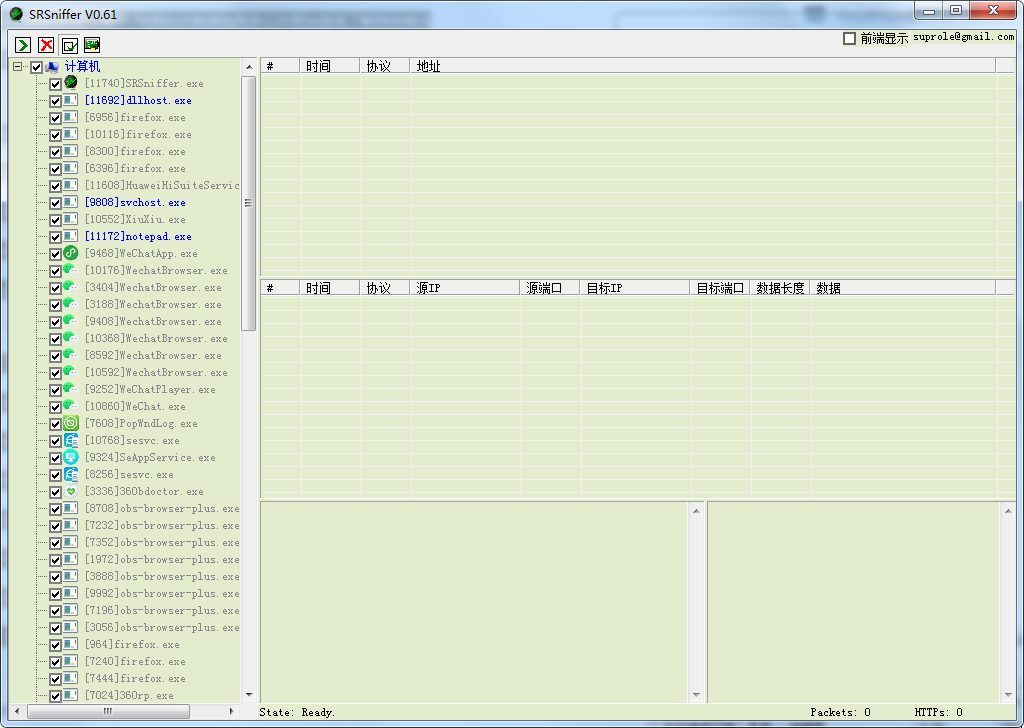
2. Supports monitoring of specified processes, using 2 colors of packet lists to allow you to understand the network situation more intuitively
3. The background color of the software is grass green to provide the best protection for your eyes, and users can monitor the specified process according to their choice.
SRSniffer (network sniffer) software highlights
1. The data packet list uses two colors to distinguish sending and receiving, which is more intuitive.
2. Use grass green as the background color of the software, which will become less dazzling after being used for a long time.
3. You can monitor the specified process according to your choice
4. Special files such as programs, videos, documents, etc. are specially marked, and website resources such as videos and music can be easily downloaded.
5. If you have any bugs or suggestions, please submit them to the email address in the upper right corner of the software.
SRSniffer (network sniffer) software features
1. Provides the function of monitoring network data
2. It can sniff the data of the programs you run and the web pages you open.
3. You can copy the data address of a web page being loaded
4. Support viewing the address of a program you need and the data packets sent
5. Supports obtaining the download address of the corresponding data and downloading the data packets monitored on the platform
6. Allow you to obtain more resources on the Internet
7. The scope of monitored data is very large
8. Support monitoring of all network data
SRSniffer (network sniffer) installation steps
1. Download SRSniffer (network sniffer) from Huajun Software Park and get a software compressed package.

2. Then decompress the software compressed package and obtain SRSniffer.exe.

3. Finally, double-click to open SRSniffer.exe and you can use it.
How to use SRSniffer (network sniffer)
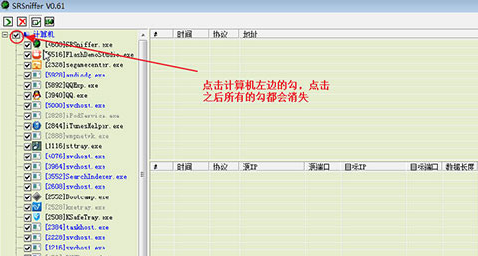
1. Click the check mark on the left side of the computer to unselect all
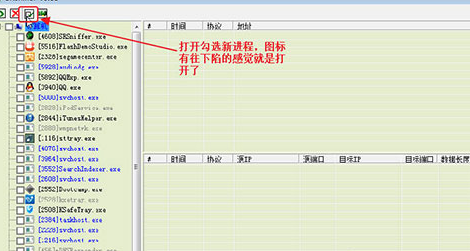
2. Click to open and check the new process
3. Click Network Card Selection to choose your own network card
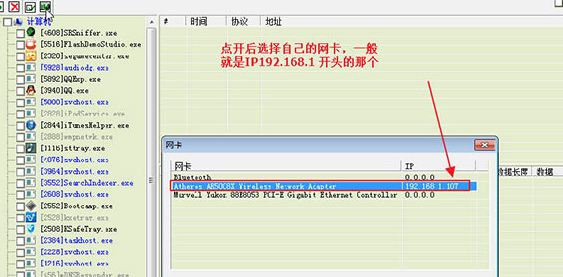
4. Open the browser and go to the page you need to download (if you had the browser open before, close it first)
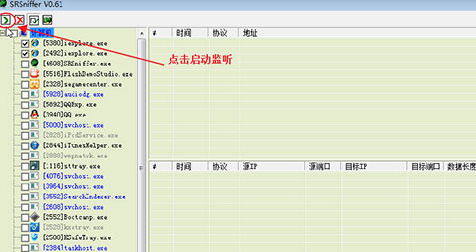
5. Click on the SRSniffer page of the mobile meeting to start monitoring
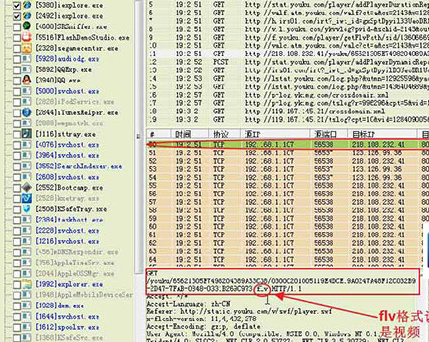
6. Click the address you need in the upper right corner area (if the address does not appear in the upper right corner, refresh the web page)
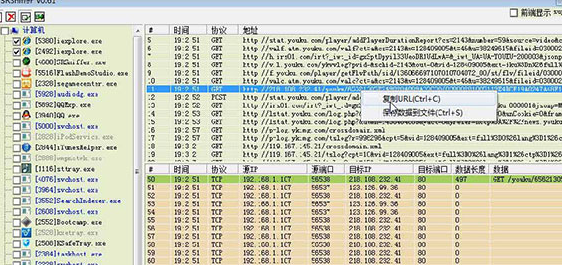
7. Copy the URL you need. After getting the URL, you can download it through the download tool
Comparison of similar software to SRSniffer (network sniffer)
folder snifferIt is a professional folder de-encryption software, mainly used to recover lost encrypted data. Folder sniffer can not only quickly recover files or folders encrypted with encryption software, but can also copy, move, delete, etc. encrypted files. If you forget the password of the encrypted file, you can use this software to help you solve your troubles.
Audio and video sniffing expertIt is a powerful online video downloading tool. Audio and video sniffing experts can customize sniffing files to capture the real addresses of movies played online, so that users can download them using the real addresses. It supports various mainstream video websites, including Youku Tudou, Sina Video, Sohu Video and other video websites, and supports many formats.
SRSniffer (network sniffer) update log
Fix errors from the previous version
Fixed the problem of not being able to monitor network data
Fixed data error issue
Now you can monitor all data opened on your computer desktop
A protocol that can automatically analyze network data
Can display the address to which data is sent
Can display the target IP of data transmitted over the network
Huajun editor recommends:
SRSniffer (network sniffer)It can also capture and analyze data packets transmitted on the network, and the analysis results can be used for users' network security analysis. SRSniffer (network sniffer) software feels really good! The editor specially tested it for this purpose, and it works really well.
Version: 0.61 official version | Update time: 2025-10-23
Similar recommendations






Latest updates




SRSniffer (network sniffer) review
-
1st floor Huajun netizen 2021-10-21 21:55:02The SRSniffer (network sniffer) software is very easy to use, the download speed is very fast, and it is very convenient!
-
2nd floor Huajun netizen 2022-02-22 04:29:24SRSniffer (network sniffer) is awesome! 100 million likes! ! !
-
3rd floor Huajun netizen 2021-10-19 10:43:37SRSniffer (network sniffer) is not bad. It downloads very quickly. I give you a good review!
Recommended products










- Diablo game tool collection
- Group purchasing software collection area
- p2p seed search artifact download-P2P seed search artifact special topic
- adobe software encyclopedia - adobe full range of software downloads - adobe software downloads
- Safe Internet Encyclopedia
- Browser PC version download-browser download collection
- Diablo 3 game collection
- Anxin Quote Software
- Which Key Wizard software is better? Key Wizard software collection




