
-
Thousand cattle
- Size: 201.07M
- Language: Simplified Chinese
- Category: Chat software
- System: Win All







Qianniu workbenchSeller versionis made ofAliProduced by Qianniu, a one-stop store management platform dedicated to business communication, also known as Qianniu Seller Edition. Commonly used functions include baby management,shopManagement, supply center, marketing center, etc. Simply put, it integrates various resources for sellers.Taobao,TmallCommunication tool for shopping platforms. The core of Qianniu Workbench lies in tools for managing stores, accessible business information and good business partnerships. If you need a Qianniu workbench that can instantly contact buyers, then come to Huajun Software Park to download it!

Introduction to Qianniu’s new features
1. [Workbench Home Page]
1. Quick and direct access to store information
A quick overview of the store’s basic information, credit rating, dynamic scores, deposit payment status, etc., and one-click access to core operations
2. Growth cards help business a
Supports viewing store growth levels and hierarchical rights, completing growth tasks, and helping store operations improve efficiency.
3. Global search improves efficiency
Support search function,plug-in, products, headline information and supply sources to improve search efficiency
4. One-click access to commonly used functions
The most commonly used functions support one-click access, making store management more efficient.
2. [Promotion]
1. Unified management of promoted products
Promote real-time data and news updates for easy viewing and personalizationAdvertisementBusiness advice, learning resources and cases to help improve promotion skills
2. One-click promotion of through train
It supports intelligent recommendation, flexible and independent product selection and other promotion methods. Set a budget and quickly create a plan in two steps, and the estimated delivery effect and cost are more controllable.
3. Super recommended quick management
Support viewing real-time data and accountsBalance, plan list, quickly understand the advertising effect, and make management more convenient
3. [Marketing Activities]
1. One-stop event registration
Supports querying the latest and most comprehensive marketing activity information in the Taobao department, and one-stop registration for various marketing activities such as Tmall/Taobao promotions, Juhuasuan/Daily sales, etc.
2. One-stop event registration
Supports querying the latest and most comprehensive marketing activity information in the Taobao department, and one-stop registration for various marketing activities such as Tmall/Taobao promotions, Juhuasuan/Daily sales, etc.
3. One-stop management of reported products
Supports querying all historical event registration records by product, and the participation information of popular events is clear at a glance
4. Activity fee inquiry and management
Supports inquiry and management of marketing activity charges, making timely payment without missing a beat, making detailed inquiry and invoicing more convenient
4. [Delivery]
1. Optimization and upgrade of delivery list
Added the ability to query orders based on product ID and waybill number. The order list supports Want Want to contact buyers and supports the function of modifying the order number.
2. Conveniently choose logistics companies
Automatically associate with the logistics company based on the order number, support quick selection of last time and frequently usedLogisticsCompany, supports selecting express companies by category to improve delivery efficiency
3. Brand new official order placing tool
One-stop ordering tool, one-click management of order printing, one-click delivery is more convenient
5. [Go to live broadcast]
1. Quickly join the live broadcast with one click
If you have not signed in to become a host, click "Sign in Now" to quickly sign in
2. Improve the efficiency of live broadcast management
The live broadcast tool supports quick publishing, live broadcast data helps improve the effect, and the live broadcast list is convenient and quick to manage.
3. Master the secrets of live broadcast courses
Official courses improve live broadcast skills, live broadcast dynamics display the latest rules, and live broadcast rankings facilitate learning & benchmarking
6. [Store decoration]
1. Unified management of navigation bar
Unify the navigation bar under all baby TABs to quickly enter the immersive decoration experience and improve decoration efficiency.
2. Unified management of decoration modules
Integrate page AB settings, module library, store live broadcast settings, module data, etc. into decoration management to reduce jumps and improve decoration efficiency.
Qianniu Workbench Seller Edition Frequently Asked Questions
How do Qianniu sellers set up automatic replies?
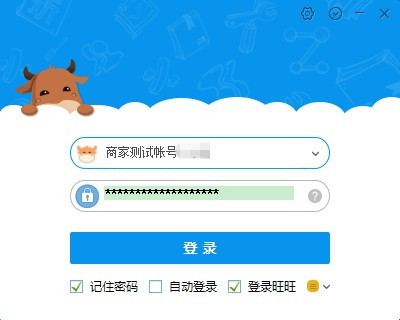
1. First download and install from this siteThousand cattleWorkbench. To run Qianniu Workbench software, first register a login account.
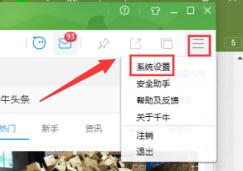
2. After logging in, click the icon of the setting options on the right side of the main interface, click to open, and select "System Settings" in the pop-up box.
3. Then open the system panel, click the left option to switch to the customer setting option to set automatic reply. The system panel is also the functional area of Qianniu Seller Edition for general, chat, personality, security, customer service and other related content settings.
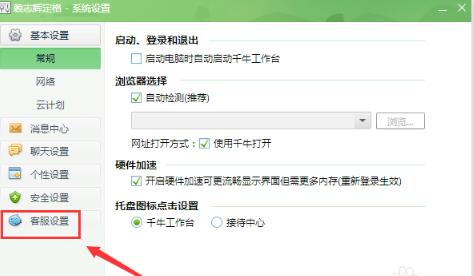
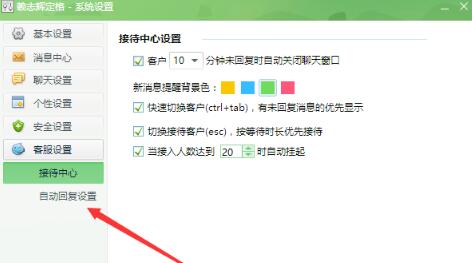
4. After clicking Customer Settings, there are two options: Reception Center and Automatic Reply Settings. Click on automatic reply settings and you will see the following interface:
5. In the "Auto-Reply Settings" panel, first set the content of the automatic reply. The Qianniu Workbench system will have some specific responses by default. The seller can choose to keep it or modify or delete it.
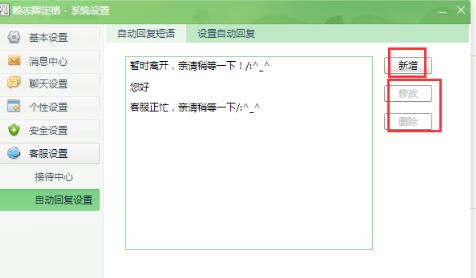
6. After adding the phrase content of the automatic reply, switch to the "Set automatic reply" option, and set the corresponding phrase for a specific scenario here, as shown in the figure below. After the settings are completed, just save and confirm. In this way, the automatic reply setting of Qianniu Seller Edition is completed.

How to upload baby in Qianniu seller version?
1. Open the Qianniu Seller Edition software that has been installed on your computer and log in to your account.
2. After logging in, click the common URL of the main interface of Qianniu Workbench. After clicking, find Baby Management in the options and click to publish the baby.
3. Open the product publishing panel, and then enter the name of the product you sell in the category search. Click the "I've read the rules, post my baby now" button.
4. Fill in the basic information details of the product. (Note that the symbol "*" is required.) Remember to be realistic when describing the baby.Upload products strictly in accordance with Taobao rules and do not sell fake products.. After filling in, click the "Publish" button.
The above is the frequently asked questions and related solutions introduced by the editor to you about Qianniu Seller Edition. I hope it can help you. If you don't find a suitable answer, you can search in the tutorial area of Huajun Software Park.
How to put Qianniu seller version on the shelvesmerchandise?
1. Open Qianniu workbench, click Settings, and click Baby Release on the setting interface.
2. Select the category and brand of the product that the seller wants to put on the shelves, then click Publish the product, enter the product interface and click Add product image, then edit the title, set the brand, edit the price and quantity of the product, etc., and finally click Publish, and the product will be on the shelves.
How to check the bill after Qianniu express delivery
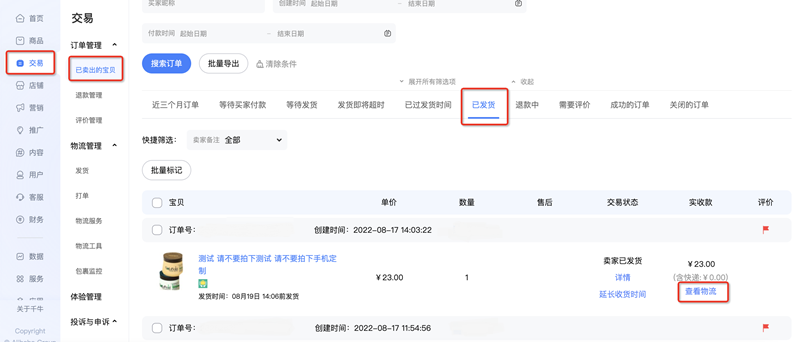
Method 1: Open [Qianniu Workbench], enter [Transaction] - [Sold Items] - [Shipping], find the corresponding order and click [View Logistics] to view the delivery time and logistics order number information of the order (bill-related information can be further correlated with the logistics order number).
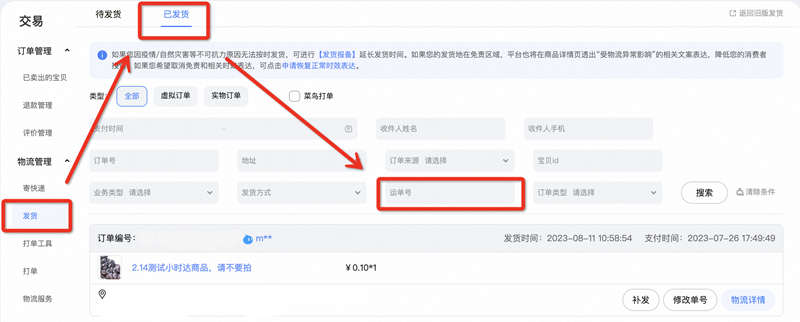
Method 2: You can also use [Qianniu Workbench] to enter the [Shipping] - [Shipping] page, enter the logistics order number in the search bar, and you can quickly locate and query the corresponding shipped order record.
How does Qianniu check the order through the logistics tracking number on the computer?
1. Install Qianniu APP on your mobile phone and log in to the corresponding merchant account. Click the scan code button in the upper right corner of the workbench. On the QR code scanning page of Qianniu APP, turn on the switch of "Synchronize scan results to computer".
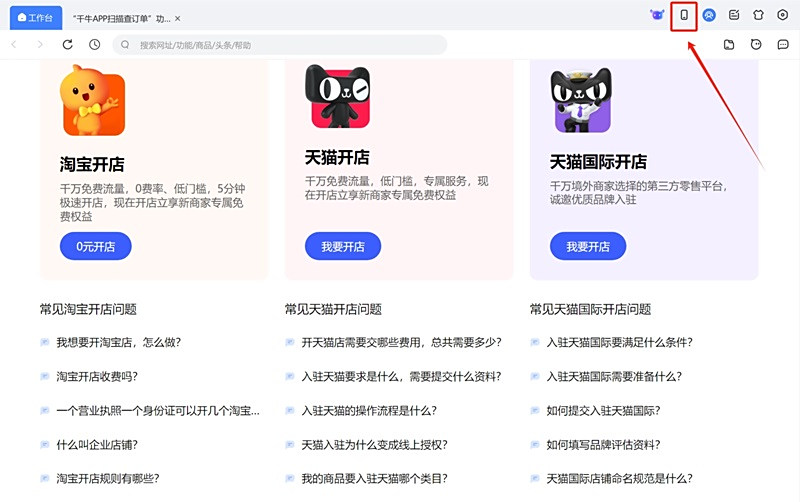
2. Install the Qianniu PC client on the computer, log in to the same merchant account as the mobile phone, and make sure the PC client version number is ≥9.16.00; then click the mobile phone icon in the upper right corner of the workbench to open the "Qianniu APP Synchronization" panel.
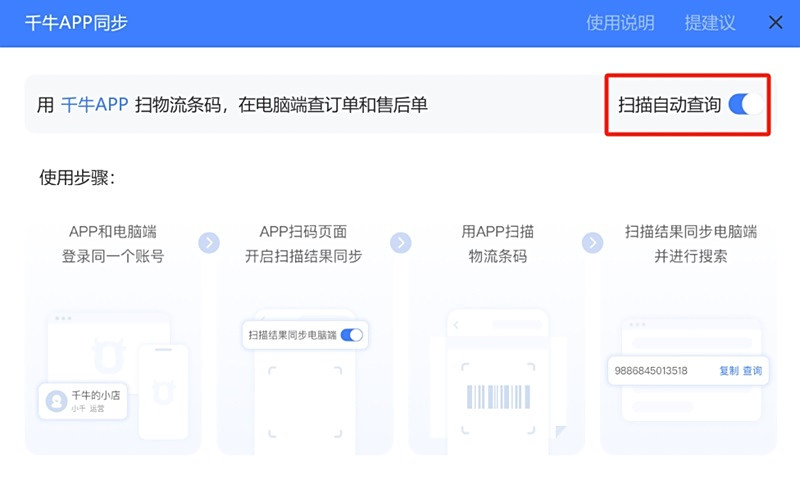
3. In the synchronization panel, turn on the "Scan Automatic Query" switch. Next, just use the mobile APP to scan the express barcode, and the synchronization panel of the PC client will automatically record the scan results and complete the order query simultaneously.
How to set personal shortcut phrases in Qianniu
1. In the Qianniu chat window, find and click the [Quick Phrases] button. After clicking, you can add, import or export shortcut phrases.
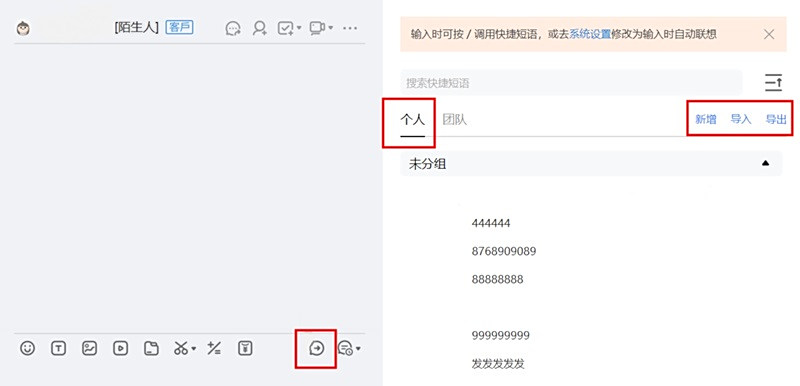
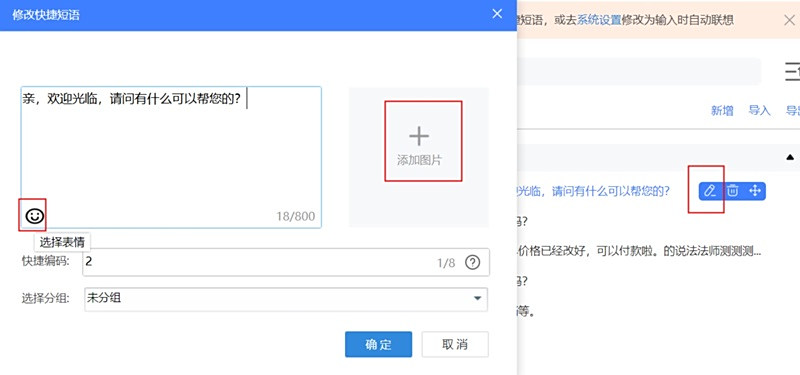
2. When setting personal shortcut phrases, you can add emoticons, pictures and other elements to enrich the content. You can also manually adjust the sorting order of phrases according to your usage habits to facilitate subsequent quick calls.
Thousand cows workDesk function
1. Automatic speech-to-text function
When buyers communicate with customer service through voice messages, the system will automatically convert the voice messages into text so that customer service can more easily view and reply. This feature requires users to update to the latest version of Taobao or Maoke to gain support.
2. Colorful stars to quickly identify customer levels
The newly added colorful star function allows customer service to mark customers in different colors and provides multiple marking methods to easily distinguish important customers and improve work efficiency.
3. Convey the reason for transfer to customer service to improve reception efficiency
During the customer service transfer process, the system supports sending the transfer reason, so that the receiving customer service does not need to ask the buyer's consultation reason again, thus significantly improving reception efficiency.
4. Real-time monitoring of store operation data
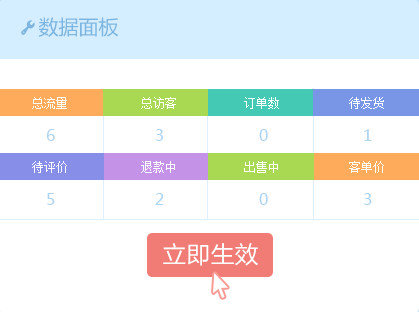
The homepage data panel now supports real-time viewing of key data such as orders, reviews, products, traffic, visitors, and transactions. Users can choose the type of data to view according to their needs.
5. Workbench search address bar optimization
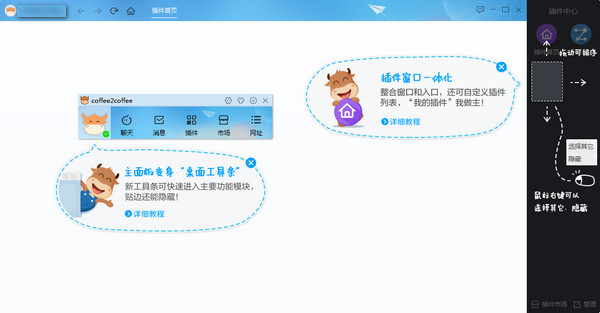
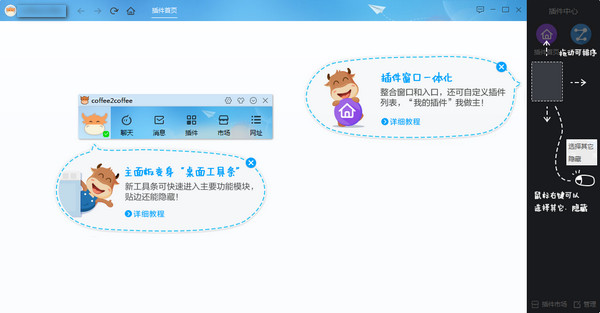
The search address bar of the workbench supports quick search of commonly used URLs and plug-ins, and you can directly enter the Taobao URL to quickly open related pages.
Features of Qianniu Workbench Seller Edition
1. Sellers can obtain products immediately on Qianniu WorkbenchOrderInformation, refund news, etc., and when buyers inquire about products, they can directly query the products in the store and recommend links to buyers.
2. After the buyer places an order, the seller can send the order information through Qianniu Workbench and push it to the buyer for information verification.
3. Integrate Ali Want Want into Qianniu software. Using this software, you can also chat with Want Want users and take orders.
5. Qianniu Seller Edition can check various store conditions through plug-ins and easily do business anytime and anywhere.
6. The one-stop workbench can realize all operations of the main link of e-commerce operations, from store application to perfect store operations, store traffic data monitoring, to after-sales refunds of goods.
7. Focus on business scenarios and provide rich and authoritative e-commerce knowledge anddataInterpretation.
8. Qianniu integrates the supply capabilities of high-quality service providers to provide sellers with supply,FinanceServices, corporate procurement and other business-oriented all-round commercial services

Qianniu Workbench Seller Edition Installation Steps
1. Download the installation package of Qianniu Workbench from Huajun Software Park, and double-click to open the .exe file.

2. Run the downloaded executable file of Qianniu Workbench and click "Install Now".

3. Wait for Qianniu-seller’s workbench to be installed. The installation process is very fast.

4. As shown below, the Qianniu installation is completed. Click "Use Now" to experience the Qianniu seller platform immediately.

Qian NiuheAliwangwangdifference?
The objects of use are different
Qianniu and Aliwangwang are actually products launched by Alibaba Group, and both are business communication software., Taobao sellers and Tmall merchants can use Qianniu, and Alibaba Wangwang can be used by buyers.
Application platforms are different
Alibaba Want Want Seller Edition is the mobile Want Want software, Qianniu can be used on both mobile phones and computers.
Development trends are different
The new AliWantWant is the integration of the Chinese website AliWantWant and Taobao WantWant. It focuses more on fast and convenient real-time negotiation and is more suitable for users who purchase on the 1688 website. Qianniu Workbench not only integrates instant communication tools (Wangwang), but also has product management, real-time monitoring tools for store traffic, etc., which is more suitable for sellers with website management needs.
Functional comparison:
Aliwangwang has relatively few functions, only simple chat and other functions. Qianniu has more complete functions, which is equivalent to a smaller version of PC. It also integrates Aliwangwang's chat function, which has functions such as price changes, listings, shipments, data viewing, and promotion settings.
Operational comparison:
Qianniu and Aliwangwang are both simple to operate and very easy to get started. This depends on personal habits. After all, there are some differences in their functions. Qianniu, which has many functions, may be more complicated to operate for some people.
Aliwangwang download link:http://softwaredownload4.com/soft/31497.htm
Here we also provide you withQianniu mobile version, mainly to facilitate sellers to receive orders when they are out and not miss business.
Qianniu mobile version download link:http://softwaredownload4.com/soft/586488.htm
Qianniu Workbench Seller Edition Update Log
1. Optimize the customer service reception "quick phrase" import/export capability and word association function;
2. Chat messages support sliding left and right to view the complete message content;
3. Chat messages support classification queries based on files, pictures/videos, and queries based on sender, specified time, and fuzzy content search;
4. Added a new global shortcut key "Select the first unanswered conversation" to quickly reach the first unanswered chat box;
5. Qianniu APP supports storage space management and chat record cleaning;
6. Optimized some image loading, caching and other performance issues;
Huajun editor recommends:
It is very convenient to use Qianniu Workbench seller version to manage your own store information. You can check your store's transaction information and product information at any time. In addition, when buyers are optimistic about the store products, they can communicate with us through Qianniu Workbench in time. Many sellers are using Qianniu Seller Edition - Qianniu Workbench. If you need it, come to Huajun and download it! In addition, this site also provides Wangwang, Jingdong Dongdong and other software for free download.
Version: 9.63.20N | Update time: 2025-10-23
Similar recommendations





Latest updates





Qianniu web version login entrance-Qianniu web version online use
Qianniu sets up the operation process of using the browser to directly open the Seller Center
Qianniu’s graphic steps for setting up a free shipping fee template
Details on using Qianniu Seller Transaction Management
Qianniu’s operation process for setting up a chatbot
Operation skills for finding and receiving files in Qianniu
How to set screenshot shortcut keys in Qianniu
Simple operation of chatting with Qianniu
Qianniu’s graphic steps for setting up the robot’s semi-automatic reply
Qianniu comments
-
1st floor Huajun netizen 2022-03-16 08:11:17Qianniu is very useful, thank you! !
-
2nd floor Huajun netizen 2022-03-10 04:41:28Qianniu software is very easy to use, the download speed is very fast and very convenient!
-
3rd floor Huajun netizen 2022-03-14 10:18:44Qianniu hopes to do better and better, come on!
Recommended products







- Diablo game tool collection
- Group purchasing software collection area
- p2p seed search artifact download-P2P seed search artifact special topic
- adobe software encyclopedia - adobe full range of software downloads - adobe software downloads
- Safe Internet Encyclopedia
- Browser PC version download-browser download collection
- Diablo 3 game collection
- Anxin Quote Software
- Which Key Wizard software is better? Key Wizard software collection




