
-
2345King of Pictures
- Size: 77.2M
- Language: Simplified Chinese
- Category: Picture viewing software
- System: Win All







2345 Picture Viewer is a high-definition picture viewing software with faster picture viewing speed and more compatible formats. The official version of 2345KantuKing Computer brings you amazing ultra-high-definition perfect picture quality, with every detail appearing, precise and sharp image processing, giving you a more realistic high-definition picture viewing effect! This site provides free downloads, so download and experience it now!

Features of the official version of 2345Kantuwang
1. Lightning-like speed supports one-click Weibo sharing function, share pictures with friends at any time and enjoy happiness. Supports minimalist picture viewing mode. 2345 Picture Viewing King uses the world's fastest and powerful image engine. Even on a low-configuration computer, it can open large pictures of more than ten megabytes at lightning speed.
2. 2345 Picture Viewer also provides you with a full-screen mode that is more suitable for viewing large pictures and a slideshow mode that can automatically adjust the playback speed and order.
3. 2345 Picture Viewer uses a beautiful and easy-to-use bird's-eye view function, which allows you to quickly and easily locate and view any part of a large picture. You can also directly use the mouse to quickly zoom in on the bird's-eye view!
4. Support mouse pointer for page turning. Move the mouse to the left and right ends of the picture, and the pointer will automatically turn into page turning arrows, making it more convenient to perform page turning!
5. Intelligent smooth zoom technology: Bringing a smoother visual experience. The first domestic intelligent smooth zoom technology makes the zoom effect of the image infinitely close to the distance stretching of the lens, bringing a smoother visual experience!
6. Support up to 67 image formats. 2345KanpiKing supports more image formats than traditional image viewers. In addition to common image formats such as BMP/PNG/JPG, it is also compatible with professional image formats such as PSD/RAW.
2345Kantuwang official version installation method
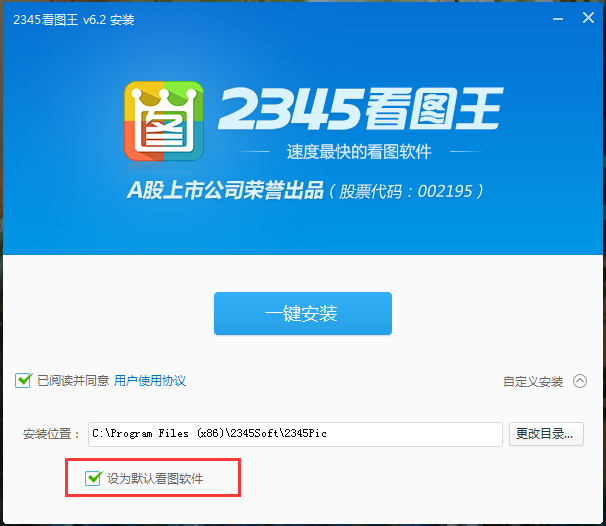
1. After downloading the official version of 2345 King of Pictures from this site, get an .exe file locally on your computer. Double-click the .exe file to enter the software installation interface. You can click [One-click installation] and the software will be installed by default.

2. Or you can click [Customize Installation]. In the expanded installation location, you can click [Change Directory]. In the window that opens, you can choose the installation location of the official version of 2345 Picture Viewer. After the selection is completed, you can check [Set as the default picture viewing software], and then click [One-click installation].
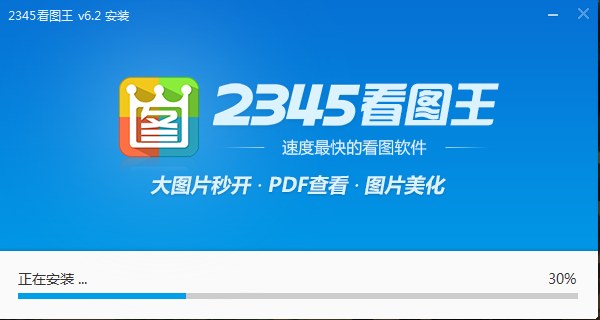
3. The official version of 2345 Kantuwang is being installed. You need to wait patiently for the software installation to be completed.
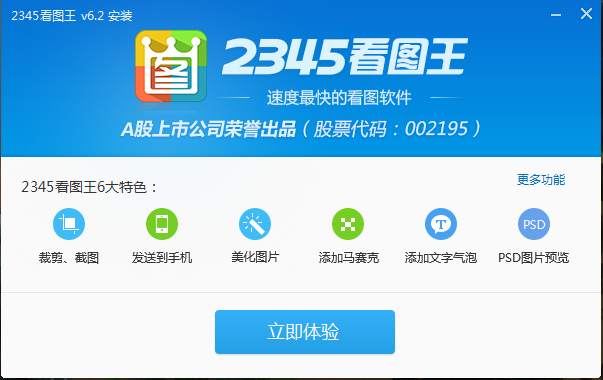
4. The official version of 2345KantuKing is installed. Click [Try Now] to open the software.
2345Kantuwang Official Version Frequently Asked Questions
2345How to change the picture size in Picture Viewer
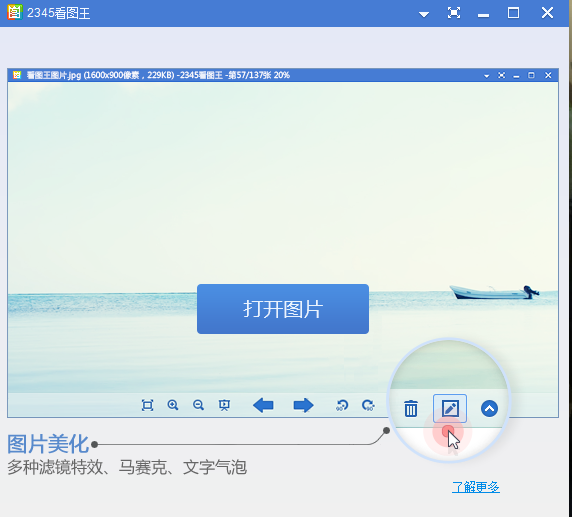
1. Open the official version of the 2345 Picture King software on this site. After opening the software, click the [Open Picture] button in the middle of the software.
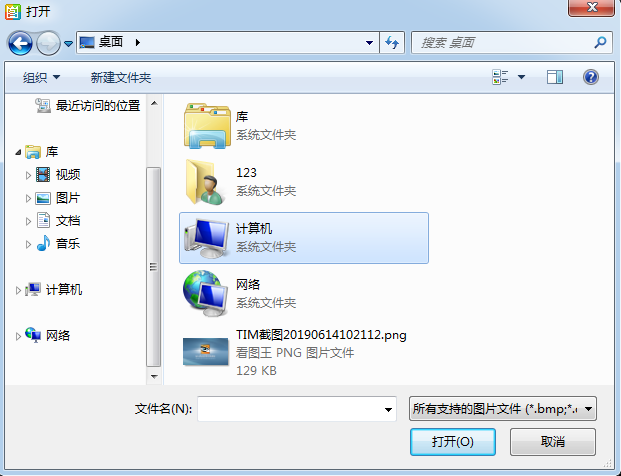
2. In the window that opens, select the picture you want to open, and click [Open] after finding it.
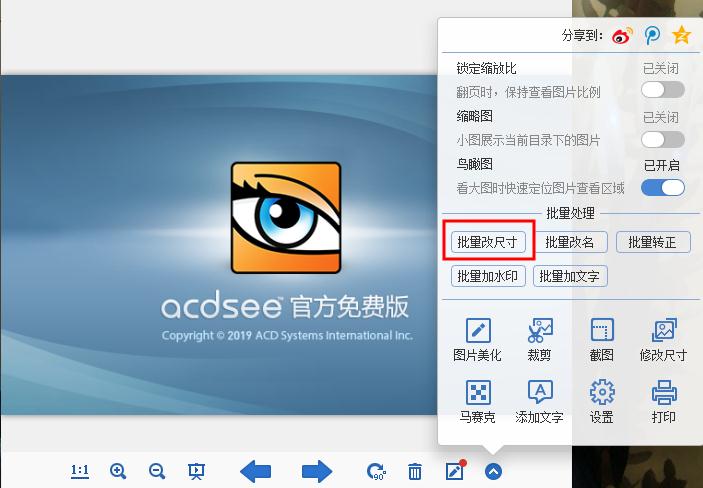
3. After opening the picture, click [More] at the bottom of the official version of 2345Kantu.com and click [Modify Size] in the pop-up options.

4. If you want to modify the image size in batches, you can select [Batch Resize].
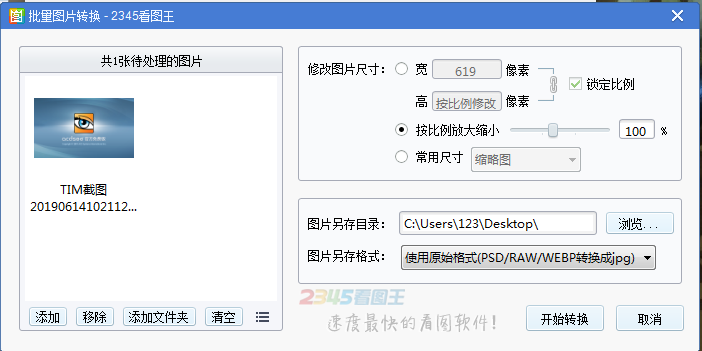
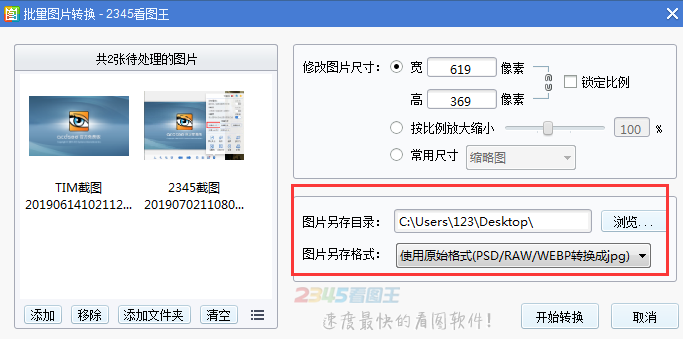
5. After the batch modification of pictures window opens, you can click [Add]. In the window that opens, you can add the pictures you need to modify.
6. You can modify the image size in the right interface. You can choose to lock the ratio, zoom in and out proportionally, and commonly used sizes. You can choose by yourself.
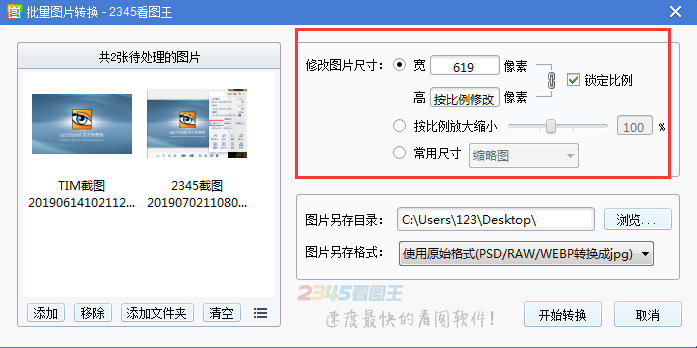
7. You can click [Browse] to select the save location of the image. You can click [▼] after the image is saved as a format. In the pop-up options, you can select the format for conversion. After the selection is completed, click [Start Conversion]
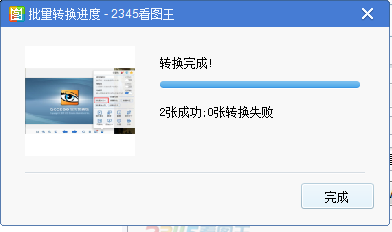
8. Wait patiently for the conversion of the official version of 2345 Kantu King to be completed. After the conversion is completed, click [Finish].
How to add special effects/enhancements to pictures in the official version of 2345Kantuwang?
You can refer to:http://softwaredownload4.com/sbdm/news/tutorial/39492.html, in this tutorial I introduce the method in detail, I hope it can help you.
Questions related to the official version of 2345Kantuwang
How to add watermark and text using 2345Kantuwang
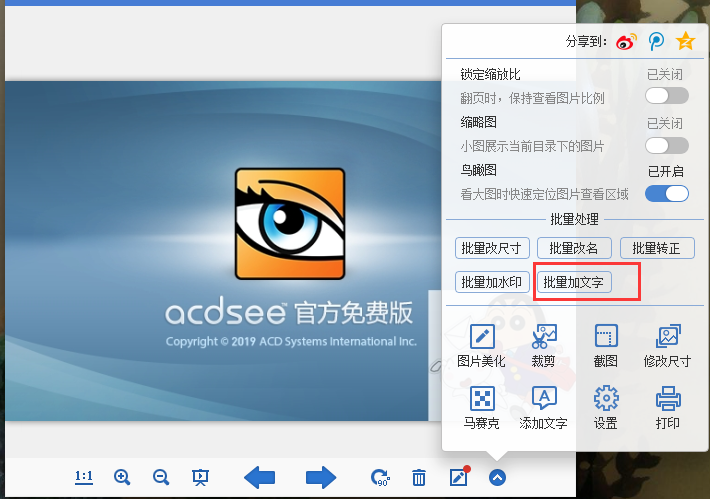
1. Open the 2345 Picture King software downloaded from this site. After opening the software, add the pictures you want to operate, and click [More] at the bottom of the software. In the pop-up options, you can now add watermarks and text in batches. You can choose by yourself.
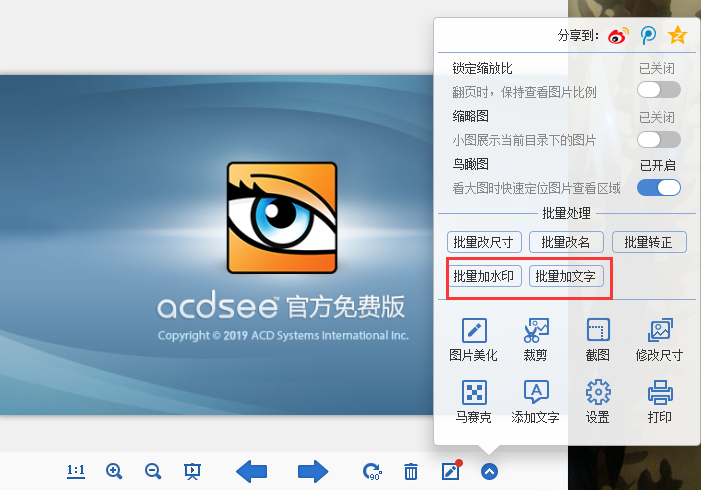
2. The editor will first demonstrate how to add a watermark. In the opened 2345 Picture Viewer Add Watermark window, click [Select Picture] on the right.

3. In the window that opens, select the picture you want to add a watermark to, and click [Open] after completing the selection.
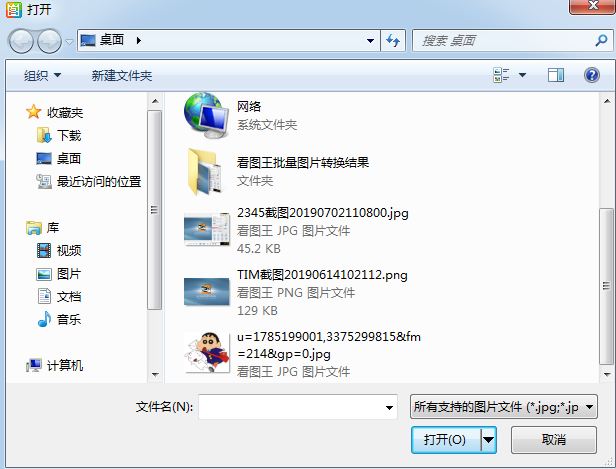
4. You can choose the size, transparency and position of the picture. You can choose it yourself. After the selection is completed, you can click [Preview] to view the effect. If you are satisfied, click [Start adding watermark].

5. If you want to add text, you can click the batch add text option.
6. In the opened 2345 Picture Viewer Add Text window, you can enter the text you want to add.
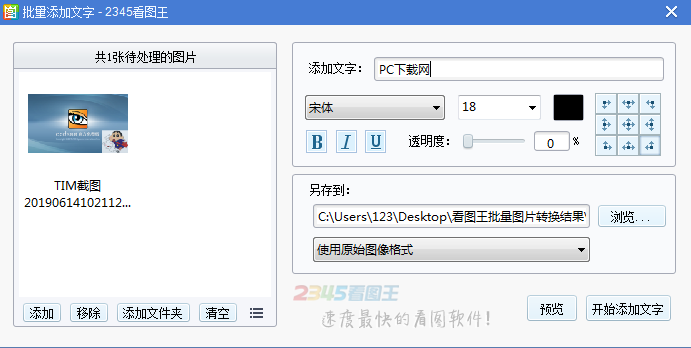
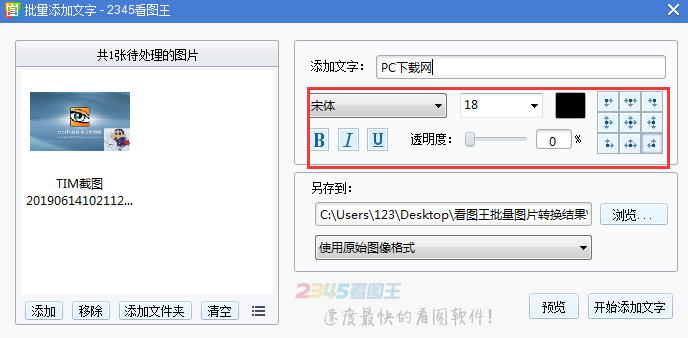
7. After the input is completed, you can click to modify the format, size, position, color, etc. of the text. You can choose it yourself. After the selection is completed, you can click [Preview] to view the effect. If you are satisfied, click [Start adding text].
How to freely rotate/crop pictures in the official version of 2345Kantuwang?
You can refer to:http://softwaredownload4.com/sbdm/news/tutorial/39497.html, in this tutorial, we introduce the operation method in detail, I hope it can help you.
2345Look at Tuwang and Meitu to see which one works best
2345 Kantuwang and Meitukankan are powerful photo software that can meet the needs of most users. 2345Kantuwang is a very powerful picture browsing and management software. This software is completely free to use and supports page turning, zooming, and printing of pictures in folders. It can also exclusively support the playback and single-frame saving of multi-frame images such as GIF, as well as full-screen viewing and slide viewing, and provides thumbnail previews. Meitukankan is currently the smallest and fastest universal image viewing software. It is perfectly compatible with all mainstream image formats, has a simple and clean interface, and is highly praised by users. Meitu Kankan uses a self-developed image engine, which is specially optimized for digital photos. The original image caching technology consumes very little CPU and memory, and can be used smoothly even on computers with low configurations.
Take a look at the download address of beautiful pictures:http://softwaredownload4.com/soft/79408.htm
2345Kantuwang official version update log
1. 2345 Picture Viewing King has added a wheel picture viewing mode, which supports scrolling pictures up and down with the wheel;
2. 2345KantuKing has added the horizontal folder penetration function, so you no longer need to open folders one by one to read comics;
3. 2345KanpiKing greatly improves the speed of opening pictures and solves the problem of slow opening of pictures in folders;
4. Improve win10 compatibility and optimize related issues and full-screen display issues of win10 anniversary edition;
Huajun editor recommends:
2345KantuKing is a very practical picture browsing tool that can help users browse pictures, and can also edit, beautify, crop, add watermarks and other functions to pictures. It also supports batch operations. Isn’t it very simple? Download and use it if you need it. The editor of Huajun Software Park has compiled and collected software that you may like, such as: Photo BlowUp, AutoCad 2020, Batch Butler, etc. You can download it from this site.
Version: 13.3 | Update time: 2025-10-23
Similar recommendations






Latest updates





2345Kantuwang how to add text-free annotations - How to add text-free annotations
How to use the locked zoom ratio in 2345Kuantuwang - How to use the locked zoom ratio
2345Kantuwang how to add film vignetting effect to pictures - How to add film vignetting effect
How to print photos on 2345Kantu.com - How to print photos on 2345kantu.com
2345Kanpiwang how to crop pictures to standard wallpaper 4:3 - How to crop standard wallpaper 4:3
2345Kantuwang comments
-
1st floor Huajun netizen 2022-01-16 05:45:29The interface design of 2345Kantuwang is very easy to use and has rich functions. I highly recommend it!
-
2nd floor Huajun netizen 2022-01-19 15:41:19The overall feeling of 2345Kantuwang is good and I am quite satisfied. The installation and operation are very smooth! Followed the installation step-by-step instructions and it went very smoothly!
-
3rd floor Huajun netizen 2021-12-09 19:03:202345Kantuwang is not bad, the download is very fast, I will give you a good review!
Recommended products









- Diablo game tool collection
- Group purchasing software collection area
- p2p seed search artifact download-P2P seed search artifact special topic
- adobe software encyclopedia - adobe full range of software downloads - adobe software downloads
- Safe Internet Encyclopedia
- Browser PC version download-browser download collection
- Diablo 3 game collection
- Anxin Quote Software
- Which Key Wizard software is better? Key Wizard software collection




