
-
Ethereal
- Size: 12.4M
- Language: English
- Category: Network detection
- System: Win9x/Me/NT/2000/XP/2003






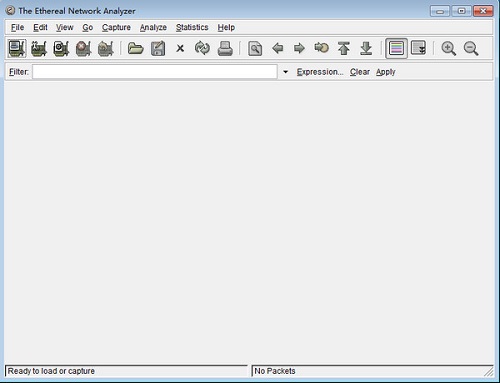
Ethereal official version
The official version of Ethereal is a packet capture tool built for computer networks. The Ethereal packet capture tool can automatically identify the file type of the captured packet, read any file format of the captured packet, and conduct real-time analysis of the data inside. Ethereal can also help users solve various network problems and make it easier to view and monitor TCP Session dynamics and so on. Huajun Software Park provides Ethereal download services. To download other versions of Ethereal, please go to Huajun Software Park!

Ethereal software features
1. Capture data from the network connection or read data from the captured file in real time;
2. Ethereal can read from tcpdump (libpcap), network universal sniffer (compressed and uncompressed), SnifferTM Professional Edition, NetXrayTM, Sun snoop and atmsnoop, Shomiti/Finisar tester, iptrace for AIX, Microsoft Network Monitor, Novell's LANalyzer, RADCOM's WAN/LAN Analyzer, the ISDN4BSD project's HP-UX nettl, and i4btrace, Cisco Security IDS iplog and pppd logs (pppdump format), WildPacket's File captured at EtherPeek/TokenPeek/AiroPeek or the visual UpTime of the visual network. In addition, Ethereal can also be used from Read trace reports from Lucent/Ascend WAN routers and Toshiba ISDN routers, as well as read output text and DBS from VMS over TCPIP Etherwatch.
3. From Ethernet, FDDI, PPP, Token Ring, IEEE 802.11, IP over ATM and loop interfaces (at least on some systems, not all systems support these types) to read real-time data.
4. The captured network data can be accessed through GUI or TTY mode tethereal program.
5. Edit or modify captured files in a planned manner through the command line switch of the editcap program.
6. The current 602 agreement can be divided.
7. The output file can be saved or printed as plain text or PostScript format.
8. Accurately display data through display filters.
9. Display filters can also be selectively used for highlight and color package summary information.
10. All or part of the captured network tracking report will be saved to disk.
Ethereal software features
1. Determine the location of Wireshark
If you don’t have a correct location, it will take a long time to capture some data that has nothing to do with you after starting Wireshark.
2.Select the capture interface
Generally, the interface connected to the Internet network is selected so that network-related data can be captured. Otherwise, the other data captured will not be of any help to you.
3. Use capture filters
By setting capture filters, you can avoid generating excessively large capture files. In this way, users will not be interfered by other data when analyzing data. Moreover, it can also save users a lot of time.
4. Use display filters
Usually the data filtered using capture filters is often still very complex. In order to make the filtered data packets more detailed, use the display filter to filter at this time.
5. Use coloring rules
Usually the data filtered using the display filter are useful data packets. If you want to highlight a session more prominently, you can use coloring rules to highlight it.
6.Construct a chart
If the user wants to more clearly see the changes in data in a network, the data distribution can be easily displayed in the form of charts.
7. Reorganize data
Ethereal The reassembly function can reorganize the information of different data packets in a session, or reorganize a complete picture or file. Because transferred files tend to be large, the information is spread across multiple packets. In order to be able to view the entire picture or file, it is necessary to use the method of reorganizing the data.
Ethereal installation steps
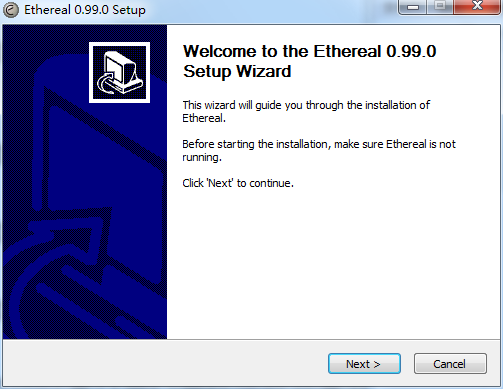
1. Download Ethereal from Huajun Software Park and extract it to the current folder. Click on the ethereal-setup-0.99.0.exe application to enter the installation wizard interface, and then click Next.
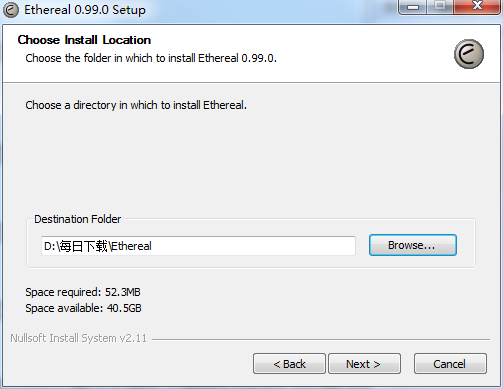
2. Select the software installation location interface. Huajun editor recommends that users install it on the D drive, select the installation location and click Next.
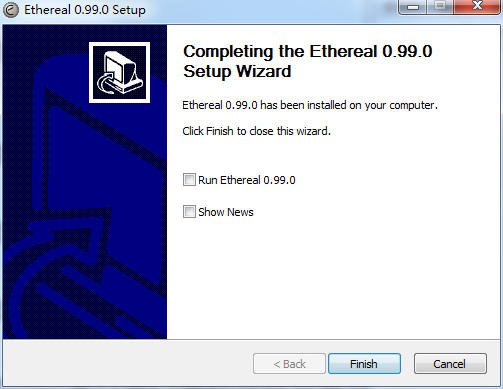
3. The Ethereal installation is completed, click Finish.
Ethereal usage instructions
Ethereal is a GUI network protocol analyzer.
It allows you to interactively browse packet data from a live network or from a previously saved capture file.
Ethereal’s native capture file format is libpcap, which is also the format used by tcpdump and various other tools. So Ethereal can read capture files from:
-libpcap/WinPcap, tcpdump and various other tools use the capture format of tcpdump
-snoop and atmsnoop
- Captured by Shomiti / Finisar Surveyor
-Novell LANalyzer capture
- Microsoft Network Monitor Capture
-AIX iptrace capture
-Cinco Networks NetXRay Capture
- Network-associated Windows-based sniffer capture
-Network General/Network Associates DOS-based Sniffer (compressed or uncompressed) capture
-AG Group / WildPeets EtherPeek / TokenPeek / AiroPeek / EtherHelp / PacketGrabber captures
-RADCOM’s WAN/LAN Analyzer Capture
-Network Instruments Observer version 9 capture
-Debug output for the Lucent/Ascend router
- HP-UX nettl files
- Toshiba’s ISDN router dump output
- Output from i4btrace from the ISDN4BSD project
Trace from EyeSDN USB S0.
- Output in IPLog format from Cisco Secure Intrusion Detection System
-pppd log (pppdump format)
- Output from VMS's TCPIPtrace/TCPtrace/UCX$TRACE utility
- Text output of the DBS Etherwatch VMS utility
- Visual upload time traffic capture for visual networks
- Output from CoSine L2 debugging
- Output from Accellent's 5Views LAN proxy
—ERF format capture of Endace measurement system
-Linux Bluez Bluetooth stack hcidump -w trace
There is no need to tell Ethereal what type of file you are reading; it will determine the file type on its own. Ethereal is also able to read any of these file formats if they use gzip compression. Ethereal recognizes this directly from the file; no '.gz' extension is required for this purpose.
Ethereal FAQ
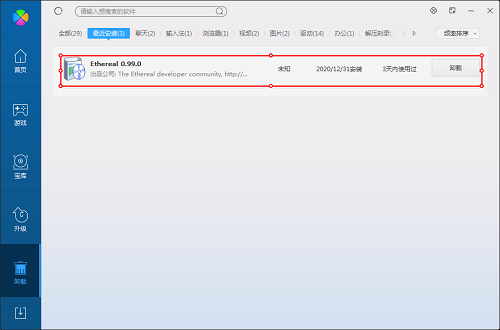
Question: How to uninstall the electronic whiteboard?
Answer: Method 1: Install and open the computer manager software, select the software management option, click the uninstall option, find the electronic whiteboard in the list, and click uninstall.
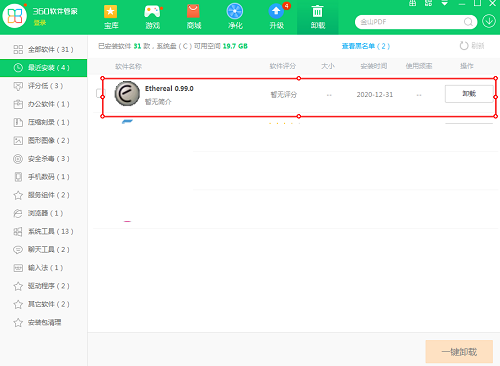
Method 2: Install and open 360 Software Manager, find the electronic whiteboard in the list of uninstall options, and click to uninstall.
Comparison of similar software
Internet Packet Capture ToolIt is a LAN packet capture tool. The network packet capture tool mainly monitors computers in the network through LAN IP, including Internet monitoring, behavior monitoring, external device monitoring and other aspects. It can ensure the security of computers in the LAN and provide users with a healthy and good usage environment.
winsock expert packet capture toolIt is a green and simple network data grabbing tool. The new version corrects the problem that error messages may appear when receiving data packets. Fixed the issue where the corresponding text content cannot be displayed correctly when data packets are displayed in HEX mode.
Huajun editor recommends:
The Ethereal packet capture tool can automatically identify the file type of the captured packet, read any file format of the captured packet, and conduct real-time analysis of the data inside. Users who are interested in this software, you need to go to the editor of Huajun Software Park to satisfy you!
Version: 0.99.0 official version | Update time: 2024-12-23
Similar recommendations






Latest updates



Ethereal Review
-
1st floor Huajun netizen 2021-05-17 01:42:39Ethereal is very useful, thank you! !
-
2nd floor Huajun netizen 2021-09-19 22:30:54The Ethereal interface design is easy to use and has rich functions. I highly recommend it!
-
3rd floor Huajun netizen 2021-05-11 15:52:27Ethereal software is very easy to use, the download speed is very fast and very convenient!
Recommended products









- Diablo game tool collection
- Group purchasing software collection area
- p2p seed search artifact download-P2P seed search artifact special topic
- adobe software encyclopedia - adobe full range of software downloads - adobe software downloads
- Safe Internet Encyclopedia
- Browser PC version download-browser download collection
- Diablo 3 game collection
- Anxin Quote Software
- Which Key Wizard software is better? Key Wizard software collection




