
-
Screenshot translation tool
- Size: 13.79M
- Language: Simplified Chinese
- Category: translation software
- System: winall






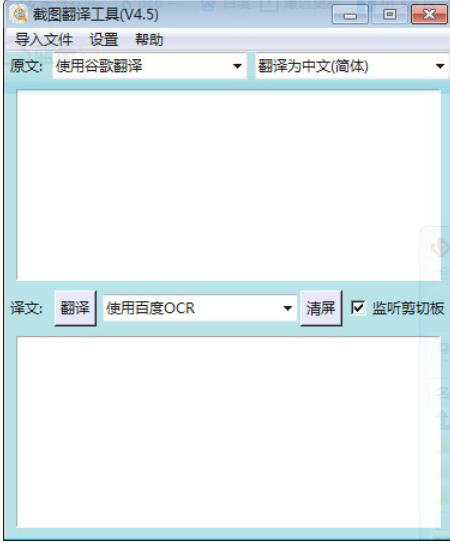

Screenshot translation tool is a type of software that recognizes Chinese characters in pictures through screenshots and translates them in real time. It is widely used in learning, office, cross-border e-commerce and other scenarios. This type of tool combines OCR (optical character recognition) technology with machine translation to support multi-language translation. Some tools also have advanced functions such as batch processing and typesetting optimization, which can significantly improve translation efficiency.

Software features
It has the functions of screenshot text recognition and image to text conversion.
The recognized content can be translated in real time.
It has built-in Google Translate and Baidu translation tools, and also has C/C++ code optimization and operation functions.
Supports translation of content into Chinese, English, Japanese, Korean and other languages.
Supports translation by importing local text and image files. Users can click the import file button to start the translation process.

Software function
Core functions
Screenshot translation: Use shortcut keys (such as Ctrl+Alt+F) or buttons to capture a screen area, recognize the text and translate it directly.
Image import and translation: Supports uploading local images (JPG, PNG and other formats) for translation, suitable for processing saved image files.
Real-time translation: Some tools support photo translation, allowing you to quickly obtain information on the move.
Advanced features
Batch processing: Translate multiple pictures at one time, suitable for cross-border e-commerce scenarios such as updating product details pages.
Typesetting optimization: Automatically match original text design elements to maintain the beauty of translated images.
Secondary editing: Provides a visual editing background that supports manual modification of translation results, adjustment of text position, or adding/deleting content.
FAQ
Inaccurate translation
Reasons: blurry pictures, complex text, unoptimized professional terms, cultural differences, etc.
Solution:
Preprocess images (improve clarity, remove distracting elements).
Manually proofread translation results, especially content involving cultural metaphors or compliance.
Screenshot translation tool update log:
1. Fixed other bugs;
2. Optimized software compatibility.
Huajun editor recommends:
Screenshot translation tool, word-of-mouth software, guaranteed to solve all your problems! The editor highly recommends! This site also has similar software such as Sesame Translation, .NET, and Batch Butler. If you are interested, you can download it!
Version: v4.5 | Update time: 2025-12-05
Similar recommendations







Latest updates



Screenshot Translation Tool Review
Recommended products







- Diablo game tool collection
- Group purchasing software collection area
- p2p seed search artifact download-P2P seed search artifact special topic
- adobe software encyclopedia - adobe full range of software downloads - adobe software downloads
- Safe Internet Encyclopedia
- Browser PC version download-browser download collection
- Diablo 3 game collection
- Anxin Quote Software
- Which Key Wizard software is better? Key Wizard software collection




