
-
Fangzhu Internet Cafe Billing 2018
- Size: 32.08M
- Language: Simplified Chinese
- Category: Internet cafe management
- System: WinAll






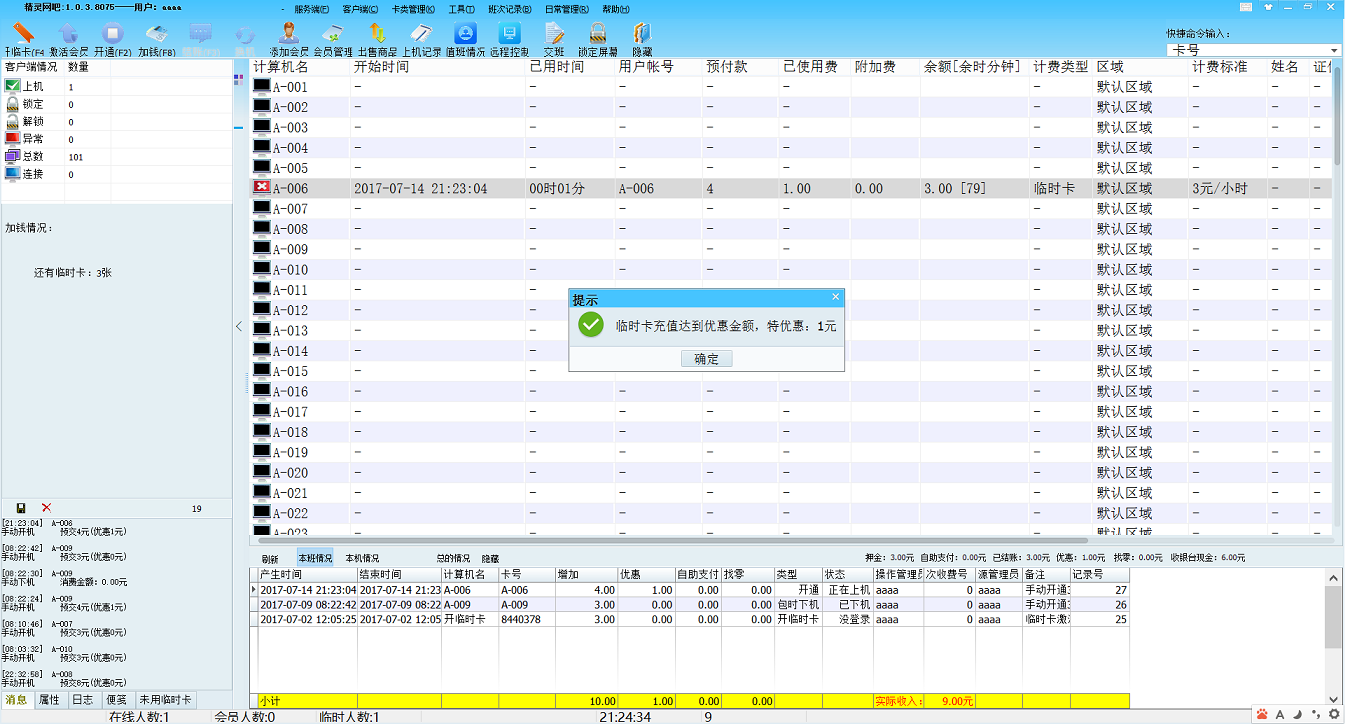
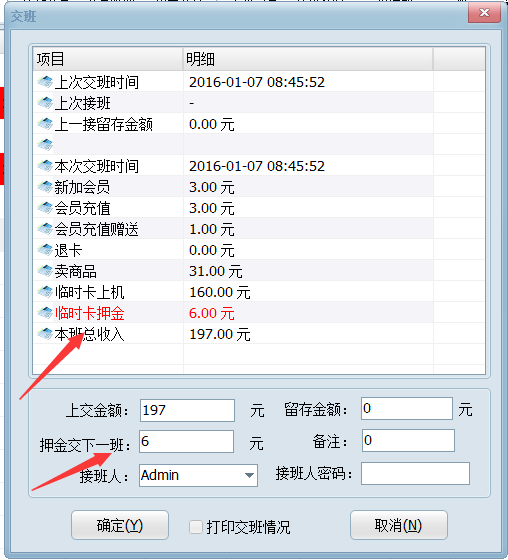
The Huajun Software Park channel provides you with downloads of Internet cafe and Internet cafe cloud billing system and official free downloads of Fangzhu Internet cafe and Internet cafe cloud billing system. Xinfangzhu Internet cafe charging system is an Internet cafe charging management system that is user-friendly, simple to operate, easy to use, easy to set up, stable in billing, and stable in operation. There is no best, only better! We strive to make better Internet cafe billing management software.
Introduction to Fangzhu Internet Cafe Billing System
This version of Fangzhu Internet Cafe Billing is very different from the old version. It is characterized by integrating the advantages of all Internet cafe billing software currently on the market. It is simple to operate, easy to get started, and can be installed and used immediately. If you have any suggestions or questions, please contact me or post on the forum.
Fangzhu Internet cafe cloud billing system can be managed using a mobile phone or tablet, and the Internet cafe owner can use a mobile phone or tablet to check accounts. You can scan the QR code in the Help About and Boss Check windows to download the mobile version and tablet version and install it.
You can register the forum by displaying the Internet cafe account remotely on your mobile phone. You can have this function after registering.
This software is free and can be used for a long time.
The cloud billing system of Fangzhu Internet Cafe and Internet Cafe supports second-generation ID card swiping (currently only Putian second-generation ID card swiping device), supports contactless IC ID card swiping, and supports self-service payment by scanning QR codes with Alipay or WeChat on mobile phones, adding members, and recharging. The powerful product function is a rare tool for Internet cafes.
Main advantages of Fangzhu Internet Cafe Billing System
1. Fangzhu Internet Café Cloud Billing System specially optimizes the database structure, so that the database file is less likely to be damaged in the event of a power outage, restart, etc. The possibility of data loss using automatic backup mechanism is almost zero.
2. The APP-free method supports mobile phone payment functions such as Alipay and WeChat. As long as customers have a mobile phone, they can scan the QR code to add members and recharge. After the Alipay payment is completed, they can directly lock the machine. It truly realizes the intelligent management of Internet cafes and Internet cafes.
3. Fangzhu Internet Cafe’s billing system has improved database performance, making the charging machine configuration requirements lower. As long as it can run XP system.
4. You can manage the Internet cafe through the mobile phone or tablet APP, such as opening, adding members, logging off and checking out, etc.
5. You can use your mobile phone to make self-service Alipay and WeChat payments on the client and server, so that customers can open memberships and recharge by themselves. Real artificial intelligence manages Internet cafes.
6. Rate settings have become simpler, with functions such as sub-region, sub-membership level, sub-regional billing, recharge discounts, flexible and diverse time packages to meet the needs of Internet cafes.
7. Remote control can control the client at will.
8. The boss can check the accounts through his mobile phone or tablet, which is so convenient.
9. Fangzhu Internet Cafe’s billing system perfectly supports WINDOWS 64-bit system.
10. Fangzhu Internet Café’s cloud billing system supports second-generation ID card swiping (currently only Putian’s second-generation ID card swiping machine) and contactless IC ID card swiping.
11. The powerful product management function is a rare charging tool for Internet cafes.
12. The client of Fangzhu Internet Café Cloud Billing System supports scanning the QR code with your mobile phone to log in. No need to enter the trouble, you can log in with just one scan, which is fast and convenient.
Fangzhu Internet cafe billing system installation steps
1. Download the Fangzhu Internet Cafe Billing System installation package from this site, unzip the compressed package and double-click the exe installation file to start the installation.
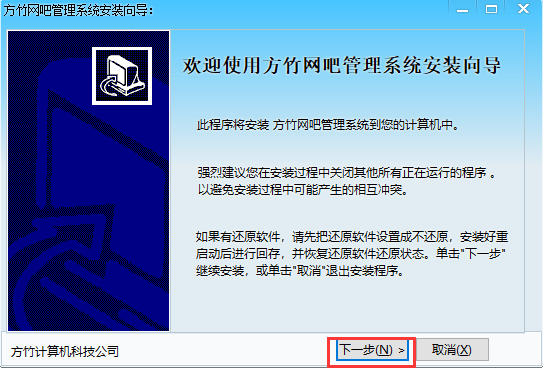
2. Enter the Fangzhu Internet Cafe Billing System Installation Wizard interface and click Next
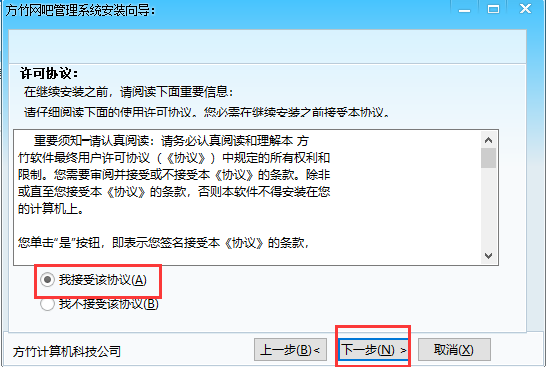
3. Enter the license agreement interface, select I accept and click Next
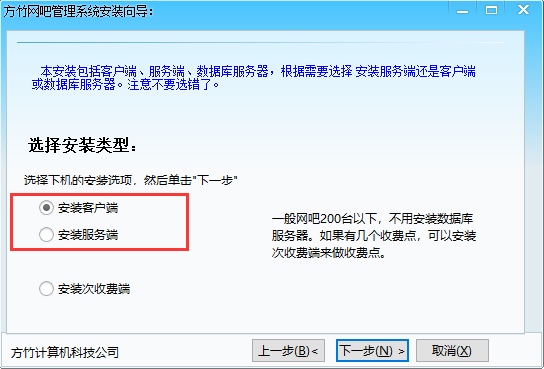
4. Select the installation type, choose to install the client or server according to your needs, and then click Next
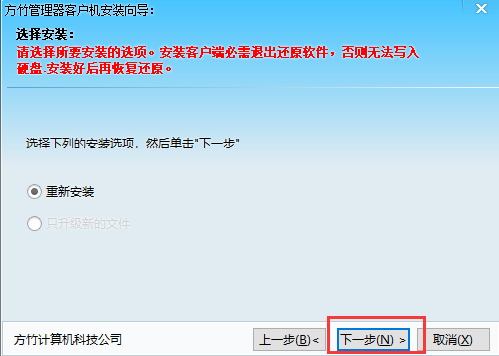
5. Enter the installation selection interface and click Next
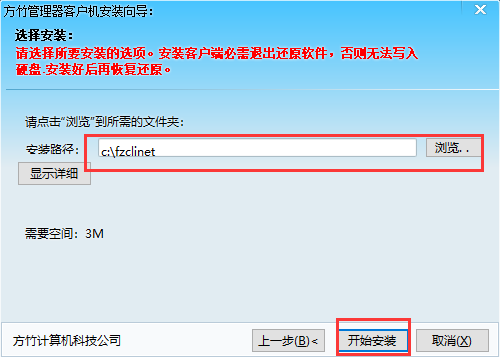
6. Enter the installation location interface, select the appropriate location for installation, and then click to start the installation
7. Wait patiently for the installation to be completed, and then you can use the Fangzhu Internet Cafe Billing System
How to use Fangzhu Internet Cafe Billing System
The simplest setting and usage method of Fangzhu Internet Cafe Billing System:
1: Establish a LAN for your own Internet cafe, find a better host, and fix the IP address.
That is, using a fixed IP address in the connection
Specified IP address: 192.168.0.1
Subcode mask: 255.255.255.0
Gateway: Fill in the IP address of the Internet router
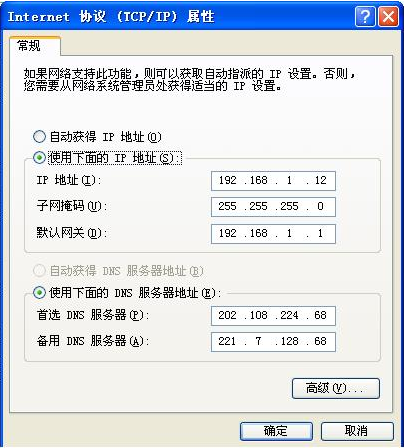
The host IP address must be fixed, and the client IP address may or may not be fixed. The host must be fixed.
1: The host IP address must be fixed, and the client IP address may or may not be fixed. The host must be fixed.
2: Install the server. If you have more than 100 Internet cafes, you can use the database server, that is, install the database server. If there are less than 100 units, there is no need to install a database server.
3: Run the centralized manager, enter the setting system and check the general billing standards and member billing standards.
4: Because the clients of the centralized manager are arranged in order of computer names, let’s sort out the client computer names first. For example, machine No. 1 is: A001, A002, A003...A009, A010, A011, A012...A019, A020, A021, A022...A099, A100. In this way, it will be arranged in the order of calculation name on the centralized manager.
5: Ping the host IP address on the client computer -t If it works, install the client computer. After running the client computer, fill in the host IP address in the timing settings in the client settings system. After saving and returning, wait about 5 seconds. You should be able to see the computing name of the client computer on the server, indicating that it is connected and can be managed by the server.
6: If the ping is successful but the connection still cannot be made, it is usually caused by the host IP address in the client settings not being filled in correctly or the firewall, such as XP2 firewall or other firewalls. You can add Fangzhu to the firewall so that the firewall will not work with Fangzhu.
After connecting, the centralized manager can control the client, such as unlocking the client, activating the timer, restarting the client, shutting down, etc.
If you use on-board management, you can go to the menu of the centralized manager -> Management -> Printer on-board card -> print some cards, so that these cards can be logged in directly on the client computer.
Fangzhu Internet cafe billing server settings
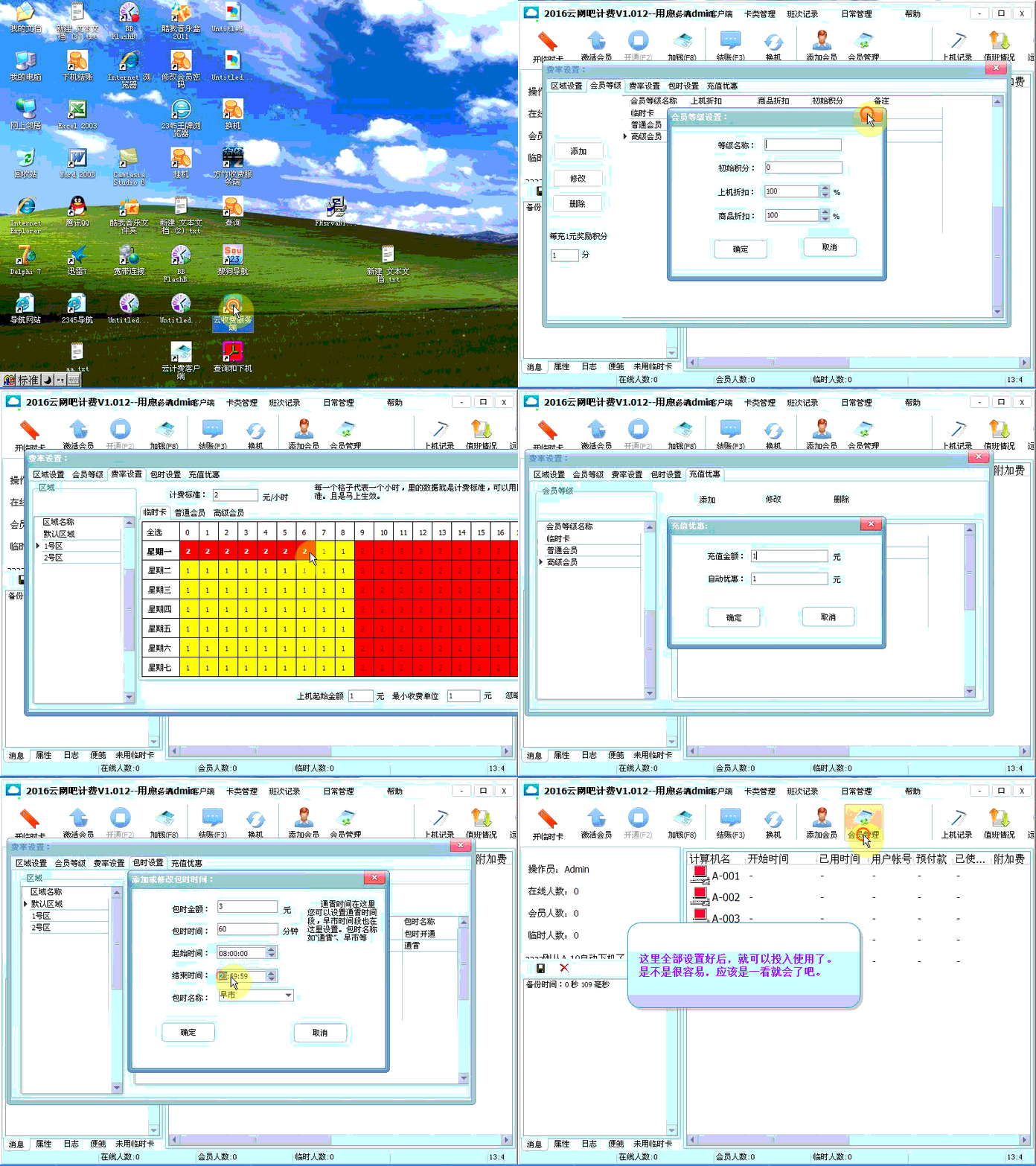
1: Rate setting, see the animation below
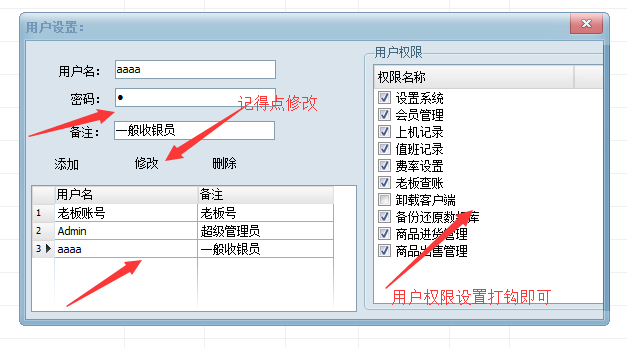
2: User permissions, see the picture below, set the password first, then click Modify to set user permissions
Frequently Asked Questions about Fangzhu Internet Cafe Billing System
1. How to set the charging IP of Fangzhu Internet Cafe’s billing system? How to connect the server machine and the client machine together?
1. Make sure your server has a dedicated IP address and run the server.
2. Under the login page of the client, click Start->System Settings->Timing Settings. There is a host IP address setting under the timing setting interface. Fill it in as the IP address of the server machine. Then test whether it is connected.
3. After the test shows that it is connected, just restart the client.
2. After the Fangzhu Internet Cafe Billing System client connects to the server, it exits the system after typing Admin. Why?
This is because the server account does not have a password and permissions set. Netizens who have this problem suggest entering the server to set system permissions and then setting the account and password.
Three, after disconnecting from the server of Fangzhu Internet Cafe Billing System (or shutting down the server), enter the Admin username and password 1111 to log out!
Regarding this problem, we learned that the client of Fangzhu Internet Cafe’s billing system did not change the password locally. It is recommended to enter the client settings system and modify it.
Fangzhu Internet cafe billing system andUniversal network management billing systemContrast
Universal network management billing system
Universal network management billing system, does not require any settings, is easy to operate, has in-place monitoring, is safe and effective, and provides timely reminders. It has functions such as temporary cards, membership cards, sending messages, changing client interfaces, voice prompts, member time management and automatic control of Internet time.
Fangzhu Internet cafe management and charging system is an early Internet cafe management software. After several years of careful construction, it integrates the Internet cafe management experience of myself and the majority of users. It has become a very mature Internet cafe management software product. It integrates charging, remote control and client management.
The two softwares, Fangzhu Internet Cafe Billing System and Universal Network Management Billing System, have their own characteristics and powerful functions. Users can download and use them according to their own needs.
Fangzhu Internet Cafe Billing Update Log
1: Fangzhu Internet cafe billing system optimizes performance
2: We are serious about solving bug problems
Huajun editor recommends:
Fangzhu Internet Cafe Billing 2018 has always been the most commonly used software by most netizens. Huajun Software Park also has Internet cafe game menus, Dudu Niu Butler, Batch Butler, etc., which are also very popular software among netizens. You can download it from Huajun Software Park!
Version: 2.2 | Update time: 2024-12-23
Similar recommendations




Latest updates


What is the use of Shuqi Novel membership? Why is it charged to read books after becoming a member?
Pixel Naruto online play entrance-Pixel Naruto web version online play-Huajun Software Park
How to add background music in python-How to add background music in python
How to configure environment variables in python - How to configure environment variables in python
How to run python - How to run python
How to create a project in python - How to create a project in python
Fangzhu Internet Cafe Billing 2018 Review
-
1st floor Huajun netizen 2019-06-16 18:45:28Fangzhu Internet Cafe Billing 2018 is very useful, thank you! !
-
2nd floor Huajun netizen 2022-03-18 21:35:54The interface design of Fangzhu Internet Cafe Billing 2018 is very easy to use and has rich functions. I highly recommend it!
-
3rd floor Huajun netizen 2018-07-27 14:18:47The overall feeling of Fangzhu Internet Cafe Billing 2018 is good, I am quite satisfied, the installation and operation are very smooth! It went very smoothly following the installation step-by-step instructions!
Recommended products






- Diablo game tool collection
- Group purchasing software collection area
- p2p seed search artifact download-P2P seed search artifact special topic
- adobe software encyclopedia - adobe full range of software downloads - adobe software downloads
- Safe Internet Encyclopedia
- Browser PC version download-browser download collection
- Diablo 3 game collection
- Anxin Quote Software
- Which Key Wizard software is better? Key Wizard software collection




