
-
Summit MP3/AMR Converter
- Size: 6.68M
- Language: Simplified Chinese
- Category: audio conversion
- System: winall






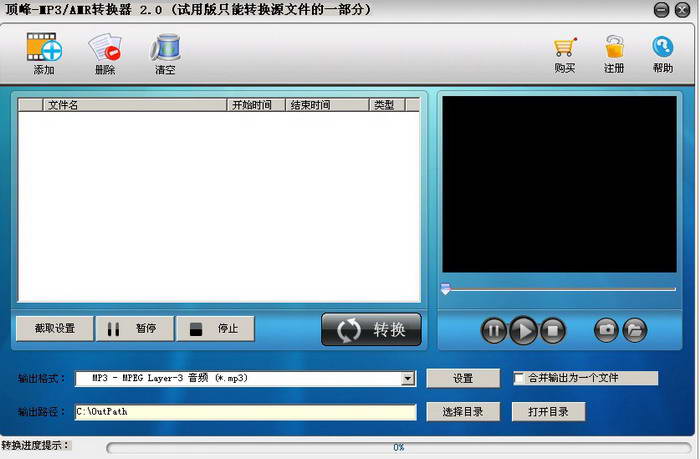
Summit MP3/AMR format converterIt is an audio format conversion software that is simple and fast to operate. It is a very practical amr to mp3 format converter. Summit MP3/AMR format converter supports all popular audio and video formats, such as MP3, MP2, OGG, APE, WAV, WMA, RM, RMVB, AVI, MPEG, MPG, FLV, DAT, VCD, ASF, WMV, QT, MOV, MP4, 3GP, etc., edit and convert to MP3, AMR and other formats.
Summit MP3/AMR format converter features
Summit-MP3/AMR Converter supports extracting audio files from videos in batches. Summit-MP3/AMR Converter supports multiple conversion operations such as amr to mp3, mp3 to amr, etc. It can not only convert high-quality files, but also the conversion speed is very fast. Summit-MP3/AMR Converter not only supports audio conversion, but can also edit audio, merge multiple audios into one file, and intercept wonderful clips to achieve appropriate sound quality effects by setting the parameters of the output audio.
Top MP3/AMR format converter features
Output format
Audio conversion output MP3, AMR
Video extraction output MP3, AMR
Input format
Audio formats: MP3, MP2, OGG, APE, WAV, WMA, etc.
Video formats: RM, RMVB, AVI, MPEG, MPG, FLV, DAT, VCD, ASF, WMV, QT, MOV, MP4, 3GP, etc.
audio editing
You can set the time to capture the highlights and convert them to output.
Merge multiple audio files and output them into one file.
Dingfeng MP3/AMR format converter installation steps
1. First download the Summit MP3/AMR format converter software package from this site, and unzip it to get the exe installation file.
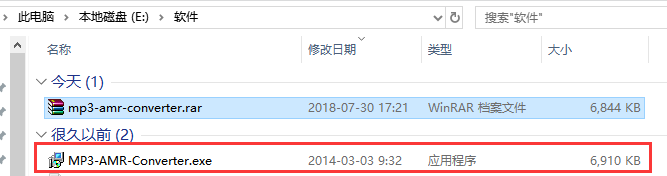
2. Double-click the exe file to enter the Summit MP3/AMR format converter installation wizard interface, click Next

3. Enter the target location selection interface. You can choose to install to the C drive by default or click Browse to select another location to install, and then click Next

4. Enter the select start menu folder interface and click Next directly.

5. Enter the Select Additional Tasks interface, choose to create a desktop shortcut, and then click Next to start the installation.

6. Enter the installation interface and wait patiently for the installation progress bar to complete.
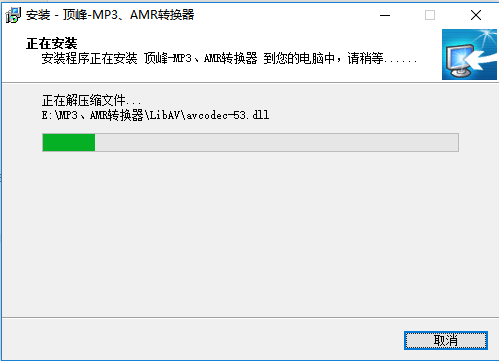
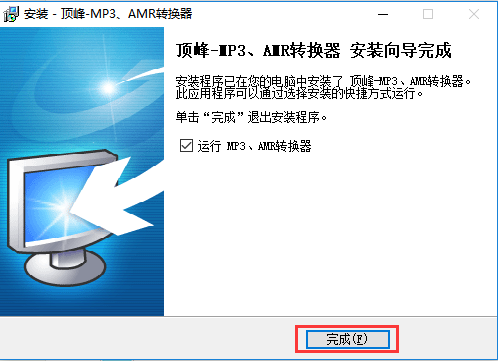
7. The installation of Dingfeng MP3/AMR format converter is completed. Click Finish to use it.
How to use Dingfeng MP3/AMR format converter
Run Dingfeng MP3/AMR format converter, double-click the software icon on the desktop, and the software window will open, as shown below:
Click the "Add" button in the upper left corner of the Dingfeng MP3/AMR format converter window, and the system's "Open" dialog box will pop up. Select the storage path of the file you want to convert, find the file you want to convert, double-click it directly or select it and click the "Open" button below. The file information will be displayed in the file list on the left side of the software window. (You can also select multiple files to add in the ‘Open’ dialog box)

Step 2: How to intercept the highlights of the file and merge the files
1. Interception: First, select the file to be intercepted in the file list of the software window, click the "Interception Settings" button on the far left below the list, and the interception dialog box will pop up, as shown below:

2. Two methods to set the interception time: First, click the play button on the left side of the dialog box to play the selected file. You can drag the slider of the player to the place where you want to intercept. Click the "Set Start Time" button. The current playback time will be recorded as the start time and displayed in the start time bar. Play or drag the slider to the desired end position, click the "Set End Time" button, and click the "OK" button if it is correct;
3. The second is to directly enter the start and end time of the file you want to intercept in the start time and end time columns in the format of 'hour:minute:second'. You can also click the up and down buttons behind the box to set the time, and finally click the "OK" button. After setting, click the "Convert" button in the software window to intercept part of the output according to the set time.
4. If the time setting is inappropriate or you do not want to intercept the file and cancel the time setting, you can click the "Reset Time" button, and the time bar will be restored to the start and end time of the entire file. If you need to intercept and convert files in batches, you can click the "Previous" and "Next" buttons to set time interception segments for the previous file and the next file in the list.
(If you want to convert all files, you can skip this step and go to the next step without setting interception.)
5. Merge: Interception settings cannot be made. After adding files, directly check the merge button below the list to output a file. The added files can be seamlessly merged and output into a unified audio file.
Step 3: The process of capturing wonderful pictures in the video
1. If you are adding a video file and you want to save wonderful pictures from the video, you can select the title in the file list of the software window and click on the right side of the window. button to play, click directly when you want to capture a picture
 button, the pictures you like will be automatically saved to your computer. You can continue to play and take screenshots. After the screenshot is completed, click
 You can open the path where the image is saved to view the image you captured.
Step 4: Choose the output format according to your needs
1. Click the "Output Format" column at the bottom of the software window. All output formats supported by the software will be listed. Use the mouse to select the format you want to output in the list. The following picture shows 'AMR - AMR Audio (*.amr)':

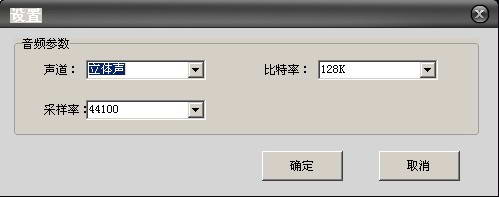
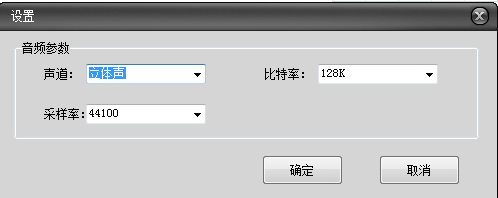
2. After selecting the format, click the "Set" button at the end. The audio parameter setting dialog box will open. Modify the parameters inside to achieve the appropriate sound quality effect. The default parameters in the dialog box are generally the most commonly used ones as shown in the figure below. After setting, click the "OK" button.
Step 5: Set the output path and convert the output audio
1. The output audio is saved in the OutPath folder under the C drive in 'My Computer' by default. If you want to save it to the path you specify, you can click "Select Directory" and select the path you want to output. After setting up, click the "Convert" button in the software window, and the software will start converting media formats. You can easily play with various audio and video formats.
2. After the conversion is completed, click the "Open Directory" button to directly open the output path you set to view the converted new files. (When the conversion is complete, click OK, and the output path will be automatically opened for your viewing convenience)
Summit MP3/AMR format converter FAQ
When I enter the registration code, Summit MP3/AMR format converter prompts, "Illegal registration code"?
Copy and paste the registration code into the software, and note that there cannot be any spaces before and after the registration code.
Another thing to note is: Is the registration code you purchased the same as the software you are currently installing? Some users, due to negligence, for example, purchased a universal DVD converter, but downloaded a universal video converter. The registration code can only be used for the product you purchased and cannot be used for other products.
Comparison of similar software of Dingfeng MP3/AMR format converter
Dream AMR to MP3 Converter is an outstanding converter that can help you convert AMR to MP3 video files and vice versa. Re-encode your mobile AMR files into high-quality non-corrupted MP3 files so you can store your favorite CDs or share them on the web.
AMR Player-amr format music converter
AMR Player is a free amr format music converter – AMR Player can not only play *.amr music files recorded with mobile phones, but the most important thing is that it can convert AMR into MP3 and WAV files, or convert MP3 and WAV files into AMR files. The files converted by AMR Player have low quality, so the files will be slightly smaller. AMR Player is mainly small and convenient.
MP3 format converter (mp3 converter) is a music format converter tool (audio format converter / audio converter) with a simple interface and easy operation. With MP3 converter, you can easily convert various popular video or audio formats (music converter / song format converter) into MP3 files.
Audio Conversion Expert is a simple-to-operate and powerful audio conversion software. It is a super collection of audio tools that covers audio format conversion, audio merging, audio interception, volume adjustment and other functions.
The above software are all audio conversion tool software, which can help users convert the required video and audio formats in a wide and wide way. Users can download and use them according to their own needs.
Summit MP3/AMR Converter update log:
Sweep the bug out and carry it out to the end
Optimize user feedback issues and improve detailed experience
Huajun editor recommends:
After continuous official improvements, Summit MP3/AMR Converter can meet all your needs. Come download and experience it. Of course, this site also carefully prepares text-to-speech assistant, silencer magician, and .NET for you.
Version: 7.1 Official version | Update time: 2024-12-23
Similar recommendations




Latest updates





How to download movies from Video Pioneer? - How to download movies from Video Pioneer
How to search for videos on Video Pioneer? - How to search for videos by Video Pioneer
How to delete history in Video Pioneer? -How to delete history records by Video Pioneer
How to set the skin for Video Pioneer? -How to set skin for Video Pioneer
Summit MP3/AMR Converter Review
-
1st floor Huajun netizen 2020-06-28 17:31:50Dingfeng MP3/AMR converter is very useful, thank you! !
-
2nd floor Huajun netizen 2017-09-20 07:08:08The interface design of Dingfeng MP3/AMR converter is easy to use and has rich functions. I highly recommend it!
-
3rd floor Huajun netizen 2019-04-03 20:28:02The overall feeling of Dingfeng MP3/AMR converter is good. I am quite satisfied with it. The installation and operation are very smooth! It went very smoothly following the installation step-by-step guide!
Recommended products





- Diablo game tool collection
- Group purchasing software collection area
- p2p seed search artifact download-P2P seed search artifact special topic
- adobe software encyclopedia - adobe full range of software downloads - adobe software downloads
- Safe Internet Encyclopedia
- Browser PC version download-browser download collection
- Diablo 3 game collection
- Anxin Quote Software
- Which Key Wizard software is better? Key Wizard software collection




