
-
Extremely fast mouse pointer
- Size: 3.92M
- Language: Simplified Chinese
- Category: keyboard mouse
- System: WinAll






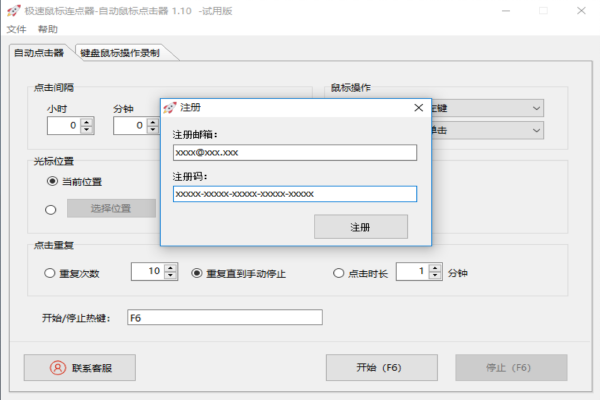
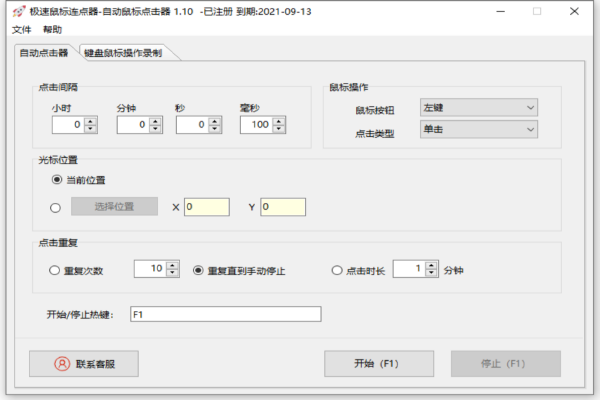
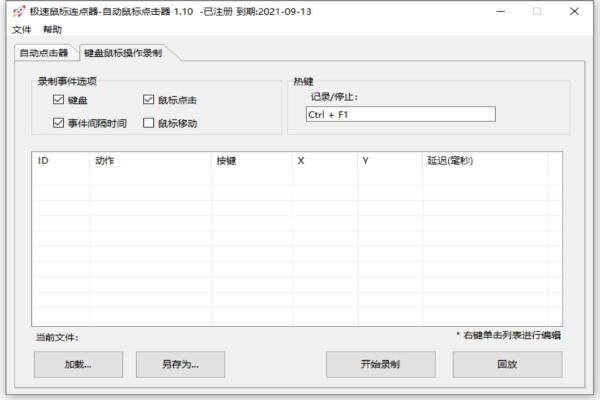
Extremely fast mouse pointerIt is a free software for automatically clicking the mouse continuously. It can simulate rapid left and right clicks of the mouse. It also supports recording mouse and keyboard operations and automatically loops playback. The extremely fast mouse clicker allows you to click the mouse quickly and fully automatically when playing games or online shopping, which is faster and saves time! Friends who like the extremely fast mouse clicker come to Huajun Software Park to download and experience it!
Features of Extremely Fast Mouse Connector Software
Efficient and stable
Written in C++, the code is of high quality and is not prone to crashing or freezing during long-term operation.
The memory usage is low (about 8-12MB), and the background runs smoothly without affecting other tasks.
Strong compatibility
Supports multiple operating systems such as Windows and Mac OS X, and is compatible with mainstream browsers and applications.
Adapt to high-resolution screens to ensure accurate click positions.
Safe and reliable
Simulate manual clicks to avoid being detected as cheats by the game or system and reduce the risk of account ban.
No ads, no viruses, some versions are open source projects, and security is guaranteed.
Simple interface
The operation interface is intuitive, and novices can quickly get started with the 5-minute tutorial.
Provide floating tips and detailed guidance to reduce learning costs.
Extremely fast mouse pointer software features
automatic click
High-speed simulated clicks: Supports up to 1,000 clicks per second, suitable for scenarios that require high-frequency clicks (such as monster spawning in games and rush purchases).
Multi-key support: The left, right or middle click can be customized to meet different operating needs.
Click mode: Supports multiple modes such as single click, double click, long press, etc., suitable for game combos or repeated office operations.
Custom parameters
Click interval: Users can freely set the click interval time (millisecond level) to accurately control the operating rhythm.
Click position: Supports fixed coordinate clicks or "follow the cursor" mode (click wherever the mouse moves), flexibly responding to dynamic interfaces.
Repeat times: You can set the total number of clicks or infinite loop until manually stopped.
Shortcut key control
Start/Stop: The default shortcut key is F6, and users can customize hot keys to achieve one-click operation.
Running in the background: Supports minimizing to the system tray without interfering with the use of other programs.
Script recording and playback
Operation recording: You can record mouse and keyboard operations, save them as scripts and play them back with one click, simplifying complex processes.
Editing adjustment: Supports modification of parameters such as delay time, click position, etc. to the recorded script.
Frequently Asked Questions about Extreme Mouse Connector
The setting parameters are incorrect
Problem description: The click interval, number of clicks and other parameters set by the user do not meet actual needs, causing the software to fail to work as expected.
Solution:
Read the software's user manual or online tutorial carefully to learn how to set various parameters correctly.
During the setup process, you can gradually adjust parameters and test the behavior of the software to ensure that the settings are correct.
hotkey conflict
Problem description: The hotkeys set by the user may conflict with the shortcut keys of other software in the system, resulting in the inability to trigger the function of the ultra-fast mouse pointer.
Solution:
Change the hotkey settings of Extreme Mouse Connector to avoid shortcut key conflicts with other software in the system.
Check and close other software that may be occupying the same hotkey.
Extremely fast mouse pointer update log:
1. Fixed other bugs;
2. Optimized software compatibility.
Huajun editor recommends:
Extremely fast mouse pointer is free software, download it if you need it! This site also has Logitech SetPoint (32-bit), Cloud Machine Manager, and Cloud Machine Manager for you to download!
Version: v3.11 | Update time: 2025-11-20
Similar recommendations







Latest updates



How to add background music in python-How to add background music in python
How to configure environment variables in python - How to configure environment variables in python
How to run python - How to run python
How to create a project in python - How to create a project in python
How to make a blue sky background with scratch-How to make a blue sky background with scratch
How to create a linked list in scratch-How to create a linked list in scratch
How to add local programs to scratch-How to add local programs to scratch
How to input Chinese in scratch-How to input Chinese in scratch
How to fire bullets in scratch-How to fire bullets in scratch
Extremely fast mouse pointer review
-
1st floor Huajun netizen 2021-12-23 11:00:02The fast mouse pointer is very useful, thank you! !
-
2nd floor Huajun netizen 2022-01-29 23:41:50The overall feeling of the Speed Mouse Connector is good, I am quite satisfied with it, the installation and operation are very smooth! It went very smoothly following the installation step-by-step instructions!
-
3rd floor Huajun netizen 2021-11-15 15:40:50The extremely fast mouse pointer has comprehensive functions and is very convenient to use.
Recommended products









- Diablo game tool collection
- Group purchasing software collection area
- p2p seed search artifact download-P2P seed search artifact special topic
- adobe software encyclopedia - adobe full range of software downloads - adobe software downloads
- Safe Internet Encyclopedia
- Browser PC version download-browser download collection
- Diablo 3 game collection
- Anxin Quote Software
- Which Key Wizard software is better? Key Wizard software collection




