
Hot search terms: 360 Security Guard Office365 360 browser WPS Office iQiyi Huawei Cloud Market Tencent Cloud Store
Hot search terms: 360 Security Guard Office365 360 browser WPS Office iQiyi Huawei Cloud Market Tencent Cloud Store

Internet TV Storage size: 69.1MB Time: 2017-01-03
Software introduction: Xunlei Video Player is a video playback software that is loved by many users. Xunlei Video is not only easy to use, users only need to search for what they need...
1. Click the inverted triangle button in the upper right corner of the software, and then select "Settings Center" in the option list below.
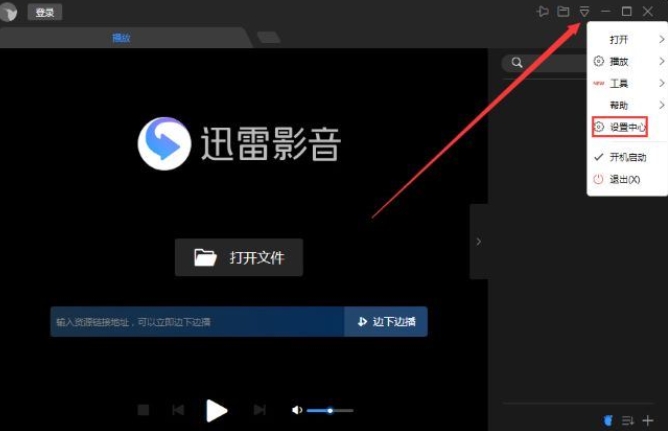
2. In the window interface that opens, click the "Play" option in the left column, then find "Playlist Loop Mode" on the right, click the drop-down button of the option box, select "Loop Play" from the option list given below, and finally click "OK" to save.
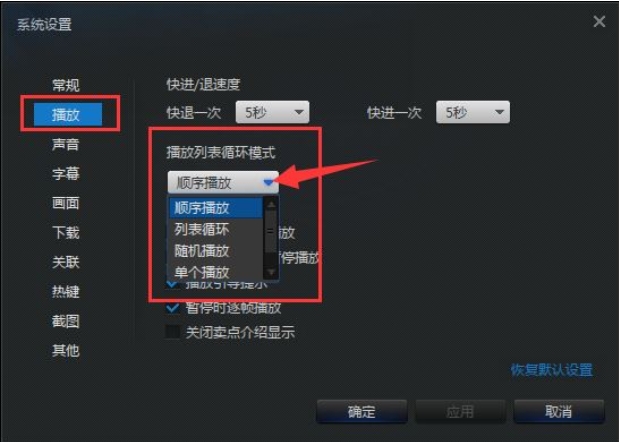
The above are the techniques for looping Thunder video lists. I hope you like them.

 How to draw a lottery in 360 Software Butler - How to draw a lottery in 360 Software Butler
 Microsoft Edge browser
 Steam
Steam
 Tencent Video
 WPS Office
 iQiyi
iQiyi
 Sohu video player
 Lightning simulator
 MuMu emulator
 Eggman Party
 What to do if there is no sound after reinstalling the computer system - Driver Wizard Tutorial
 How to switch accounts in WPS Office 2019-How to switch accounts in WPS Office 2019
 How to clear the cache of Google Chrome - How to clear the cache of Google Chrome
 How to fire bullets in scratch-How to fire bullets in scratch


