
Hot search terms: 360 Security Guard Office365 360 browser WPS Office iQiyi Huawei Cloud Market Tencent Cloud Store
Hot search terms: 360 Security Guard Office365 360 browser WPS Office iQiyi Huawei Cloud Market Tencent Cloud Store

media management Storage size: 450.42 MB Time: 2022-10-11
Software introduction: The PC version is a fully functional anchor software. Through the Douyin Live Companion software, users can easily conduct live broadcasts and live broadcasts. It is simple and easy to use, just...
1. Add Android screencasting materials;

2. Select [Wired Screen Casting] or [Wireless Screen Casting] and connect according to the screen casting instructions;


3. If you need to change the projection configuration, you can set it through [Screen Settings] and click Save. Some settings need to be replugged (wired) or re-scanned to connect (wireless) to take effect.
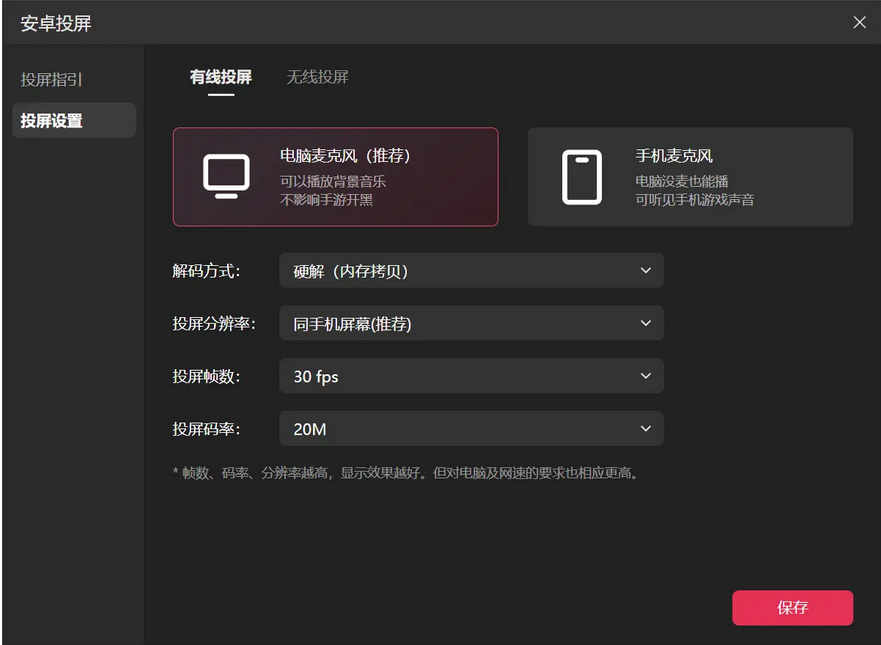
The above is the relevant content about how to cast videos on Douyin Live Companion. I hope it will be helpful to you!

 How to upgrade software in 360 Software Manager? -How to upgrade software in 360 Software Manager
 Microsoft Edge browser
 Steam
Steam
 Tencent Video
 WPS Office
 iQiyi
iQiyi
 Sohu video player
 Lightning simulator
 MuMu emulator
 Eggman Party
 What to do if there is no sound after reinstalling the computer system - Driver Wizard Tutorial
 How to switch accounts in WPS Office 2019-How to switch accounts in WPS Office 2019
 How to clear the cache of Google Chrome - How to clear the cache of Google Chrome
 How to fire bullets in scratch-How to fire bullets in scratch


