
Hot search terms: 360 Security Guard Office365 360 browser WPS Office iQiyi Huawei Cloud Market Tencent Cloud Store
Hot search terms: 360 Security Guard Office365 360 browser WPS Office iQiyi Huawei Cloud Market Tencent Cloud Store

CAD software Storage size: 6,200,000KB Time: 2022-08-12
Software introduction: ANSYS software is a large-scale general-purpose finite element analysis (FEA) software developed by the American ANSYS company. It is the fastest growing computer in the world...
Friends, do you know how ANSYS implements the undo function? Today I will explain how ANSYS implements the undo function. If you are interested, come and take a look with me. I hope it can help you.
1. First open the software. You can find in the menu bar of the software that we cannot find the undo command (as shown in the picture).

2. What needs to be explained here is that although this software does not have an undo function on the operation interface, its core has an undo function. You need to use the command /undo,on to turn on the undo function (as shown in the figure).
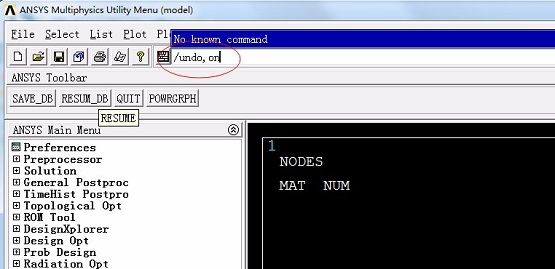
3. Then find “MenuCtrls” in the upper right corner of the interface and click it. A drop-down box will appear. We select “Edit Toolbar” in the drop-down box (as shown in the picture).
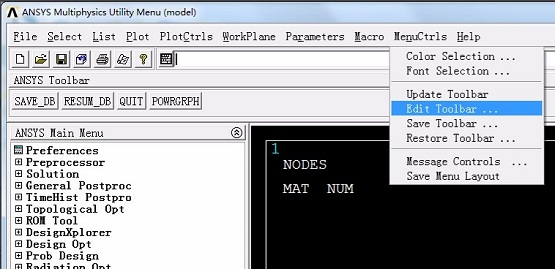
4. Then a window will appear on the interface. We enter "*ABBR,UNDO,undo" in the text box at the bottom of the window, and then click the "Accept" and "Close" buttons in sequence (as shown in the picture).

5. Return to the main interface of the software at this time, we will find ANSYS at the top of the interface An UNDO button appears below the Toolbar. We can click this button to undo the operation after making a mistake (as shown in the picture).
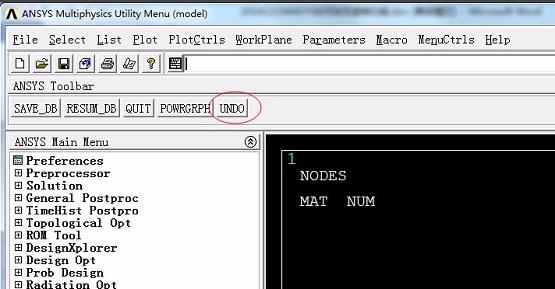
6. What we need to note is that after exiting the software, when restarting the software, you need to enter the command /undo,on again to turn on the undo function (as shown in the figure).
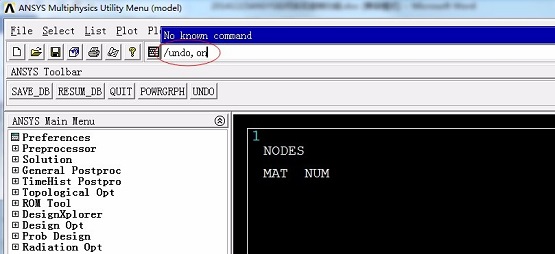
The above is the entire content of how to implement the undo function in ANSYS brought to you by the editor. I hope it can help you.

 How to draw a lottery in 360 Software Butler - How to draw a lottery in 360 Software Butler
 How to collect software in 360 Software Manager - How to collect software in 360 Software Manager
 Microsoft Edge browser
 Steam
Steam
 Tencent Video
 WPS Office
 iQiyi
iQiyi
 Sohu video player
 Lightning simulator
 MuMu emulator
 Eggman Party
 What to do if there is no sound after reinstalling the computer system - Driver Wizard Tutorial
 How to switch accounts in WPS Office 2019-How to switch accounts in WPS Office 2019
 How to clear the cache of Google Chrome - How to clear the cache of Google Chrome
 How to fire bullets in scratch-How to fire bullets in scratch


