
Hot search terms: 360 Security Guard Office365 360 browser WPS Office iQiyi Huawei Cloud Market Tencent Cloud Store
Hot search terms: 360 Security Guard Office365 360 browser WPS Office iQiyi Huawei Cloud Market Tencent Cloud Store

CAD software Storage: 1.44GB Time: 2022-04-22
Software introduction: CAD2018 is a very well-known CAD engineering drawing software launched by Autodesk of the United States. CAD2018 can be used...
Friends, do you know how to extend arcs in CAD2018? Today I will explain how to extend arcs in CAD2018. If you are interested, come and take a look with me. I hope it can help everyone.
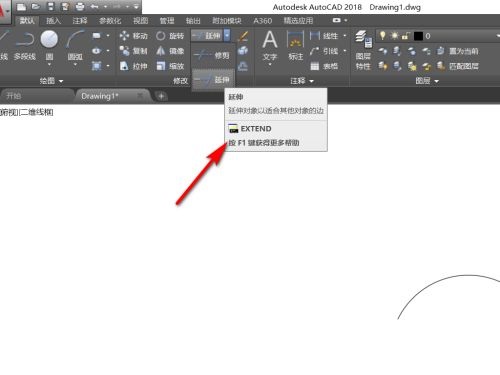
Step 1: Click the small triangle next to Extend in the toolbar and select the Extend command in the drop-down menu (as shown in the figure).
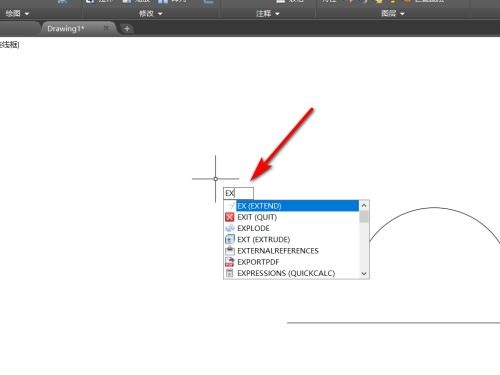
Step 2: Or directly hit the ex key on the keyboard, and then hit Enter to call up the command (as shown in the picture).
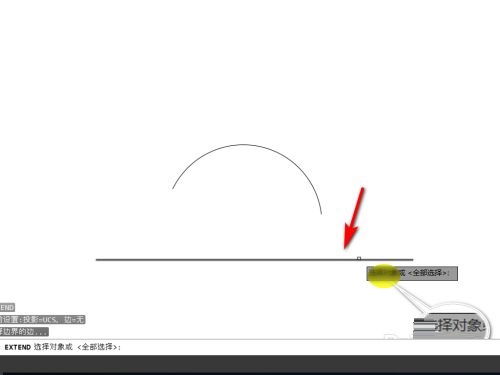
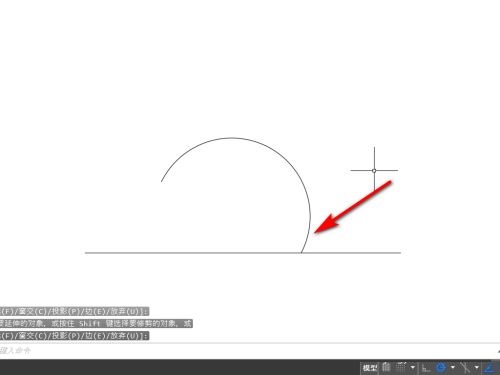
Step 3: According to the prompts, we first select the boundary object and select this straight line (as shown in the picture).
Step 4: Then select the object to be extended. When we place the mouse on it, it will naturally extend (as shown in the picture).
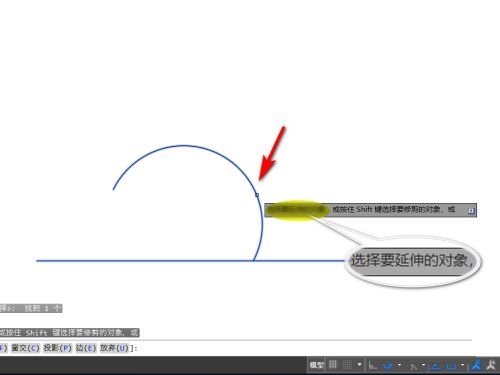
Step 5: Then click the left mouse button to complete the arc extension (as shown in the picture).
The above is the entire content of how to extend an arc in CAD2018 brought to you by the editor. I hope it can help you.

 How to upgrade software in 360 Software Manager? -How to upgrade software with 360 Software Manager
 Microsoft Edge browser
 Steam
Steam
 Tencent Video
 WPS Office
 iQiyi
iQiyi
 Sohu video player
 Lightning simulator
 MuMu emulator
 Eggman Party
 What to do if there is no sound after reinstalling the computer system - Driver Wizard Tutorial
 How to switch accounts in WPS Office 2019-How to switch accounts in WPS Office 2019
 How to clear the cache of Google Chrome - How to clear the cache of Google Chrome
 How to fire bullets in scratch-How to fire bullets in scratch


