
Hot search terms: 360 Security Guard Office365 360 browser WPS Office iQiyi Huawei Cloud Market Tencent Cloud Store
Hot search terms: 360 Security Guard Office365 360 browser WPS Office iQiyi Huawei Cloud Market Tencent Cloud Store
science tools Storage size: 39.13MB Time: 2021-08-19
Software introduction: MathType formula editor is a powerful mathematical formula editor specially prepared for science students. MathType mathematical formula editor is used to...
Some netizens expressed that they are still not clear about how MathType edits the harpoon arrow symbol. This section introduces how MathType edits the harpoon arrow symbol. For those who don’t know yet, please follow the editor to learn. I hope it will be helpful to you.
Open MathType, enter the formula editing interface, and edit the corresponding formula.
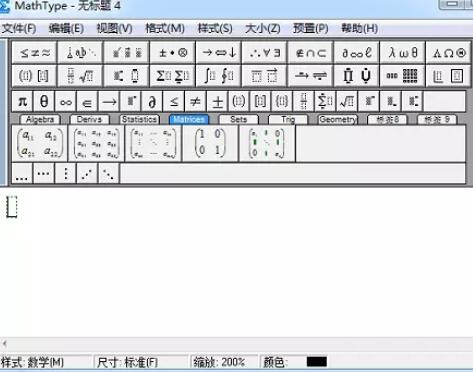
In the editing interface, after editing the formula, place the cursor where you want to add the harpoon arrow symbol, select and click the "Edit" - "Insert Symbol" command in the menu bar.

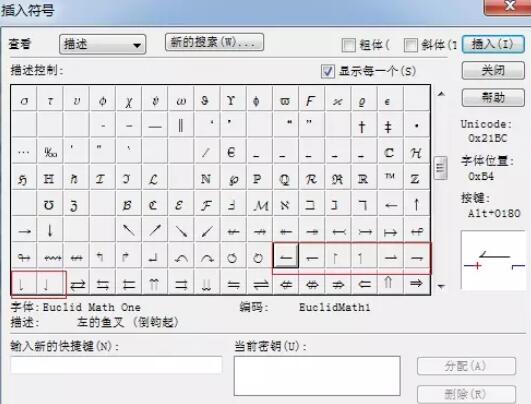
In the "Insert Symbol" dialog box that pops up, select "Description" as the "View" method, and just select it from the drop-down list at the end of the input box. Pull the scroll bar in the symbol panel below to find the harpoon arrow symbol template and insert it. The harpoon arrow symbols are also arranged in four directions, up, down, left, and right. You can choose according to your needs.
以上这里为各位分享了MathType编辑鱼叉箭头符号的简单教程。 Friends in need should hurry up and read this article.

 How to draw a lottery in 360 Software Butler - How to draw a lottery in 360 Software Butler
 Microsoft Edge browser
 Steam
Steam
 Tencent Video
 WPS Office
 iQiyi
iQiyi
 Sohu video player
 Lightning simulator
 MuMu emulator
 Eggman Party
 What to do if there is no sound after reinstalling the computer system - Driver Wizard Tutorial
 How to switch accounts in WPS Office 2019-How to switch accounts in WPS Office 2019
 How to clear the cache of Google Chrome - How to clear the cache of Google Chrome
 How to fire bullets in scratch-How to fire bullets in scratch


