
Hot search terms: 360 Security Guard Office365 360 browser WPS Office iQiyi Huawei Cloud Market Tencent Cloud Store
Hot search terms: 360 Security Guard Office365 360 browser WPS Office iQiyi Huawei Cloud Market Tencent Cloud Store

System optimization Storage: 29.68MB Time: 2022-10-21
Software introduction: The official version of Windows 11 Manager (Win11 system optimization tool) is a system optimization software specially developed for win11 system. Windows...
Many people don’t know how to turn off the firewall in Win11? The article brought to you today is about how to turn off the firewall in Win11. If you still don’t know, let’s learn it with the editor.
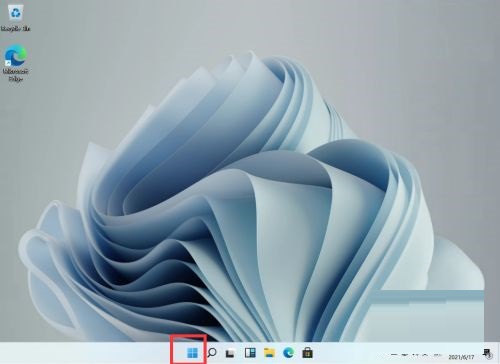
1. First we find the menu on the desktop, which by default is in the middle leftmost position of the taskbar;
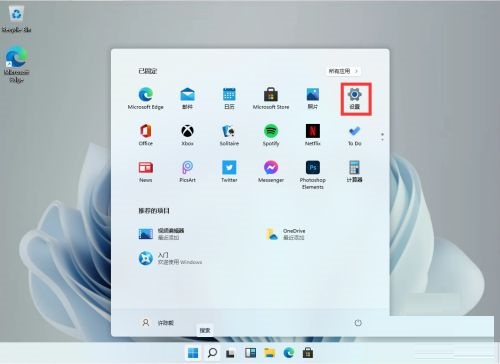
2. After opening it, find our settings and click to enter;
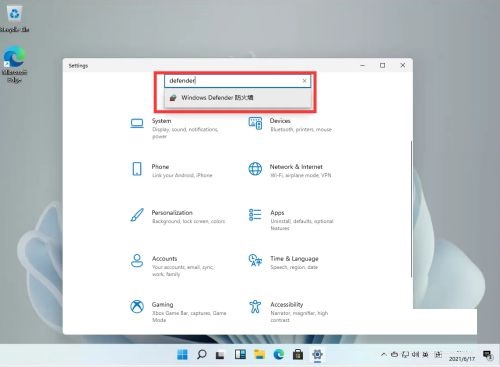
3. After entering the settings, we can directly search for [defender] in the search box above, and the firewall will pop up;
4. After clicking to enter the firewall, find [Enable or turn off Windows defender firewall] in the list on the left, and click to enter;
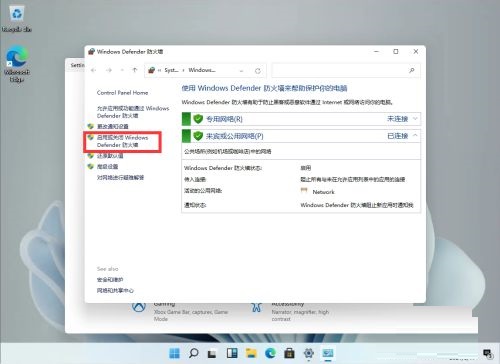
5. After entering, the user can choose to turn on and off the firewall by himself. After the settings are completed, click OK.
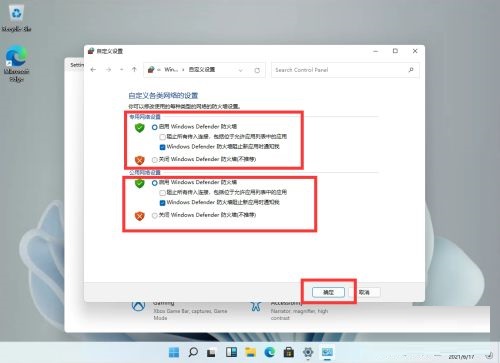
The above is the entire content of how to turn off the firewall in Win11 brought to you by the editor. I hope it can help you.

 How to draw a lottery in 360 Software Butler - How to draw a lottery in 360 Software Butler
 Microsoft Edge browser
 Steam
Steam
 Tencent Video
 WPS Office
 iQiyi
iQiyi
 Sohu video player
 Lightning simulator
 MuMu emulator
 Eggman Party
 What to do if there is no sound after reinstalling the computer system - Driver Wizard Tutorial
 How to switch accounts in WPS Office 2019-How to switch accounts in WPS Office 2019
 How to clear the cache of Google Chrome - How to clear the cache of Google Chrome
 How to fire bullets in scratch-How to fire bullets in scratch


