
Hot search terms: 360 Security Guard Office365 360 browser WPS Office iQiyi Huawei Cloud Market Tencent Cloud Store
Hot search terms: 360 Security Guard Office365 360 browser WPS Office iQiyi Huawei Cloud Market Tencent Cloud Store
video editing Storage: 1.89GB Time: 2022-06-17
Software introduction: Adobe After Effects CC2019, referred to as "AE CC2019", is a video post-processing software launched by Adobe. Adobe...
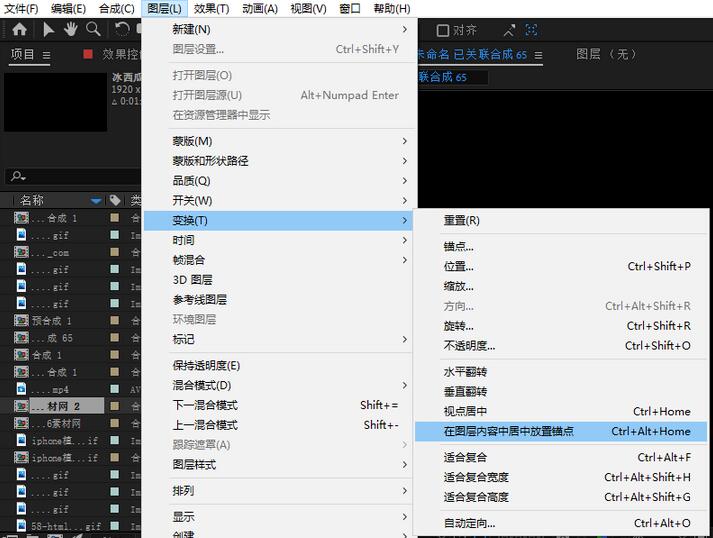
Do you know what the shortcut keys for anchor point centering in Adobe After Effects CC 2019 are? Then the editor will bring you an introduction to the shortcut keys for anchor point centering in Adobe After Effects CC 2019. Friends in need can take a look.
Adobe After Effects CC 2019 anchor point centering shortcut key is: Ctrl+Alt+Home
Introduction to other commonly used shortcut keys:
Move the keyframe ten frames forward——[Shift+Alt+right arrow]
Move the keyframe ten frames backward——[Shift+Alt+Left Arrow]
To the end of the workspace——[Shift+End]
Ten frames backward——[Shift+Page]
Ten frames forward——[Shift+Page]
The change amount of movement, rotation and scaling is 10——[Shift+shortcut key]
Approach the keyframe to the specified time——[Shift+drag the keyframe]
Constrain the rotation increment to 45 degrees - [Shift+drag rotation tool]
Opacity——[T]
Show/hide all panels——[TAB]
Mask opacity——[TT]
Display all animation values——[U]
Select tool——[V]
Rotary tool——[W]
Scroll the selected layer to the top of the time layout window - [X]
Back movement tool——[Y]
The above is the editor’s introduction to the shortcut keys for anchor point centering in Adobe After Effects CC 2019. I hope it can help everyone.

 How to add background music in python-How to add background music in python
 How to configure environment variables in python - How to configure environment variables in python
 How to run python - How to run python
 How to create a project in python - How to create a project in python
 How to make a blue sky background with scratch-How to make a blue sky background with scratch
 Steam
Steam
 Tencent Video
 WPS Office
 iQiyi
iQiyi
 Sohu video player
 Lightning simulator
 MuMu emulator
 Eggman Party
 WPS Office 2023
 What to do if there is no sound after reinstalling the computer system - Driver Wizard Tutorial
 How to switch accounts in WPS Office 2019-How to switch accounts in WPS Office 2019
 How to clear the cache of Google Chrome - How to clear the cache of Google Chrome
 How to fire bullets in scratch-How to fire bullets in scratch
