
Hot search terms: 360 Security Guard Office365 360 browser WPS Office iQiyi Huawei Cloud Market Tencent Cloud Store
Hot search terms: 360 Security Guard Office365 360 browser WPS Office iQiyi Huawei Cloud Market Tencent Cloud Store

desktop assistance Storage size: 102 MB Time: 2022-04-01
Software introduction: UPUPOO dynamic wallpaper is a dynamic wallpaper software that integrates desktop wallpaper beautification and multiple practical functional components. Since 2017...
Currently, some netizens have just come into contact with the upupoo software and do not know how to use their own dynamic wallpapers, so today I will share here how to use upupoo's own dynamic wallpapers. Let's learn together.
First, edit the video you want to make into a wallpaper. After editing, open the upupoo dynamic wallpaper software;
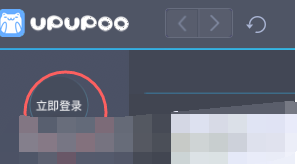
After opening upupoo, click the "Log in now" button in the upper left corner of the interface to log in to your upupoo account. Of course, you can also log in using third-party platforms such as QQ. If you don’t log in, you can’t use the wallpaper you created;
After logging in, open the "Downloaded Wallpaper", double-click the left mouse button at the bottom of the interface, and add the edited video in the pop-up window:

Give the video wallpaper a name, upload a cover or preview, select a tag, and finally click "Use It Yourself";
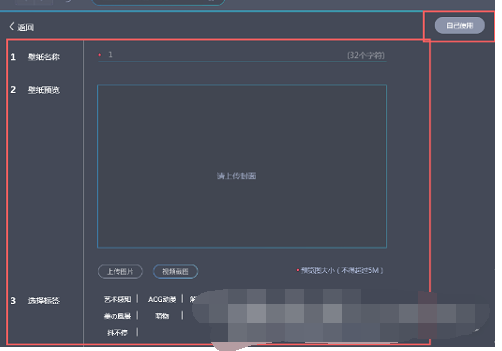
After clicking "Use it yourself", you can see the video wallpaper you just created in "Downloaded Wallpapers". Double-click it to use it.
Above, I shared with you the simple operation method of using upupoo's own dynamic wallpaper. Friends in need should hurry up and read this article.

 How to draw a lottery in 360 Software Butler - How to draw a lottery in 360 Software Butler
 Microsoft Edge browser
 Steam
Steam
 Tencent Video
 WPS Office
 iQiyi
iQiyi
 Sohu video player
 Lightning simulator
 MuMu emulator
 Eggman Party
 What to do if there is no sound after reinstalling the computer system - Driver Wizard Tutorial
 How to switch accounts in WPS Office 2019-How to switch accounts in WPS Office 2019
 How to clear the cache of Google Chrome - How to clear the cache of Google Chrome
 How to fire bullets in scratch-How to fire bullets in scratch


