
Hot search terms: 360 Security Guard Office365 360 browser WPS Office iQiyi Huawei Cloud Market Tencent Cloud Store
Hot search terms: 360 Security Guard Office365 360 browser WPS Office iQiyi Huawei Cloud Market Tencent Cloud Store
How to use WiFi Sharing Master? Just three steps
Step 1: First download and install WiFi Sharing Master on your computer, as shown in the picture.
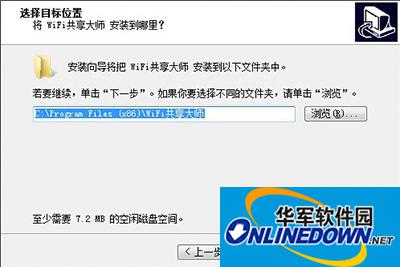
How to use WiFi Sharing Master
Note: The computer must have a built-in wireless network card. Laptops generally have built-in wireless network cards, while desktop computers do not have built-in wireless network cards. If the desktop computer wants to achieve Wifi sharing, you need to purchase a USB wireless network card and use it together.
Step 2: Open the WiFi Sharing Master software, and then click "Create Free WiFi", as shown in the picture.
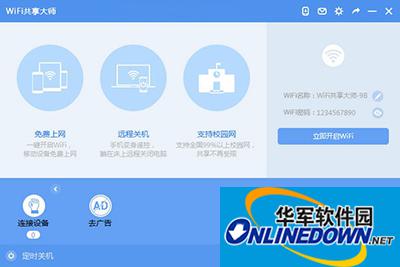
How to use WiFi Sharing Master
Step 3: Next, WiFi Sharing Master will automatically create a Wifi hotspot, and then we can see the name and password of the created Wifi hotspot, as shown in the picture.
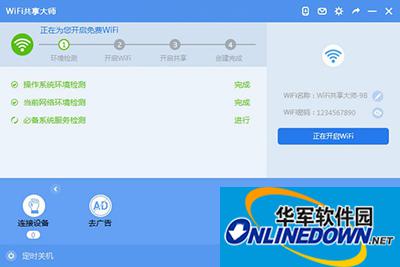
How to use WiFi Sharing Master
After the Wifi hotspot is successfully created, smartphones, tablets and even laptops attached to the computer can connect to the Wifi wireless hotspot. When connecting, just enter the password above to connect to the wireless network.

 How to draw a lottery in 360 Software Butler - How to draw a lottery in 360 Software Butler
 Microsoft Edge browser
 Steam
Steam
 Tencent Video
 WPS Office
 iQiyi
iQiyi
 Sohu video player
 Lightning simulator
 MuMu emulator
 Eggman Party
 What to do if there is no sound after reinstalling the computer system - Driver Wizard Tutorial
 How to switch accounts in WPS Office 2019-How to switch accounts in WPS Office 2019
 How to clear the cache of Google Chrome - How to clear the cache of Google Chrome
 How to fire bullets in scratch-How to fire bullets in scratch


