



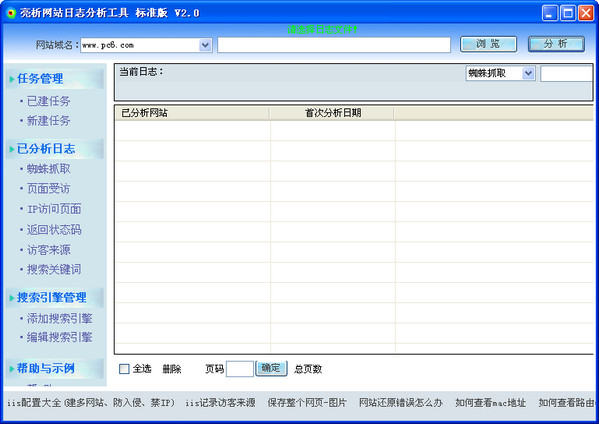
An analysis of the six major functions of website log analysis tools
spider crawling
Search engine spiders can be added freely. In addition to counting how many times each spider has visited, it also counts which pages each spider has visited and the visit time. If the same web page has been visited multiple times, you can also know the first visit time and the last departure time.
Page interviews
Count how many times each web page has been visited by users, excluding the number of search engine visits; you can know which web page is the most popular among users, and also know which web pages whose IP maliciously visits do not exist, find out the IP of the scanning server, users who try to maliciously upload viruses, and users who want to steal their own websites; and list in detail the access time, status code and source URL of each web page.
IP access page
Count the total number of visitor IPs and search engine IPs respectively, how many times each IP has been visited, arrival time and departure time; you can know which IP is maliciously accessing, and identify IPs that have a particularly high number of visits every day and only waste traffic without bringing traffic.
Return status code
Count the web pages that return 404, 403, 500, 503, and 304, classify them according to these status codes, and count how many times each status appears on each page; you can grasp path changes and non-existent web pages in a timely manner.
visitor source
Divided into source search engines and ordinary websites, count how many times each search engine comes from, what keywords are searched, what web pages are visited, and the number of sources of each web page (number of visits); ordinary source websites refer to all websites except search engines; this information is convenient for understanding your own promotion effect.
Search keywords
It refers to the situation of searching for keywords from a search engine and clicking to enter your website. In addition to counting each source keyword, it also counts the number of sources of each keyword, so as to understand which keywords set on the web page can bring traffic.
How to use
1. Methods of analyzing website logs
1. Enter the domain name of the website to which the log to be analyzed belongs, click "Browse", locate the folder where the log is located, and double-click the log to be analyzed, as shown in Figure 1:

Figure 1
2. Click "Analyze" to start analysis, as shown in Figure 2:
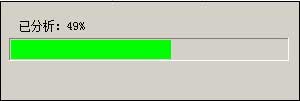
Figure 2
3. The time required for analysis is determined by the log size. The results after the analysis is completed are as shown in Figure 3:
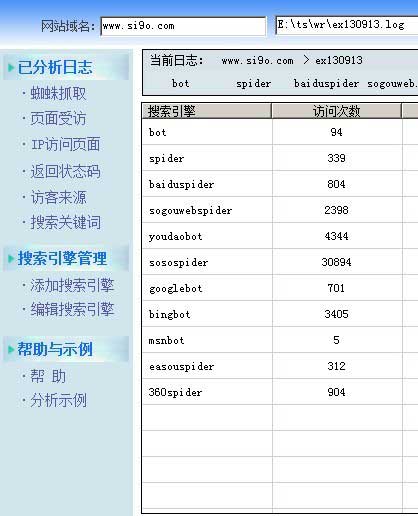
Figure 3
4. Click the menu on the left to browse the corresponding analysis results. If there is a navigation menu under "Current Log", move the mouse above it and the corresponding data will be displayed.
5. Click the domain name after "Current Log" to display all analyzed logs of the domain name, as shown in Figure 4:
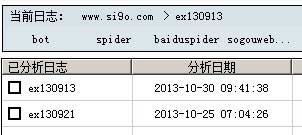
Figure 4
2. Delete the analyzed website logs
1. Click "Analyzed Logs". If more than two websites have been analyzed, their domain names will be displayed. Click "Select All" to select them, as shown in Figure 5:
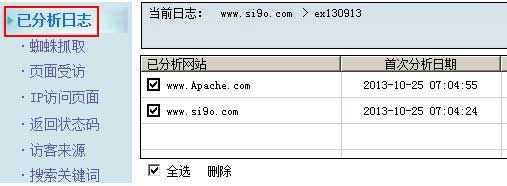
Figure 5
2. Click "Delete", and all logs belonging to the selected domain name will be deleted.
3. Click "Analyzed Logs" and then click the domain name under "Analyzed Websites" to display all analyzed logs under the domain name, as shown in Figure 6:
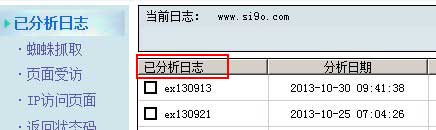
Figure 6
4. Select the logs to be deleted and click "Delete", then all selected logs will be deleted.
3. Add, edit and delete search engines
1. Add search engine
1) Click "Add Search Engine" on the left menu (or click "Edit Search Engine" and select "Add") to open the window as shown in Figure 7:
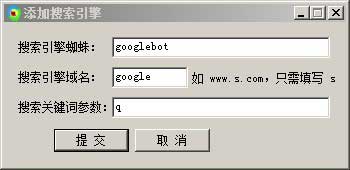
Figure 7
2) Enter "search engine spider, search engine domain name and search keyword parameters" respectively, and finally submit.
2. Edit search engine
1) Click "Edit Search Engine" on the left menu to open the window as shown in Figure 8:
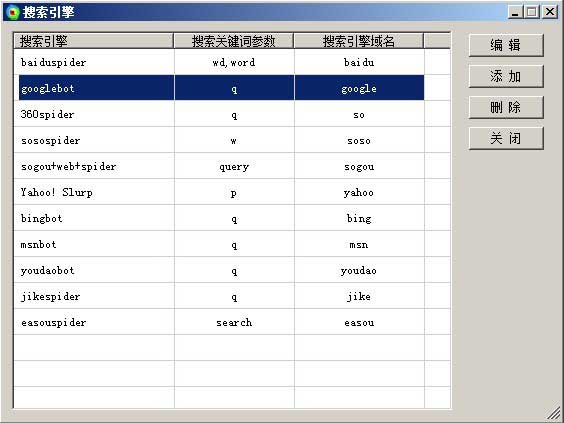
Figure 8
2) Select the search engine (such as Google) to be edited and click "Edit". The same window as Figure 7 will open. Modify and submit.
3. Delete search engines
Select the search engine you want to delete and click "Delete", as shown in Figure 8.










Useful
Useful
Useful