





 You may like





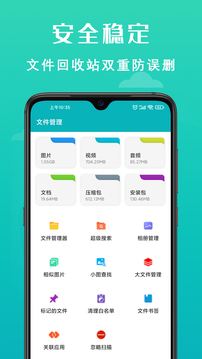
Main functions
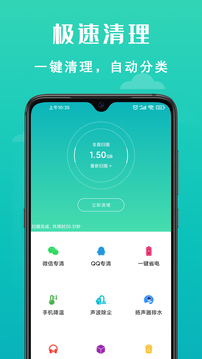
[One-click cleaning] Get rid of useless garbage with one click, making mobile phone cleaning more worry-free
[Mobile Phone Acceleration] Instantly releases the phone's memory, and the acceleration effect is superior to its peers.
[Recycle Bin] Prevent files from being accidentally deleted and automatically delete them after 7 days.
[File Label] can mark files as important files, junk files, whitelist files and set file descriptions.
[Sonic Dust Removal] The speaker of the mobile phone will absorb a lot of dust and iron powder, which will cause the speaker to have a low sound. In severe cases, there will be popping sound or even no sound. Sonic Cleaning Master uses the principle of resonance to vibrate dust away from the speaker, thereby achieving the effect of dust cleaning.
【Hertz Drainage】Water entering the phone will affect the performance of the phone and cause even greater damage to the speakers. Cleaning Master uses the principle of sonic vibration and adjusts it to 140-165HZ, which can shake the water out of the phone and solve the problem of water entering the phone without disassembling the phone!
[Professional Burn-in for Headphones] Headphone enthusiasts are pursuing a burn-in, and Clean Master also provides professional burn-in methods for the majority of audiophiles. It uses pink noise, white noise, and music suitable for burning headphones to burn-in the headphones, so that the performance of the machine will gradually stabilize and the sound quality will be better.
[Cleaning] Deeply clean junk and chat more smoothly
[Album Cleanup] Automatically filter unsightly photos to retain wonderful moments
[Slimming down mobile phones] Comprehensive analysis of storage space, no garbage can be found
[Mobile phone cooling] Cool down the temperature of a hot mobile phone in a short time
FAQ
1. The storage space has not increased significantly after cleaning.
Reason:
Some cache files are locked by the system or applications and cannot be completely cleaned.
Some hidden junk files (such as old system backups, ad caches) are not recognized by the cleaning tool.
Mistakenly cleaning important data as junk files.
Solution:
Use the "deep cleaning" function of the cleaning tool, or manually check the application cache (such as WeChat, QQ).
After regularly backing up important data, manually delete old system backup files.
Avoid cleaning "User Data" or "Application Documents" files.
2. The application runs slowly or crashes after cleaning
Reason:
The cache or data files required for the application to run were accidentally deleted during cleaning.
Some cleaning tools will forcefully close background processes, causing applications to load slowly after restarting.
Solution:
Set an "ignore list" in the cleaning tool to avoid cleaning the cache of important applications.
Select "Smart Clean" mode instead of "Power Clean".
If the app crashes frequently, try reinstalling it.
Phone Cleaner Master update log:
1.Fix some bugs
2. Optimized some functions
Huajun editor recommends:
Dear children, Mobile Phone Cleaner Master can definitely meet your needs. From the software interface to the software functions, it is absolutely eye-catching. Everyone is welcome to download and use it! There are similar software on this siteapp store,APlayer,WiFi magic box,Cheetah Security Master,Tencent Mobile Manager!






































Your comment needs to be reviewed before it can be displayed