






If you are looking for software to use, go to Huajun Software Park! software release AI product list

Hello, if there is a need for software inclusion, please package the software and attach the software name, software introduction, software-related screenshots, software icon, soft copy, business license (if you do not have a business license, please provide the front and back of the corresponding developer ID card and a photo of yourself holding the ID card), and send it to email http://softwaredownload4.com/sbdm/user/login

Close >>

Send to email:news@onlinedown.net

Close >>

Location: Home pageAndroid softwareApplicationOther applications Variety of icons

97.72%

2.28%
QR code

Scan the QR code to access the mobile version

Permissions: View

The following important permissions need to be called
uses-permission:'android.permission.INTERNET', allows the program to access the network connection, which may generate GPRS traffic
uses-permission:'android.permission.ACCESS_NETWORK_STATE', allows the program to obtain network information status, such as whether the current network connection is valid
uses-permission:'android.permission.ACCESS_WIFI_STATE', allows the program to obtain the current WiFi access status and WLAN hotspot information
uses-permission:'android.permission.READ_EXTERNAL_STORAGE', the program can read files in the device's external storage space (built-in SDcard and external SDCard)
uses-permission:'android.permission.WRITE_EXTERNAL_STORAGE', allows the program to write to external storage, such as writing files on the SD card
uses-permission:'android.permission.SET_WALLPAPER', allows the program to set the desktop wallpaper
uses-permission:'android.permission.SET_WALLPAPER_HINTS', allows the program to set wallpaper suggestions
uses-permission:'android.permission.INSTALL_SHORTCUT'
uses-permission:'android.permission.UNINSTALL_SHORTCUT'
uses-permission:'com.android.launcher.permission.INSTALL_SHORTCUT', create a shortcut
uses-permission:'com.android.launcher.permission.UNINSTALL_SHORTCUT', delete shortcuts
uses-permission:'com.huawei.android.launcher.permission.READ_SETTINGS'
uses-permission:'com.huawei.android.launcher.permission.WRITE_SETTINGS'
uses-permission:'com.huawei.systemmanager.permission.ACCESS_INTERFACE'
uses-permission:'com.huawei.android.launcher.permission.CHANGE_BADGE'
uses-permission:'com.huawei.permission.sec.MDM.v2'
uses-permission:'com.huawei.permission.sec.ACCESS_UDID'
uses-permission:'com.android.permission.system_manager_interface'
uses-permission:'com.huawei.appmarket.service.commondata.permission.GET_COMMON_DATA'
uses-permission:'com.huawei.android.permission.HW_SIGNATURE_OR_SYSTEM'
uses-permission:'com.miui.home.permission.READ_SETTINGS'
uses-permission:'com.miui.home.permission.WRITE_SETTINGS'
uses-permission:'com.miui.mihome2.permission.READ_SETTINGS'
uses-permission:'com.miui.mihome2.permission.WRITE_SETTINGS'
uses-permission:'com.oppo.launcher.permission.READ_SETTINGS'
uses-permission:'com.oppo.launcher.permission.WRITE_SETTINGS'
uses-permission:'oppo.permission.OPPO_COMPONENT_SAFE'
uses-permission:'com.bbk.launcher2.permission.READ_SETTINGS'
uses-permission:'com.bbk.launcher2.permission.WRITE_SETTINGS'
uses-permission:'com.meizu.flyme.launcher.permission.READ_SETTINGS'
uses-permission:'com.meizu.flyme.launcher.permission.WRITE_SETTINGS'
uses-permission:'net.oneplus.launcher.permission.READ_SETTINGS'
uses-permission:'net.oneplus.launcher.permission.WRITE_SETTINGS'
uses-permission:'com.htc.launcher.permission.READ_SETTINGS'
uses-permission:'com.htc.launcher.permission.UPDATE_SHORTCUT'
uses-permission:'cn.nubia.launcher.permission.READ_SETTINGS'
uses-permission:'cn.nubia.launcher.permission.WRITE_SETTINGS'
uses-permission:'cn.nubia.launcher2.permission.READ_SETTINGS'
uses-permission:'cn.nubia.launcher2.permission.WRITE_SETTINGS'
uses-permission:'com.google.android.apps.nexuslauncher.permission.READ_SETTINGS'
uses-permission:'com.sec.android.app.launcher.permission.READ_SETTINGS'
uses-permission:'com.sec.android.app.twlauncher.settings.READ_SETTINGS'
uses-permission:'com.sec.android.provider.badge.permission.READ'
uses-permission:'com.sec.android.provider.badge.permission.WRITE'
uses-permission:'com.lenovo.launcher.permission.READ_SETTINGS'
uses-permission:'com.lenovo.launcher.permission.WRITE_SETTINGS'
uses-permission:'com.qiku.launcher.permission.READ_SETTINGS'
uses-permission:'com.qiku.launcher.permission.WRITE_SETTINGS'
uses-permission:'com.qihoo360.home.permission.READ_SETTINGS'
uses-permission:'com.qihoo360.home.permission.WRITE_SETTINGS'
uses-permission:'net.qihoo.launcher.permission.READ_SETTINGS'
uses-permission:'net.qihoo.launcher.permission.WRITE_SETTINGS'
uses-permission:'com.qihoo360.launcher.permission.READ_SETTINGS'
uses-permission:'com.qihoo360.launcher.permission.WRITE_SETTINGS'
uses-permission:'com.lge.launcher.permission.READ_SETTINGS'
uses-permission:'com.lge.launcher.permission.WRITE_SETTINGS'
uses-permission:'com.smartisanos.launcher.WRITE_DATABASE'
uses-permission:'com.smartisanos.launcher.READ_DATABASE'
uses-permission:'org.adw.launcher.permission.READ_SETTINGS'
uses-permission:'org.adw.launcher.permission.WRITE_SETTINGS'
uses-permission:'org.adwfreak.launcher.permission.READ_SETTINGS'
uses-permission:'org.adw.launcher_donut.permission.READ_SETTINGS'
uses-permission:'com.tencent.qqlauncher.permission.READ_SETTINGS'
uses-permission:'com.tencent.qqlauncher.permission.WRITE_SETTINGS'
uses-permission:'com.anddoes.launcher.permission.READ_SETTINGS'
uses-permission:'com.anddoes.launcher.permission.WRITE_SETTINGS'
uses-permission:'com.fede.launcher.permission.READ_SETTINGS'
uses-permission:'com.fede.launcher.permission.WRITE_SETTINGS'
uses-permission:'app.cobo.launcher.permission.WRITE_SETTINGS'
uses-permission:'app.cobo.launcher.permission.READ_SETTINGS'
uses-permission:'com.hola.launcher.permission.READ_SETTINGS'
uses-permission:'com.hola.launcher.permission.WRITE_SETTINGS'
uses-permission:'com.android.launcher.permission.READ_SETTINGS'
uses-permission:'com.android.launcher2.permission.READ_SETTINGS'
uses-permission:'com.android.launcher3.permission.READ_SETTINGS'
uses-permission:'com.android.mylauncher.permission.READ_SETTINGS'
uses-permission:'com.ebproductions.android.launcher.permission.READ_SETTINGS'
uses-permission:'android.permission.READ_PHONE_STATE',允许程序访问电话状态
uses-permission:'android.permission.WAKE_LOCK',允许程序在手机屏幕关闭后后台进程仍然运行
uses-permission:'android.permission.RECEIVE_BOOT_COMPLETED',允许程序开机自动运行
uses-permission:'android.permission.FOREGROUND_SERVICE'
uses-permission:'com.google.android.gms.permission.AD_ID'
uses-permission:'android.permission.REQUEST_INSTALL_PACKAGES',允许访问来自未知来源的安装应用程序
uses-permission:'android.permission.CHANGE_NETWORK_STATE',允许程序改变网络状态,如是否联网
uses-permission:'android.permission.ACCESS_COARSE_LOCATION',允许程序通过WiFi或移动基站的方式获取用户错略的经纬度信息
uses-permission:'android.permission.QUERY_ALL_PACKAGES'
uses-permission:'android.permission.REORDER_TASKS',允许程序重新排序系统Z轴运行中的任务
uses-permission:'android.permission.VIBRATE',允许程序振动
uses-permission:'com.myicon.themeiconchanger.permission.KW_SDK_BROADCAST'
uses-permission:'com.myicon.themeiconchanger.openadsdk.permission.TT_PANGOLIN'
uses-permission:'com.asus.msa.SupplementaryDID.ACCESS'

百变图标  1.2.0.5

专区
软件大小86.9 MB
软件语言简体中文
软件评分
软件类型国产软件
软件授权共享软件
更新时间2025-08-18
应用平台Android
软件分类其它应用
版本1.2.0.5
备案号京ICP备20003996号-3A
软件厂商爱北极星(北京)科技有限公司

软件介绍 相关专题 FAQ Download address

Basic introduction
Variety of icons segment first LOGO
The ever-changing icon widget redefines mobile phone desktop icons, bids farewell to rigidity, and uses a large number of creative components to create new trendy and cute icons to make your mobile phone desktop full of vitality! The built-in icon library allows you to change your personalized icons with one click, making desktop elements more interesting!Huajun Software Park provides the download address of the official version of the Variety Icon app. Users in need can download and use it for free!

Variety icon screenshot

Introduction to Variety Icon Widget Software

Variety of icons:Make your screen full of personality!

Application icon replacement requires the "Create desktop shortcut" permission to be turned on.

With thousands of icon and wallpaper designs, the combinations are unlimited*

​​Use these popular icons, mobile photo albums, and text icons. Give your mobile phone a makeover!
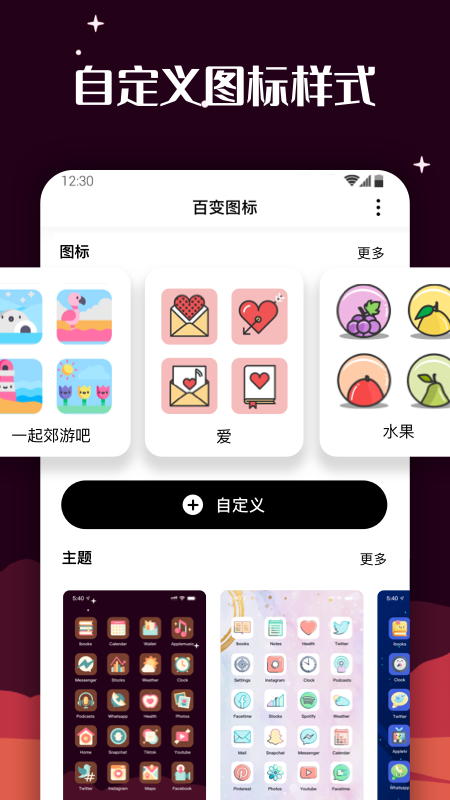
Variety icon screenshot

Features of Variety Icon Widget Software

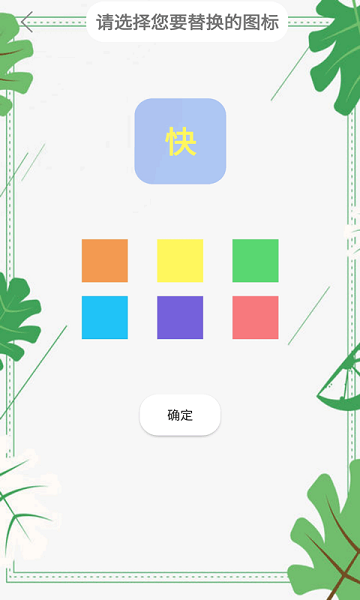
​​ 1Find the picture you like in the mobile phone album, and customize it to replace it with a desktop icon.

​​ 2You can quickly query the app package name, apk path, and installation date

3. You can share the App or installation package with others, or you can go to the market to update the latest version with one click.

​​ 4You can also change the APP name and show it off in front of your friends, which is extremely cool.

5. You can change the name of the new icon at will. After the replacement is successful, a startup shortcut for this APP will be added to the mobile phone desktop. Whether this shortcut is added or deleted, it will have no impact on the original APP.
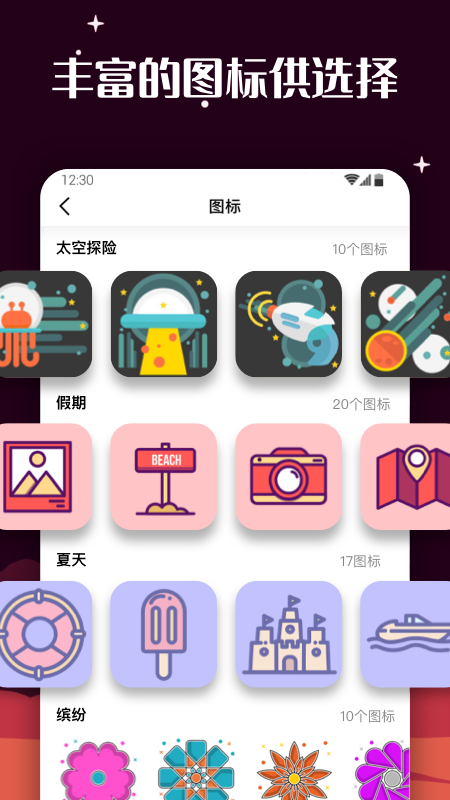
Variety icon screenshot


Software features


Massive icon resources:

Provides thousands of icons in different styles, covering simple, cartoon, animation, technology and other types to meet the diverse needs of users.

The icon library is updated regularly to maintain the freshness and diversity of materials, such as adding summer themes, science fiction series, etc.

Custom functions:

Support users to upload local pictures or design icons, and create exclusive icons by cropping, coloring, adding text, etc.

Editing tools such as color filters and pattern overlays are provided, and users can freely adjust icon styles.

Theme supporting services:

It provides theme wallpapers that match the icon style, and users can change the entire set of themes with one click to achieve a unified desktop style.

The themes cover fresh, sci-fi, cute and other styles, and the matching icons and wallpapers are seamlessly integrated.

Easy to operate:

The interface design is simple, the functions are reasonably laid out, and it supports batch setting of icons with one click, making it easy for novices to get started quickly.

The operation process is clear, from selecting the icon to applying it, it only takes a few steps, no complicated steps are required.

Strong compatibility:

It is compatible with a variety of mainstream mobile phone brands and operating systems, including Huawei, Xiaomi, OPPO, etc., ensuring a user experience for a wide range of user groups.

Software function


Icon replacement:

Users can select or customize design icons from the icon library, replace the original icons of mobile applications, and support batch operations.

A new shortcut will be generated after replacement. The original application icon can be hidden or removed, but cannot be deleted to avoid the application becoming unusable.

Theme customization:

Provides a variety of themes (such as fresh, sci-fi, cute, etc.), and matching icons and wallpapers can be applied with one click.

The theme supports customization, and users can mix and match different elements.

Icon management:

Supports icon classification, search and backup and recovery functions to facilitate users to organize and manage desktop icons.

Provides an icon preview function to check the effect before replacement to avoid misoperation.

App hiding and renaming:

Allow users to modify the application display name to match the custom icon to create a coordinated desktop effect.

You can hide or remove the original application icon to protect privacy (such as hiding social applications to folders).

Social sharing:

Users can share customized icons or themes to social platforms such as WeChat and Douyin to display personalized results.

FAQ


It will not take effect after the icon is changed:

Reason: The "Create desktop shortcut" permission is not turned on.

Solution: Go to the phone settings, find application permission management, and allow the Variety icon to create desktop shortcuts.

The original application icon cannot be deleted:

Note: After changing the icon, the original application icon can be hidden by dragging it to the folder, but cannot be deleted, otherwise the application may become unusable.

Suggestion: Move the original icons to less commonly used folders to keep the desktop tidy.

Variety Icon Widget Update Log

​ ​ 1: Brand new interface, refreshing, simple and efficient

​ ​ 2: Performance is getting better and better

Huajun editor recommends:

After so many years of updates and optimizations, the Variety Icon widget has become more user-friendly and more technological. It is highly recommended to everyone, and you are welcome to download it. Those who are interested can also downloadXuRong cashier system software,Great deeds of heaven and earth,Perfect World Esports,attention,random number generator.

FAQ