-
USB boot creation tool (WindowsToUSB Lite)
- Size: 1.3M
- Language: Simplified Chinese
- Category: Disk Utility
- System: winall






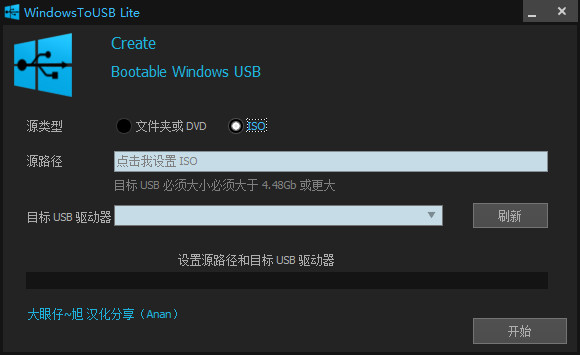
WindowsToUSB Lite Chinese version is a small and simple software that can help you create a bootable USB from a Windows ISO image file or Windows DVD or Windows source folder.
Its goal is to create a simple tool to help everyone install Windows with one click from a USB pen. Simple and Practical Interface The utility features a very simple and straightforward interface, making it very approachable for people of all experience levels, as it does not require any prior knowledge with similar tools.
WindowsToUSB Lite visual window, non-resizable window, you can select "Source Type" and then enter "Source Path" and then "Destination USB Drive" from the drop-down menu. Enter the source, select the drive, and create a bootable USB. In terms of "Source Type", the application supports folders or DVDs and ISO images containing the operating system, which you can then load from your PC into the main window of WindowsToUSB Lite. When selecting the USB you want to place on Windows, obviously it must be at least the same size as the iso file or folder you are using. Also, keep in mind that if you have any data on the pen drive, it will be deleted and lost, so be sure to make a copy of whatever you need before doing this. After configuring all these little requirements, you can press the "Start" button and within a few minutes, you will have your own bootable USB Windows drive.
Benefits of Portable Tool Additionally, since WindowsToUSB Lite is a portable program, it means that you do not need to install it on your system, you can download and run it whenever you need. Furthermore, you can store it on a portable storage device and take it with you wherever you go, and launch it on any compatible computer without leaving any traces in the system's registry. A quick way to create a bootable USB All in all, WindowsToUSB Lite can prove to be quite handy in helping you create a bootable USB, thereby enabling you to quickly install your Windows operating system.
Version: v1.3.1.0 Chinese green version | Update time: 2024-12-30
Similar recommendations



Latest updates





USB Boot Making Tool (WindowsToUSB Lite) Review
-
1st floor Huajun netizen 2022-02-16 00:59:17The interface design of the USB boot creation tool (WindowsToUSB Lite) is easy to use and has rich functions. I highly recommend it!
-
2nd floor Huajun netizen 2018-05-04 13:41:04The USB boot creation tool (WindowsToUSB Lite) is awesome! 100 million likes! ! !
-
3rd floor Huajun netizen 2017-08-10 01:05:52The USB boot creation tool (WindowsToUSB Lite) overall feels good and I am quite satisfied. The installation and operation are very smooth! It went very smoothly following the installation step-by-step guide!
Recommended products
-

Hard disk chkdsk repair tool
-

Kingston USB disk repair tool 2012
-

MHDD hard drive detection tool
-

chkdsk disk repair tool
-

Hard drive low-level formatting tool under Windows
-

Secret Disk (hard disk encryption tool)
-

Hard drive partition magician
-

HD Tune (mobile hard drive repair)
-
Hard drive low-level formatting tool
-

Super Powerful Excel File Recovery Software
- Diablo game tool collection
- Group purchasing software collection area
- p2p seed search artifact download-P2P seed search artifact special topic
- adobe software encyclopedia - adobe full range of software downloads - adobe software downloads
- Safe Internet Encyclopedia
- Browser PC version download-browser download collection
- Diablo 3 game collection
- Anxin Quote Software
- Which Key Wizard software is better? Key Wizard software collection




