-
InsideClipboard
- Size: 0.04M
- Language: English
- Category: Cutting tools
- System: WinAll






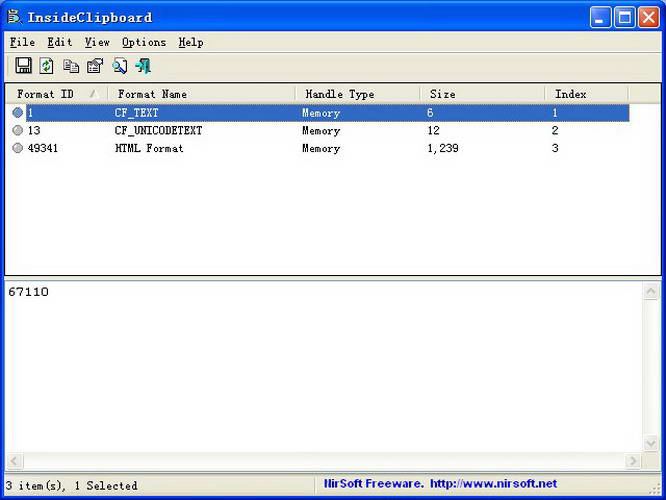
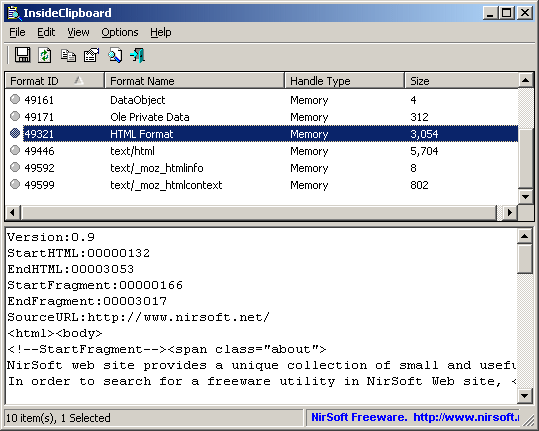
InsideClipboard is a small utility that displays the binary content of all formats currently stored in the clipboard and allows you to save content of a specific format to a binary file. Every time you copy something into the clipboard to paste it into another application, the copied data will be saved in multiple formats. Windows' main clipboard application only displays basic clipboard formats such as text and bitmap, but does not display a list of all formats stored in the clipboard.
InsideClipboard screenshot
InsideClipboard does not require any installation process or additional dll files. In order to start using it, just run the executable file (InsideClipboard.exe). InsideClipboard’s main window has 2 panes. The top pane displays a list of all formats currently stored in the clipboard. When you select a single item in the top pane, the bottom pane displays the contents of the selected clipboard format. You can view the content as Ascii (text-based formats like RTF or HTML) or as a hex dump.
System requirements
This utility works on any version of Windows, from Windows 98 to Windows Vista.
Command line options
/stext <filename> Save a list of clipboard items as a regular text file.
/stab <filename> Saves a list of clipboard items to a tab-delimited text file.
/stabulary <filename> Save a list of clipboard items to a tabular text file.
/shtml <filename> Save a list of clipboard items to an HTML file (horizontal).
/sverhtml <filename> Save a list of clipboard items to an HTML file (vertical).
/sxml<Filename> Save a list of clipboard items to an XML file.
/saveclp <.clp file name> Save the current clipboard data to a .clp file.
/loadclp <.clp file name> Load the .clp file into the clipboard.
Translate InsideClipboard into other languages
In order to translate InsideClipboard into other languages, please follow the instructions below:
Run InsideClipboard with the /savelangfile parameter:
InsideClipboard.exe /
savelangfile will create a file called InsideClipboard_lng.ini in the folder of the InsideClipboard utility.
Open the created language file in Notepad or any other text editor.
Translate all string entries into the required language. Alternatively, you can also add your name and/or link to your website. (TranslatorName and TranslatorURL values) If you add this information, it will be used in the About window.
Once translation is complete, run InsideClipboard and all translated strings will be loaded from the language file.
If you want to run InsideClipboard without translations, simply rename the language file, or move it to another folder.
Version history
Version 1.15:
Added support for displaying UTF-16 strings in the lower pane.
Version 1.12:
Adds a horizontal scroll bar to the lower pane.
Version 1.11:
Added index column showing the order of clipboard formats.
Version 1.10:
Added support for saving and loading Windows .clp files. You can use it from the user interface or command line
Version 1.06:
Bug fixed: Main window lost focus when user switched to another application and then returned to InsideClipboard.
Version 1.05:
New option: Save as image file. (Only for Windows XP/2003/Vista or other systems with GDI+ installed)
Version 1.04:
New option: Clear all clipboard data
Version 1.03:
New option: Refresh clipboard changes.
Version 1.02:
Bug fixed: CF_LOCALE format was shown as CF_DIBV5.
Version 1.01:
Bug fixed: InsideClipboard displays incorrect data.
Added support for displaying streaming data.
Version 1.00 - Initial release.
Version: 1.12 | Update time: 2024-12-23
Similar recommendations







Latest updates





How to add background music in python-How to add background music in python
How to configure environment variables in python - How to configure environment variables in python
How to run python - How to run python
How to create a project in python - How to create a project in python
How to make a blue sky background with scratch-How to make a blue sky background with scratch
How to create a linked list in scratch-How to create a linked list in scratch
How to add local programs to scratch-How to add local programs to scratch
How to input Chinese in scratch-How to input Chinese in scratch
How to fire bullets in scratch-How to fire bullets in scratch
InsideClipboard Review
-
1st floor Huajun netizen 2011-12-02 23:54:37InsideClipboard is very useful, thank you! !
-
2nd floor Huajun netizen 2011-07-30 21:42:49The interface design of InsideClipboard is very easy to use and has rich functions. I highly recommend it!
-
3rd floor Huajun netizen 2016-08-03 23:58:00InsideClipboard software is very easy to use, downloads quickly and is very convenient!
Recommended products






- Diablo game tool collection
- Group purchasing software collection area
- p2p seed search artifact download-P2P seed search artifact special topic
- adobe software encyclopedia - adobe full range of software downloads - adobe software downloads
- Safe Internet Encyclopedia
- Browser PC version download-browser download collection
- Diablo 3 game collection
- Anxin Quote Software
- Which Key Wizard software is better? Key Wizard software collection




