
-
Automatically change computer wallpaper with SyncWall
- Size: 10.5M
- Language: English
- Category: desktop assistance
- System: WinAll







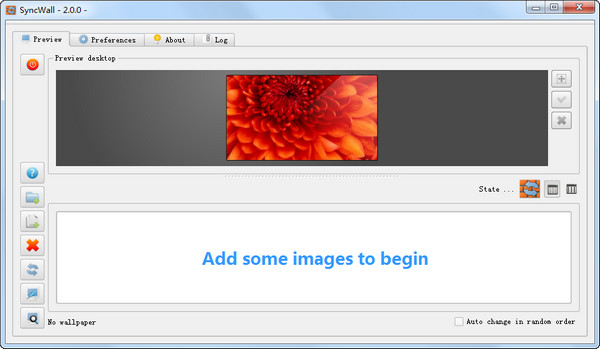
SyncWallIt is an automatic computer wallpaper changing software. In addition to adding multiple pictures, you can also add multiple folders, add various special effects to the wallpaper, and use shortcut keys to quickly change wallpapers. The picture display mode can also be customized to be centered, tiled or pulled up, and even the picture folder can be synchronized with the server.
Features
1. Completely free.
2. You can add multiple picture folders. After adding, the SyncWall interface has multiple display methods. You can use the thumbnail mode to view and manage all added pictures. This mode will tell you the size of all pictures. If you feel that the thumbnails are still too small, use the preview button to view the 100% size of the large picture.
3. In addition to switching wallpapers in order, it also has a random replacement mode.
4. Support multiple monitors.
5. Picture display modes include centered, tiled and raised. This solves the display problems caused by different image sizes.
6. You can also choose whether to position the picture against the top, in the center, or near the bottom.
7. Add special effects to wallpaper images. Such as saturation, Gaussian blur, sharpen, nostalgia and so on.
8. It can be started automatically along with the system.
9. With global shortcut keys, when you press the preset shortcut key, the wallpaper will jump to the next one.
10. The wallpaper replacement time interval can be set freely. You would think that this function should be available in automatic wallpaper changing software, but SyncWall is better because in addition to being able to set how long it takes to change pictures, you can also set pictures to change at certain fixed time points. However, the same time point only occurs once a day. I believe no one likes that the system will automatically change the wallpaper only at 8:30 every day, so the software has a built-in time point list function, which completely solves this problem by adding multiple different time points.
11. Picture folders can be synchronized with the server.
Version: 2.0 official version | Update time: 2024-12-26
Similar recommendations





Latest updates




Computer wallpaper automatic change SyncWall review
-
1st floor Huajun netizen 2022-01-09 12:42:04SyncWall is very useful for automatically changing computer wallpapers, thank you! !
-
2nd floor Huajun netizen 2020-03-25 02:50:42The SyncWall interface design for automatically changing computer wallpapers is easy to use and has rich functions. I highly recommend it!
-
3rd floor Huajun netizen 2020-02-17 08:15:31The SyncWall software for automatically changing computer wallpapers is very easy to use. The download speed is very fast and very convenient!
Recommended products








- Diablo game tool collection
- Group purchasing software collection area
- p2p seed search artifact download-P2P seed search artifact special topic
- adobe software encyclopedia - adobe full range of software downloads - adobe software downloads
- Safe Internet Encyclopedia
- Browser PC version download-browser download collection
- Diablo 3 game collection
- Anxin Quote Software
- Which Key Wizard software is better? Key Wizard software collection




