
-
MathType
- Size: 39.13M
- Language: English
- Category: Liberal Arts Tools
- System: Win All






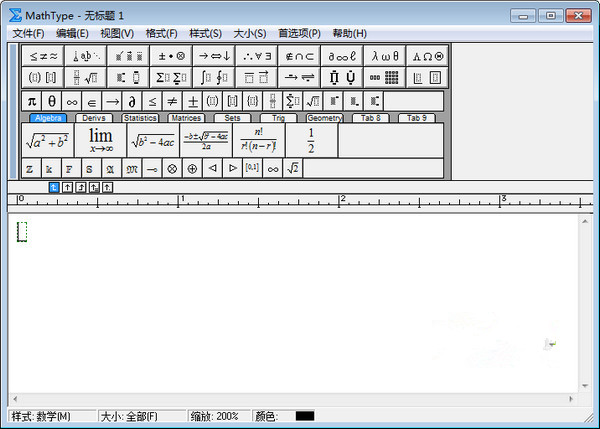

MathTypeIt is a powerful tool developed by the American company Design Science.Math formula editor.MathType needs to be matched with otherDocument editing toolsUsed together, and perfectly compatible with office series software,It can be used to edit mathematics test papers, books, newspapers, papers, slide presentations, etc. It is a powerful tool for editing mathematics materials.. andofficeThe series has built-inMathTypeA shortened version, making it easier for users to get started. Friends who like MathType, come to Huajun Software Park to download and experience it!
MathType function introduction
1. MathType has an intuitive, easy-to-use, WYSIWYG user interface that is compatible with various word processing software and publishing software in Windows and Macintosh environments.
2. Automatically and intelligently change the font and format of formulas, suitable for various complex formulas, and supports multiple fonts.
3. MathType supports TeX and LaTeX, as well as the international standard MathML, and can convert formulas into various graphics that support the Web (such as Gif, etc.), and also supports WMF and EPS output.
4. MathType comes with more than 70 special symbol fonts and hundreds of formula symbols and templates, covering mathematics, physics, chemistry, geography and other scientific fields.
MathType software features
1. Compatible with all versions of office
MathType has good compatibility with Office
2. Multi-platform support
MathType supports any word processing software, presentation program, page program, HTML editing tool and other types of software to create formulas
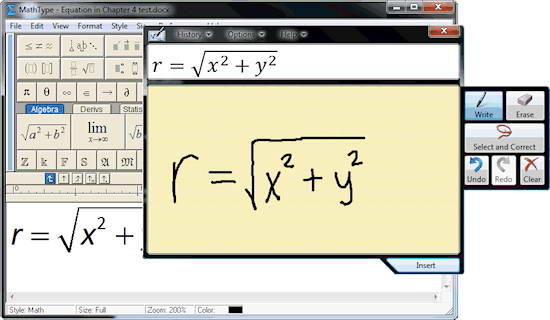
3. Support handwriting
"Open the input math panel" in the "Edit" menu supports handwritten input formulas, intelligently recognizes handwritten content, and you can complete writing with just a touch of the mouse.
4. Automated processing
MathType supports one-click conversion to Latex, Amslatex and other codes, and provides commonly used mathematical formulas and physical formula templates. With just one click, the formula will appear on the page.
MathType installation steps
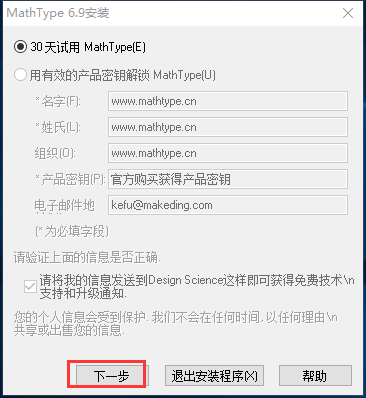
1. Users can choose to use MathType for free for 30 days, and then click Next
2. Select the appropriate installation location for MathType to install.
3. The installation does not take long, just wait patiently.
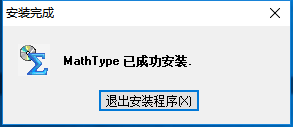
Installation summary:First, download the MathType software installation package from this site, unzip it, open the exe file, and enter the installation wizard. Follow the steps to install according to the prompts. You can choose a 30-day trial or enter a secret key to unlock. During installation, you can choose the default installation location or customize the installation location. After checking the corresponding shortcut, enter the installation program. After a short wait, the installation will be completed and enjoy this software.
MathType usage tips
1. Open Word 2003 and click the "Object" command in the "Insert" menu.

2. Open the "Object" dialog box, select the "Microsoft Formula 3.0" project in the object type list under the "New" tab, and click the "OK" button.
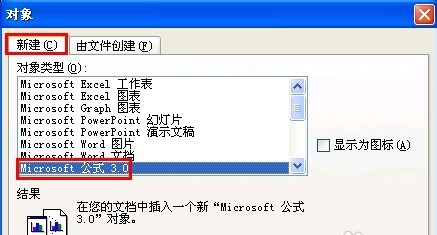
3. Enter the MathType formula editor window and select the appropriate number symbol in the "Formula" toolbar.

4. Type the specific value in the formula text box of MathType, then select the value, and click the "Dimensions" - "Others" command in the menu bar.

5. Open the "Other Sizes" dialog box, type the appropriate numerical size in the size text box, and click the "OK" button.
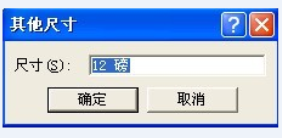
6. Finally, click on the blank area outside the editing window to return to the Word document interface. We can see the formula graphically inserted into the Word document.

MathType related issues
How to embed MathType in word?
First, install the office and MathType software, and find where the installation files are. If it is already installed, just find the installation address.

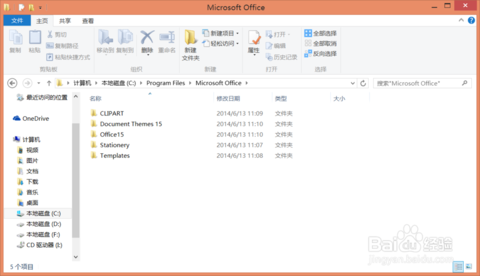
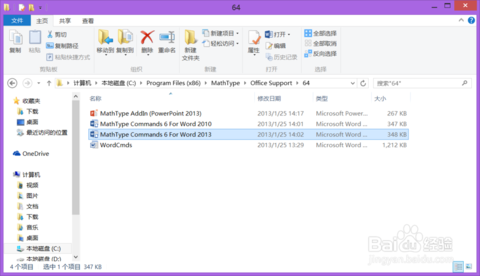
Find the office support folder under the MathType installation address, then select the corresponding 32-bit or 64-bit folder and find the file "MathType Commands 6 For Word 2010/2013". As for choosing 2010 or 2013, it depends on the installed office version.
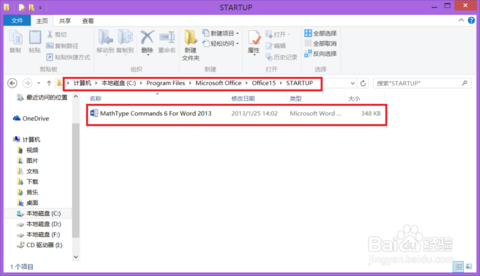
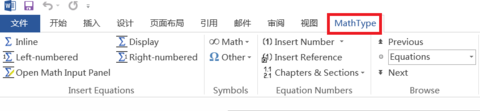
Find the installation address of office, then find the STARTUP folder as shown, and copy the files mentioned in step 2 to this folder. Then when you open word, you can see that MathType has been embedded in the toolbar.
Comparison between MathType and LaTeX
MathType is mainly attached to office, mainly because it is more convenient to edit formulas in word; LaTex has the function of word, and can edit text and formulas, and the edited interface is more beautiful. In general, MathType is a mathematical equation editor, while LaTex is a text editor.
MathType What you see is what you get, this is the advantage. Of course, like all other WYSIWYG software, it is precisely because of this advantage that many man-made formulas are not standardized.
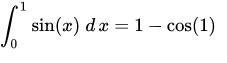
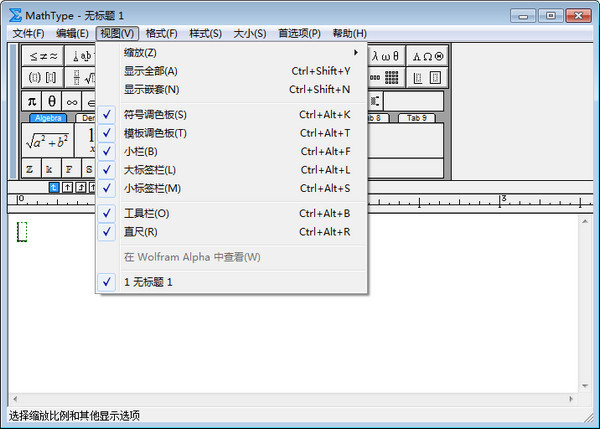
It doesn’t matter for LaTeX syntax, just input it sequentially, but for MathType, due to the effect of template-placeholder and nesting, you need to always pay attention. For example, in the above example, sin(x) dx is in the box of the integral template, but the equal sign is not. On the one hand, you must be familiar with those shortcut keys. On the other hand, it is recommended to turn on the `Show Nesting` switch to easily see the nesting relationship. However, the LaTeX mathematical commands in LaTeX, which are designed to reduce words for ease of memory, are equivalent to a burden for Chinese users.
FAQ
1. Insert special symbols (such as thousandth sign)
Problem description: There is no ready-made thousands sign template in the MathType toolbar, and users do not know how to insert it.
Solution:
After entering the corresponding numbers in MathType, select the "Edit" - "Insert Symbol" command.
In the pop-up "Insert Symbol" dialog box, set "View" to "Style" or "Description", find the thousand sign and click "Insert".
Be careful to avoid using non-standard symbol input methods, such as direct input from oblique fraction templates.
2. Edit complex formulas (such as partial derivatives, matrices, etc.)
Problem description: Users do not know how to edit complex mathematical formulas, such as partial derivatives, matrices, etc.
Solution:
Build formulas using the templates and symbol libraries provided by MathType.
For partial derivatives, you can use fractional templates and partial derivative symbolic templates.
For matrices, you can use matrix templates to add rows and columns, and adjust the appearance by styling the matrix.
3. Alignment and formatting issues between formulas and Word documents
Problem description: After inserting a MathType formula into Word, the formula is poorly aligned with the document content or the format is inconsistent.
Solution:
Adjust paragraph settings in Word documents, such as line spacing, indentation, etc., to ensure formulas are aligned with text.
Set the font, size and other properties of the formula in MathType to match the format of the Word document.
Use MathType's "Format Formula" function to uniformly adjust formula formats.
4. Automatic numbering and referencing of formulas
Problem description: The user wants to automatically number formulas and be able to reference these numbers in documents.
Solution:
In Word, use MathType's "Insert Equation Numbering" feature to add numbers to formulas.
Reference formula numbers in documents through MathType's "Insert Formula Reference" feature.
The style and position of numbering can be set in MathType to meet different typesetting needs.
MathType update log
1. Perfectly compatible with Windows 10 operating system;
2. Can run on Office2016 and Office 365;
3. Newly compatible with 800+ software applications and websites;
4. MathPage supports MathJax technology;
5. MathType supports mathematical handwriting recognition;
6. Added support for more mathematical symbols and fonts;
7. Add more saving formats.
Huajun editor recommends:
Huajun Software Park also has popular software with the same functions as this software, such as: electronic version of Chinese Idiom Dictionary, .NET, Batch Butler, etc. If you need it, you can collect it!
Version: 7.8.2 | Update time: 2025-11-18
Similar recommendations



Latest updates





MathType How to use LaTex code to edit formulas - Tutorial on using LaTex code to edit formulas
How to edit the harpoon arrow symbol in MathType? How to edit the harpoon arrow symbol in MathType
MathType graphic tutorial for inputting Fourier transform symbols
How to install MathType into Word? How to install MathType into Word
How does MathType edit commonly used matrices? MathType quickly edits commonly used matrices
How does MathType use custom styles? The operation process of MathType using custom styles
How to add MathType to the Word quick access bar? How to add MathType to the Word quick access bar
MathType comments
-
1st floor Huajun netizen 2021-05-24 05:12:57MathType is very useful, thank you! !
-
2nd floor Huajun netizen 2021-05-16 11:03:38MathType software is very easy to use, downloads quickly and is very convenient!
-
3rd floor Huajun netizen 2022-03-19 23:51:28MathType is awesome! 100 million likes! ! !
Recommended products
-

PEP version of primary school Chinese language teaching courseware for the first grade of the first volume of the complete text
-

Complete collection of rhymes
-

Master of Calligraphy Practice Methods
-

Three Hundred Tang Poems
-

pen god
-

Electronic Xinhua Dictionary
-

Yixuetang fast reading training system
-

Ancient poems and essays from past dynasties
-

Lighthouse online answer questions
-
Paper latent search
- Diablo game tool collection
- Group purchasing software collection area
- p2p seed search artifact download-P2P seed search artifact special topic
- adobe software encyclopedia - adobe full range of software downloads - adobe software downloads
- Safe Internet Encyclopedia
- Browser PC version download-browser download collection
- Diablo 3 game collection
- Anxin Quote Software
- Which Key Wizard software is better? Key Wizard software collection




