How to add MathType to the Word quick access bar? The following is the editor's introduction to the method of adding MathType to the Word quick access bar. Friends in need can take a look below. I hope it can help you!
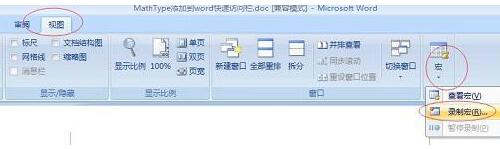
Step 1: After installing MathType, open the Word 2007 document, click "View" - "Macro", and select "Record Macro" in the drop-down menu. See the example below.
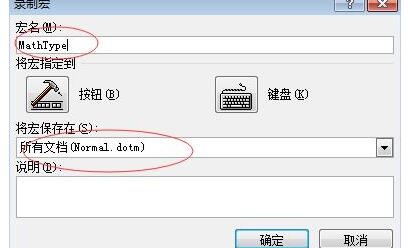
Step 2: A dialog box will appear, change the macro name to "MathType", save the macro in "All Documents (Normal.dotm)", click [OK] to start recording the macro
Step 3: Click "Insert" - "Object" in Word, select "Object" in the drop-down menu, a dialog box will appear, select "MathType6.0" in the "New Object Type" in the dialog box Equtaion" and click "OK".
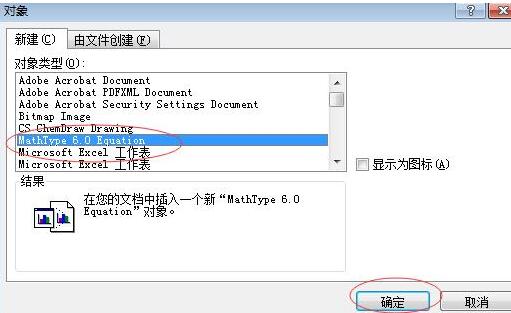
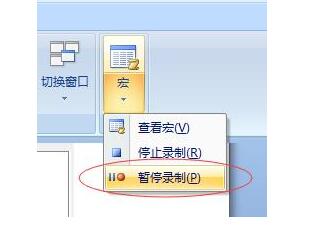
Step 4: At this time, the MathType main program will open; click anywhere in the document to return to the word interface, click "View" - "Macro", and select "Pause Recording". See the example below.
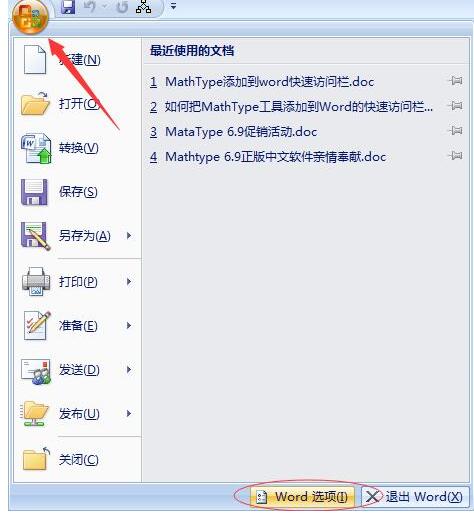
Step 5: Click the office button on the Word interface and click "Word Options". See the example below.
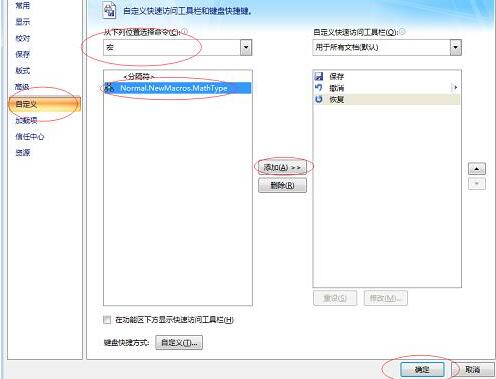
Step 6: Click "Customize" in the Word Options dialog box that appears, select the "Macro" command in the "Select a command from" drop-down menu, and select "Normal.NewMacros.MathType" in the "Separator" dialog box is added to the right dialog box. (Click "Modify" at the bottom of the dialog box on the right to Select the icon you like) and click [OK].
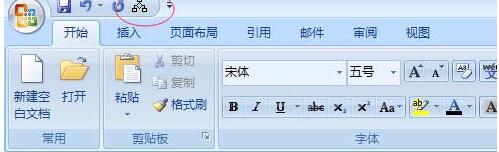
Step 7: When you close and reopen Word, the MathType shortcut icon will appear in the "Quick Access Toolbar".
以上这里为各位分享了将MathType添加到Word快速访问栏的操作流程。 Friends in need should hurry up and read this article.