
-
DingTalk
- Size: 431.47M
- Language: Simplified Chinese
- Category: Office software
- System: Winall









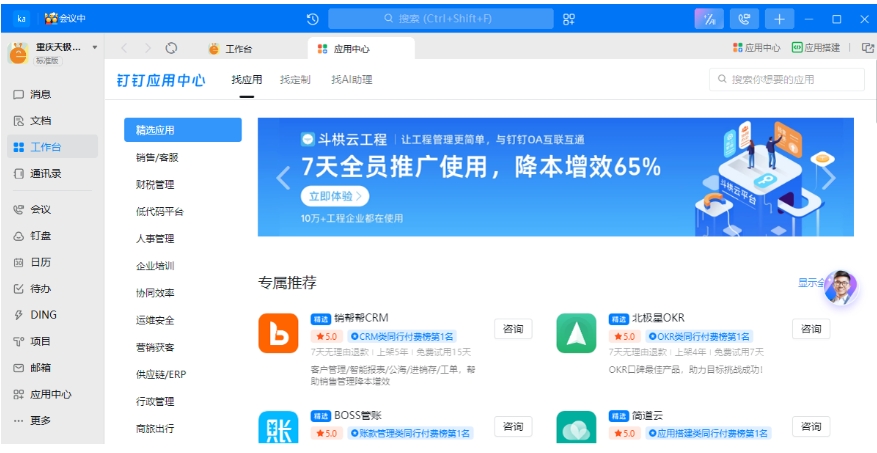
DingTalk PC versionIt is a very powerful smart office software. The computer version of DingTalk can quickly create hierarchical team management; it can communicate internally and externally, intelligentlyvideo calls;Encrypted transmission of key enterprise information, safestorageAre these the only features you want for DingTalk? Of course not! Help organizations achieve successremoteCollaborate effectively. Friends who like it, please come to Huajun Software Park to download and experience it.

How to use DingTalk PC version:
How to exit the company on DingTalk?
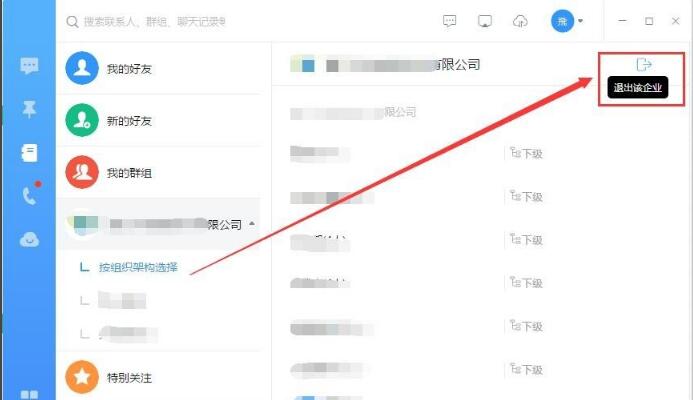
1. Open the DingTalk we have installed, log in to your account, and enterDingTalkSystem; select the "Contact Book" option in the function list on the left and click to open it;

2. Find your company name and click on the organizational structure below the company.
3. After clicking, the organizational teams you have joined will be listed for you below. At this time, select the name of the organization you want to exit, and then you will see a small icon (Exit the company) on the upper right side of the interface. You can exit with one click.
How to create a group on DingTalk?
1. First open our DingTalk PC version. When you open it, you will see a small plus sign at the top of the interface.icon, hover the mouse over the icon and you will see the words "Start a group chat". This is the entrance where we want to create a group. Click to open.

2. Then a window to create a group chat will pop up, as shown in the picture below. Enter the group chat name and select the group type (usually a normal group). Just check it in the friend list on the left.
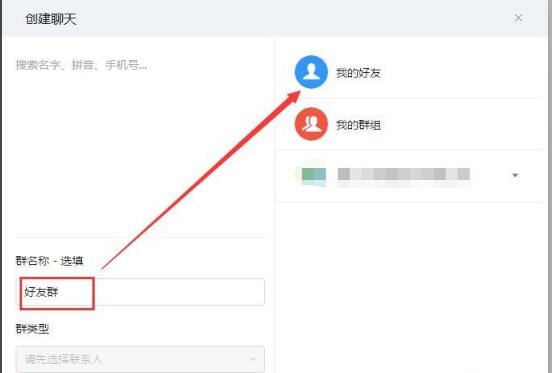
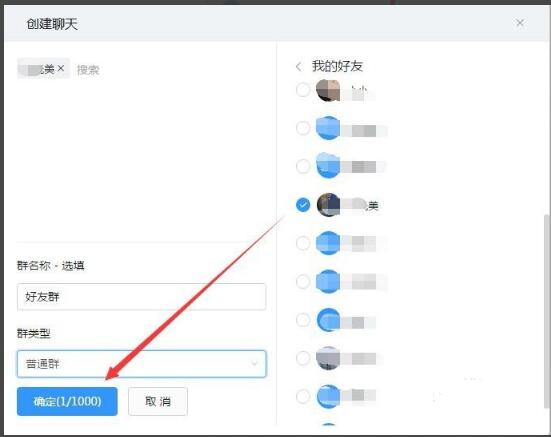
3. What I want to explain here is to create an internal group within the company. You can join the group without adding friends. If you are a non-enterprise user, you need to add friends first and then create a group.
4. After the above settings are completed, click OK, and the group chat will be created. After the creation is completed, you can enter the group to chat. You can also click the head icon on the left to view the group list. This is the end of the tutorial on how to create a group on DingTalk. Have you learned it?

How to like in a group chat on DingTalk?
1. Open the DingTalk office software we have installed and log in to our DingTalk account. If you receive a message in the group and want to like it, you can directly click on the toolbar at the bottom of the group chat window. There will be a small like icon there. Click to send.

2. If you have many groups, you can first click on the message on the left to find the corresponding group, and then like it. The way to like is the same, just click the like icon below the toolbar.

Frequently asked questions about DingTalk PC version
1. Between employeesChat historyCan the administrator view it in the background?
Administrators or others cannot view chat records that they are not involved in. Chat records can only be seen by the person who sent and received the chat. The DingTalk platform attaches great importance to the protection of customer privacy. It also attaches great importance to privacy protection in terms of the security of product functions. For example, in a chat session, only those who participate in the chat can view the corresponding files. People who are not in the chat session have no right to view the files. Enterprise administrators and bosses cannot view employee chat information from the management backend. The DingTalk platform does not provide companies with the ability to view employee chat content.
2. How long can chat records be retained?
The current chat history is stored in the cloud. If you do not clear it, the chat history will be retained for the last 1 year. Even if you change the phone in the chat box, you will see the chat information within 1 year by pulling down.
3. How to delete chat history?
You can choose to delete message records and withdraw messages.
【Delete Message】: Deleting your own local message record cannot change the action that has been sent and will not affect the other party's record.
【Withdraw message】: Refers to withdrawing the message as if it had never been sent, and the message received by the other party will also be withdrawn.
【How to operate】: In the mobile DingTalk, long press the chat message to withdraw or delete it; in the PC version of DingTalk, place the mouse on the message and three small dots will be displayed. After clicking, you can choose to withdraw or delete (in the dialog window list, right-click on a dialog window and you can choose to clear the chat history).
【Warm reminder】
1. Regardless of whether the other party has read it or not, it can be withdrawn within 24 hours after sending it.
2. If you delete it on the mobile phone, it will also be deleted on the computer, and vice versa.
Features of DingTalk PC version software
Instant messaging and message management
Supports individual chats and group chats, and the read and unread status of messages can be viewed to ensure efficient access to information.
Provides a "DING" function to ensure important notifications are delivered through free calls, text messages or in-app messages.
Supports message withdrawal (within 24 hours) and group chat message group owners can withdraw indefinitely to avoid the spread of incorrect information.
Audio and video conferencing and live streaming functions
Provides high-definition video conferencing, supports screen sharing, real-time annotation and multi-person speaking to meet remote collaboration needs.
Supports multi-group simulcast, you can forward the live broadcast room to multiple groups with one click, and collect live broadcast data to improve training and meeting efficiency.
Document collaboration and cloud storage
DingTalk documents support real-time online editing by multiple people, integrating tasks, schedules, files and other content to achieve a high degree of information integration.
Provides enterprise cloud disks and personal cloud disks, supports secure file sharing and version control, and ensures orderly team collaboration.
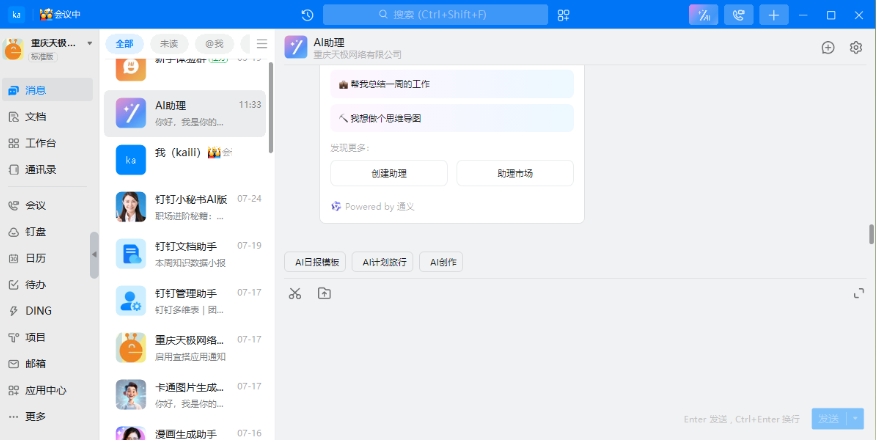
DingTalk PC version software functions
OA Approval and Task Management
Built-in approval templates for leave, business trip, reimbursement, etc. support customized processes and real-time tracking, simplifying the approval process.
Provides a task list function, where deadlines, priorities and responsible persons can be set, task progress can be tracked in real time, and collaboration efficiency can be improved.
Attendance Management and Data Analysis
Supports face recognition, fingerprint recognition and GPS positioning attendance, automatically generates attendance reports, and facilitates salary calculation and performance appraisal.
Provides sales, financial, human resources and other data reports, supports data export and decision-making analysis, and promotes enterprise digital management.
Security and Privacy Guarantee
Use bank-level encryption technology and third-party encryption support to ensure corporate data security.
Provides bathhouse mode (messages are automatically destroyed after 30 seconds), hidden conversations and other functions to protect the privacy of sensitive information.
Multi-terminal collaboration and open ecology
Supports multi-terminal synchronization on mobile phones, computers, tablets, etc. to achieve a seamless office experience.
It opens more than 2,000 API interfaces and supports low-code tools to build CRM, ERP and other systems to meet the personalized needs of enterprises.
Related information
DingTalk web login portal
The DingTalk website login entrance is the official website www.dingtalk.com. Enter the URL into the browser to enter the official website. Click "Login" or "Web Version" in the upper right corner to go directly to the login interface. It supports four methods of logging in via mobile phone DingTalk code scanning (recommended), mobile phone number + verification code, account password and corporate account. It is easy to operate. There is no need to install the client in public computers or temporary office scenarios, and you can quickly access the office environment.
Use the web version of DingTalk online
DingTalk web version is a lightweight office platform that does not require installation. You can use core functions through a browser, covering instant messaging, high-definition video conferencing, multi-person document collaboration, attendance approval, DingTalk disk storage and file sharing, etc., and supports cross-end synchronization of messages and data. The interface is simple and intuitive, adaptable to various browsers, does not require device storage space, adapts to temporary office, cross-device collaboration and other scenarios, and meets the core needs of team communication and efficient collaboration.
DingTalk PC version vs. WeChat Enterprise
DingTalkContrastEnterprise WeChatWhat's the difference?
Enterprise WeChatCurrently, teams that have opened a QQ corporate email or WeChat corporate account can directly import their employee address books. Employees who are registered can log in through their mobile phone number, email or WeChat to start using corporate WeChat. The method of establishing a group is the same as that of WeChat, but since friends outside the company cannot be added, all group organizations are limited to enterprise groups and its subgroups.
DingTalkIt supports individual registration through mobile phone number. After joining, you can find your own company or organization within the App. The entrance to DingTalk group building is also in the "+" in the upper right corner of the homepage, but in the secondary menu it is subdivided into ordinary "enterprise groups", "private groups" in bathhouse mode, and "group chat" functions that are not limited to companies. In addition, DingTalk also supports adding friends who are not from the company.
After reading the above summary, I believe everyone has their own understanding. Both DingTalk PC version and Enterprise WeChat have their own advantages. It depends on how you choose, and the one that suits you is the best!
Enterprise WeChat download address:http://softwaredownload4.com/soft/578119.htm
DingTalk update log:
1: Brand new interface, refreshing, simple and efficient
2: Performance is getting better and better
Huajun editor recommends:
A very good DingTalk, easy to use and powerful, don’t miss it if you need it. This site also provides .NET, Batch Butler, and Cloud Machine Manager for you to download.
Version: 8.1.5.1107 | Update time: 2025-11-17
Similar recommendations






Latest updates





Tutorial on how to turn off message alerts on DingTalk
Steps for connecting wheat in DingTalk
Detailed tutorial on casting DingTalk screen to TV
Operation process of querying online viewing time on DingTalk
The operation process of deleting redundant images on DingTalk
Graphical tutorial for closing DingTalk face check-in
Detailed steps to disable likes on DingTalk live broadcast
Steps to play live video at double speed on DingTalk
Graphical steps to turn off automatic voice-to-text conversion on DingTalk
Description of the basic steps for viewing live broadcast data on DingTalk
DingTalk comments
-
1st floor Huajun netizen 2022-03-18 20:53:07The interface design of DingTalk is easy to use and has rich functions. I highly recommend it!
-
2nd floor Huajun netizen 2022-03-21 03:59:16DingTalk software is very easy to use, downloads quickly and is very convenient!
-
3rd floor Huajun netizen 2022-03-12 07:56:30DingTalk is awesome! 100 million likes! ! !
Recommended products







- Diablo game tool collection
- Group purchasing software collection area
- p2p seed search artifact download-P2P seed search artifact special topic
- adobe software encyclopedia - adobe full range of software downloads - adobe software downloads
- Safe Internet Encyclopedia
- Browser PC version download-browser download collection
- Diablo 3 game collection
- Anxin Quote Software
- Which Key Wizard software is better? Key Wizard software collection




