
-
Photoshop CS4
- Size: 2.32M
- Language: Simplified Chinese
- Category: image processing
- System: WinAll






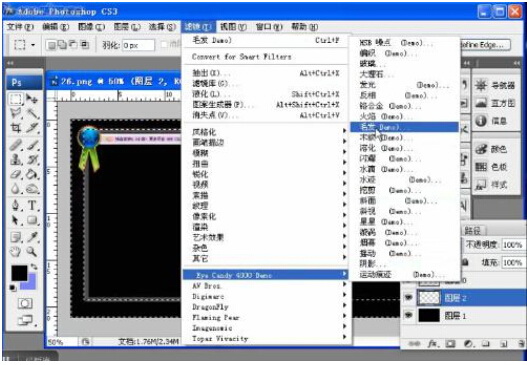
Photoshop cs4 is one of the most famous image processing software produced by Adobe. It makes full use of unparalleled editing and synthesis functions to greatly improve work efficiency. The update is only a compatibility update for Vista, because Vista has problems supporting Photoshop CS, CS2, and CS3.
Adobe Photoshop CS4Chinese versionFeatures
In addition to all the functions of Adobe Photoshop CS3, the software also adds some special functions, such as support for 3D and video streaming, animation, deep image analysis, etc. The entry interfaces of the two versions are different, but if you look at the operation interfaces of Photoshop CS3 10.0 Extended and CS4 Extended, they are almost the same.
1. The tool box becomes retractable and can be long single or short double.
2. The quick mask mode and screen switching mode on the toolbox also change the switching method.
3. In the selection tool options of the toolbox, there is an additional group selection mode. You can decide to select groups or individual layers.
4. The toolbox has a Quick Selection Tool, which is a shortcut version of the magic wand. You can add selections without any shortcut keys. Press and hold to select an area like painting, which is very magical. Of course, the option bar also has three modes: New, Add, and Subtract. It will be very intuitive and fast to quickly select images with large color differences.
Adobe Photoshop CS4Chinese versionFunction introduction
Photoshop can be divided into image editing, image composition, color correction and special effects production. Image editing is the basis of image processing. It can perform various transformations on images, such as expanding, reducing, rotating, skewing, mirroring, perspective, etc. It can also be used for copying, removing spots, repairing, and modifying damage to pictures, etc. Image composition is to combine several images through layer manipulation and the use of tools to form a complete image that conveys clear meaning. This is the only way for art planning. The drawing tools provided by photoshop allow external images to be perfectly integrated with creativity. Color correction is one of the most powerful functions in Photoshop. It can quickly and easily adjust and proofread the light, shade, and color coding of the image. It can also switch between different colors to meet the use of the image in different fields such as page planning, printing, multimedia, etc.
Adobe Photoshop CS4Chinese versionFAQ
How to convert multiple pictures to PDF files using Photoshop?
1. Open Photoshop, click File menu→Automatic→PDF Batch Processing.
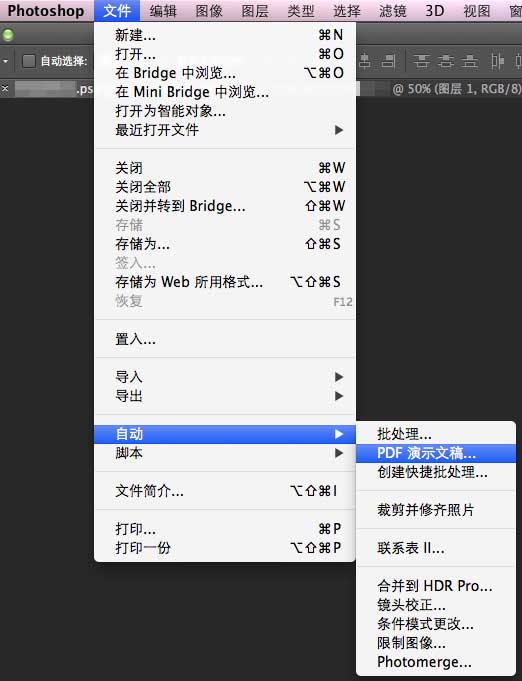
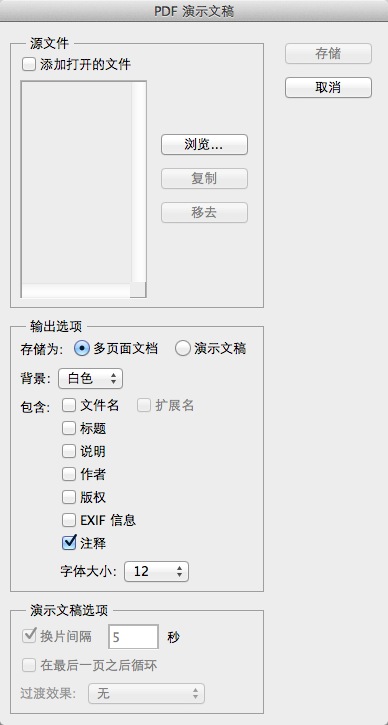
2. Click the [Browse] button to select the image file to be created.
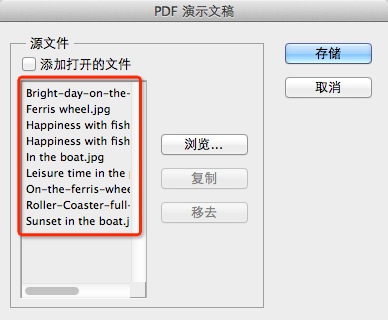
3. Select pictures and sort them
You can drag the image names here to sort them, which will affect the page order after PDF output.
4. Store and set parameters
You can change the specific parameters of the PDF as needed, including whether to embed page thumbnails, compression attributes, etc. You can set it up according to your needs.
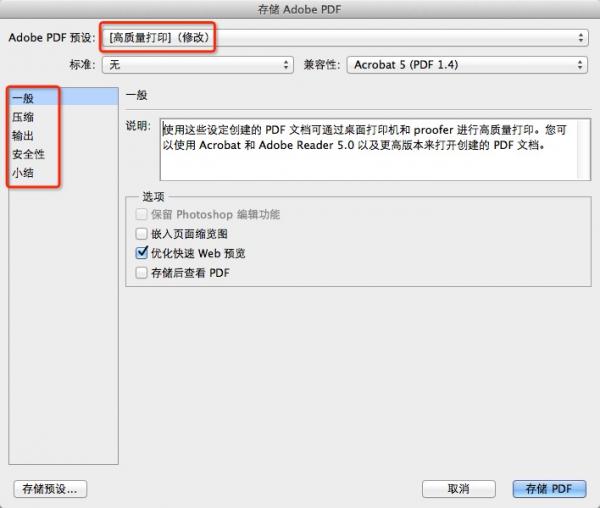
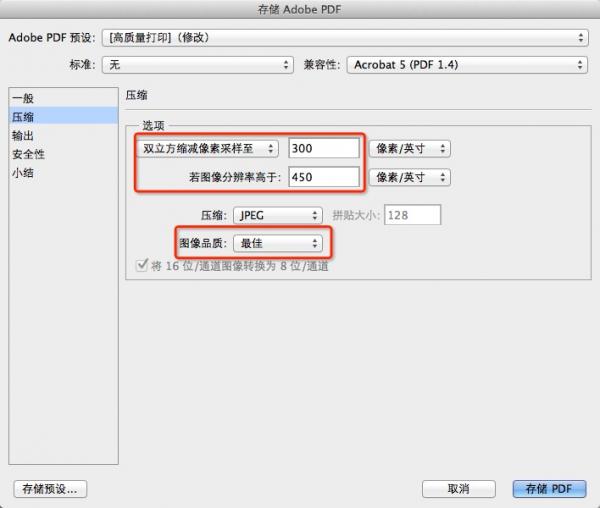
5. Click [Save PDF] and wait for automatic processing
After clicking [Save PDF], Photoshop will automatically process it. After a moment, you will see the output PDF file.
Due to copyright and manufacturer requirements, Huajun Software Park provides the official download package of Photoshop CS4 software.
Photoshop CS4 update log:
Sweep the bug out and carry it out to the end
Optimize user feedback issues and improve detailed experience
Huajun editor recommends:
The editor has also used Adobe Illustrator CC, AutoCad 2020, Batch Butler and other software with similar functions to this software. Huajun Software Park provides them and can be downloaded and used!
Version: Simplified Chinese version | Update time: 2025-01-22
Similar recommendations





Latest updates





Photoshop CS4 Review
-
1st floor Huajun netizen 2021-09-10 03:18:14The interface design of Photoshop CS4 is very easy to use and has rich functions. I highly recommend it!
-
2nd floor Huajun netizen 2022-02-15 07:26:05Photoshop CS4 software is very easy to use, downloads quickly and is very convenient!
-
3rd floor Huajun netizen 2022-02-17 14:42:57The overall feeling of Photoshop CS4 is good and I am quite satisfied with it. The installation and operation are very smooth! It went very smoothly following the installation step-by-step guide!
Recommended products



- Diablo game tool collection
- Group purchasing software collection area
- p2p seed search artifact download-P2P seed search artifact special topic
- adobe software encyclopedia - adobe full range of software downloads - adobe software downloads
- Safe Internet Encyclopedia
- Browser PC version download-browser download collection
- Diablo 3 game collection
- Anxin Quote Software
- Which Key Wizard software is better? Key Wizard software collection




