
-
Jinfeiyi Video Conversion Expert
- Size: 5.81M
- Language: Simplified Chinese
- Category: video conversion
- System: winall







Jinfeiyi Video Conversion Expert PC version is a conversion tool suitable for creating video files. The official version of Jinfeiyi Video Conversion Expert supports all common video and audio formats, and can be run on Apple, PSP, mobile phones and other devices after conversion. Jinfeiyi Video Conversion Expert can also adjust the video size and screen aspect ratio, and supports batch operations. It also provides up to 60 default settings and covers various common video conversion needs.
Introduction to Jinfeiyi video conversion expert software
Jinfeiyi Video Conversion Expert Official Version Are you troubled by the inability to play some important video files? Are you confused about the complex video formats in your computer system? Do you need to convert your video files to FLASH format to share with everyone online? Have you ever thought about putting the original dubbing from foreign language blockbusters into MP3 to learn spoken English anytime and anywhere? Come and try our video conversion expert, it can help you convert video materials on your computer into almost any video and audio format you can expect.
Video Converter is a powerful video conversion software that supports almost all video file formats, including 3gp, 3g2, avi, dv, dif, mov, qt, swf, mp2, mp3, ogg, aac, m4a, nut, ac3, h261, h264, m4v, yuv, mp4, rm, ra, ram, rmvb, wma, wmv, asf, mpg, mpeg, mpa, vob, dat, ape, cue, mkv, wav, aiff, au, cda, avs, psp, smk, nsv, etc.
Introduction to the functions of Jinfeiyi Video Conversion Expert
1. Support batch conversion of video file formats
2. Support free selection of file formats to be converted
3. Support moving up and down buttons to adjust the order of video file conversion during batch conversion.
4. Support optional audio and video encoder for video conversion
5. Support setting the audio and video quality of converted videos
6. Support setting the video frame rate, size and screen aspect ratio in the converted video file
7. Support setting the audio sound sampling rate and number of channels in the converted video file
Features of Jinfeiyi Video Conversion Expert Software
1. Fast speed. Compared with other similar software, it can increase the conversion speed by about 30%.
2. The software provides up to 60 default settings, covering various common video conversion needs. Even if you don't know much about the parameters that need to be set, there is no need to worry, just choose a preset plan and start the conversion directly.
3. The software also provides advanced setting functions. You can specify specific video parameters according to your special requirements, such as video encoding, video bit rate, video frame rate, video resolution, audio encoding, audio bit rate, audio sampling rate, and number of audio channels.
4. Support batch import of conversion files in directory mode. This feature helps you avoid meaningless duplication of work and save time when you need to import multiple video files.
5. Skin changing function, we provide you with 16 skin interfaces in the software, which you can change according to your personal preferences.
Jinfeiyi video conversion expert supports formats
It can convert the above supported video formats to:
Video section:
Mobile video format (*.3gp;*.3g2)
BlackBerry video format
MP4 player video format
Apple TV video format
Apple IPOD video format
Apple iPhone video format
Sony PSP video format
Sony Play Station video format
Windows media files (*.AVI;*.WMV;*.ASF);
MPEG files (*.MPG;*.MPEG;*.MPE;*.M1V;*.MPV2);
DVD-NTSC, DVD-PAL, VCD, SVCD formats
DivX video format
Xvid video format
Flash format (*.flv;*.swf)
Real video format (*.rm)
Audio part:
AAC audio format
AC3 audio format
SUN AU audio format
M4A audio format
MP2/MP3 audio format
OGG audio format
RA audio format
WAV audio format
WMA audio format
Installation steps of Jinfeiyi Video Conversion Expert
1. Download Jinfeiyi Video Converter Expert in Huajun Software Park, then unzip it to the current folder, then open the cool_video_converter.exe application, enter the main installation program, and click Next
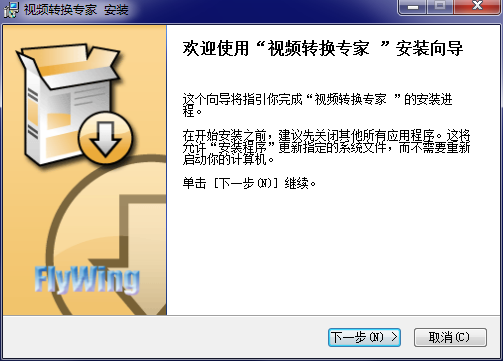
2. In the user license agreement interface, we click the I accept button to continue.

3. Set the software installation location folder. Huajun editor recommends users to install it in the D drive. Select the installation location and click Install.

4. Jinfeiyi video conversion expert is being installed. Users are waiting patiently for the progress bar to be full.

5. The installation of Jinfeiyi Video Conversion Expert is completed. Click the Finish button to exit the installation wizard and open the software.

Instructions for use by Jinfeiyi Video Conversion Expert
1. Add files and click the Add button to add local video files that need to be converted to the software.
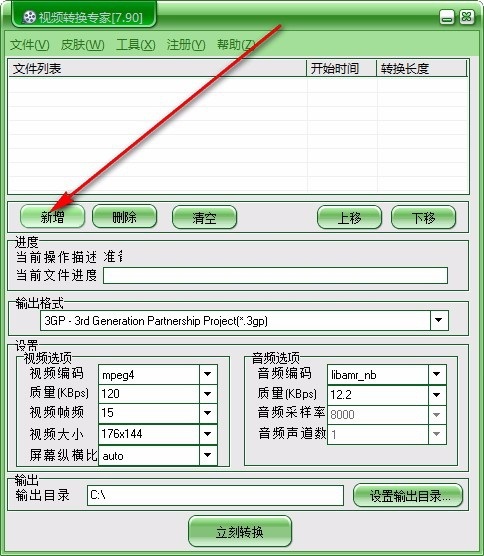
2. Output format selection, expand and select the output format that needs to be converted.

3. Set the project and select video encoding in the video options.

4. For the selection of output quality, expand and select the required quality.
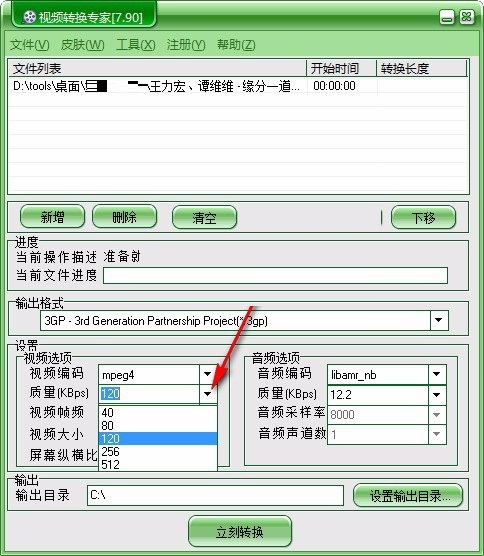
5. Set the video frame rate, video size and video screen aspect ratio

6. Audio option settings, you can set the corresponding parameters according to your own needs.

7. Set the output directory and click the corresponding button to set the output directory.

8. If there are multiple video files, you can click Move Up and Move Down to set the order of video conversion.
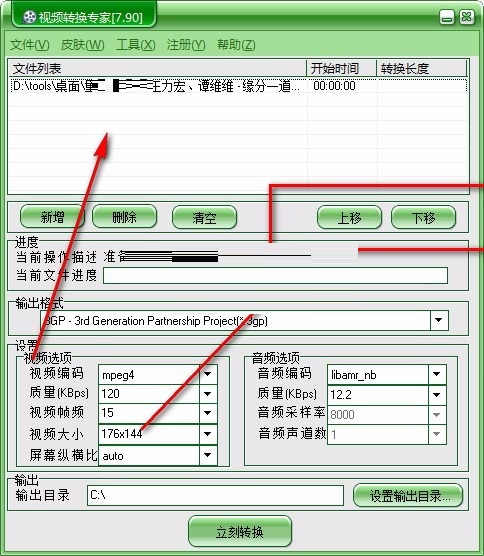
9. Start the conversion and click the Convert Now button to convert the video files.

10. Converting in progress, wait patiently for the video file conversion to complete. You can see the conversion progress on the software interface.

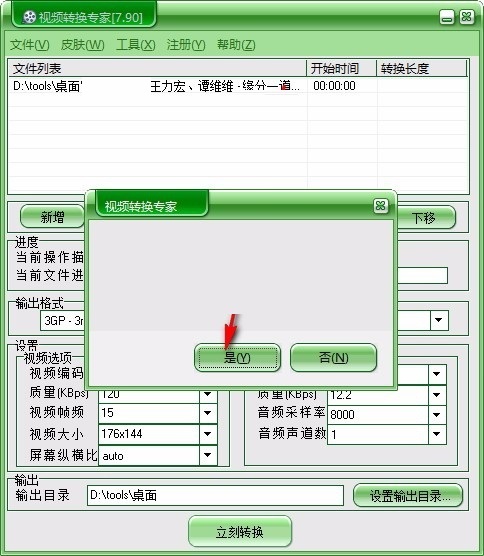
11. When the conversion is completed, click the Yes button to launch the conversion completion prompt interface.
Jinfeiyi video conversion expert update log
1. Optimized some functions
2. Solved many intolerable bugs
Huajun editor recommends:
Jinfeiyi Video Converter is so easy to use. It is one of the best software among them. I believe friends who have used it will say it is easy to use. If you don’t like it, we also have Dingfeng FLV Video Converter, Haoyi MP4 Format Converter, and Adobe Audition CC.
Version: 7.90 PC version | Update time: 2024-12-26
Similar recommendations



Latest updates





Jinfeiyi video conversion expert review
-
1st floor Huajun netizen 2020-09-21 16:53:24Jinfeiyi Video Conversion Expert is very useful, thank you! !
-
2nd floor Huajun netizen 2021-04-04 09:45:17The interface design of Jinfeiyi Video Conversion Expert is very easy to use and has rich functions. I highly recommend it!
-
3rd floor Huajun netizen 2021-04-30 09:36:28Jinfeiyi video conversion expert software is very easy to use, the download speed is very fast, and it is very convenient!
Recommended products









- Diablo game tool collection
- Group purchasing software collection area
- p2p seed search artifact download-P2P seed search artifact special topic
- adobe software encyclopedia - adobe full range of software downloads - adobe software downloads
- Safe Internet Encyclopedia
- Browser PC version download-browser download collection
- Diablo 3 game collection
- Anxin Quote Software
- Which Key Wizard software is better? Key Wizard software collection




