
-
Ovi interactive map
- Size: 87.94M
- Language: Simplified Chinese
- Category: web browsing
- System: Win7 and above






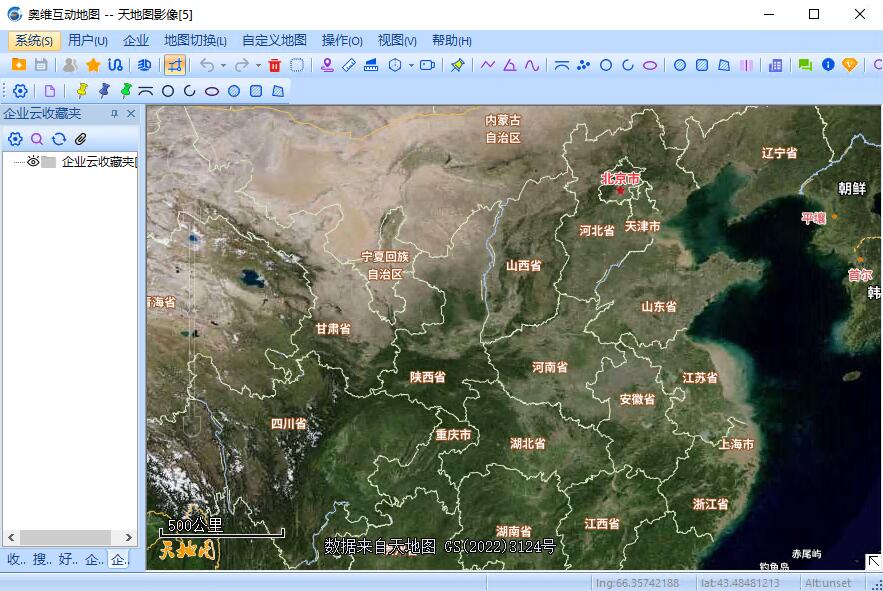
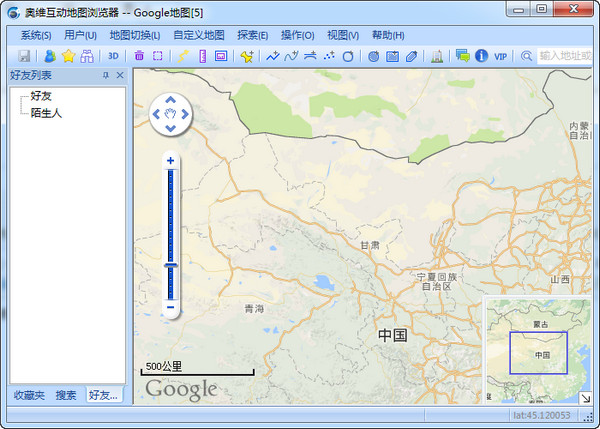

Ovi interactive map browserIt is a powerful mapBrowser. Ovi interactive map PC version supportBaidu map, Sogou Map,GoogleMaps, etc., you can switch to download the map that suits you. Not only that, the PC version of Ovi Interactive Map also has offline map downloads, elevationdataFeatures such as services and multiple platforms can bring you an efficient and convenient experience. Ovi interactive map 2025 free download.
user community
Features of the PC version of Ovi Interactive Map
1. Supports a variety of well-known maps at the same time
Currently, it has integrated Google Maps and satellite maps, Bing satellite maps, Baidu Maps, Sogou Maps and other well-known maps. Users can freely switch and download these maps offline.
2. Three-dimensional map
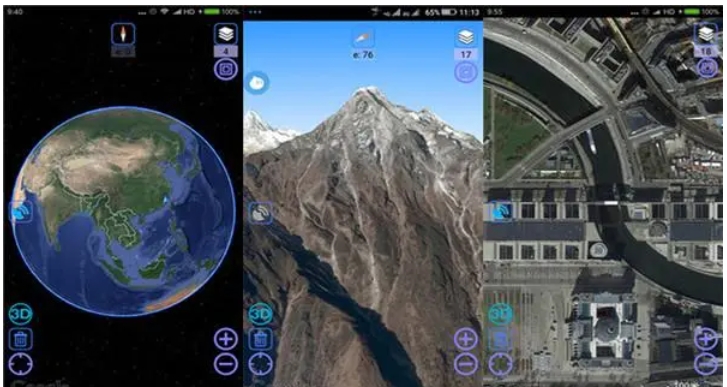
Combining satellite images and elevation data to automatically perform rapid 3D modeling.
3. Geographical planning
Ovi Browser provides you with common tools for planning and design. You can do various planning and design directly on the map.
4. Location and trajectory sharing
Share your walking track with your friends; you can also guide your friends out of the way based on the shared location! Track your friend's location.
5. Elevation data service
Aowei Browser Cloud integrates SRTM3 global elevation data, you can quickly query the altitude of any location in the world.
6. Seamless integration with AutoCAD
奥维浏览器可直接读取CAD设计文件并将其转化为奥维对象,将您的设计展现在地图之上。
7. Big data support
Allows millions of Orvey objects to be displayed on the map at the same time; supports up to 256TB of massive map data.
8. Cross-platform
The computer version of Ovi Interactive Map fully supports mainstream platforms such as Microsoft, Apple, and Android.
Installation steps of PC version of Ovi Interactive Map
1. First, we need to download the installation package of the PC version of Ovi Interactive Map. After the download is completed, we will get the compressed package. After decompressing it, run the exe file and enter the installation interface in the picture below. We first read the user agreement of the interface, then check I accept the license terms, and then click Next.

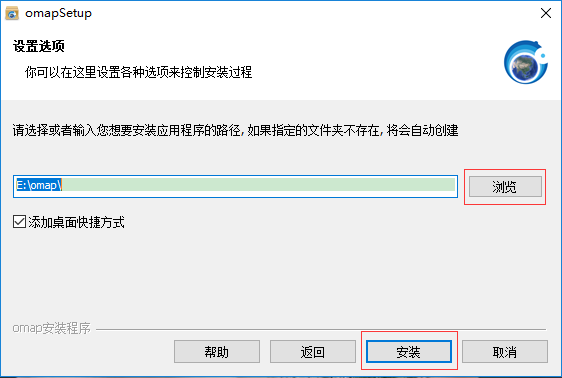
2. Entering the setting options interface, we can set the installation location of the software. You can choose the default installation. The PC version of Ovi Interactive Map will be installed in the system C drive by default, or click Browse to select the appropriate installation location. After we select the installation location, click Install at the bottom of the interface to proceed to the next step.
3. The installation of the PC version of the Ovi Interactive Map software has begun. After we wait patiently for the installation to be completed, we can enter the interface in the picture below. We click Finish at the bottom of the interface to close the installation interface and open the software for use.

How to use the PC version of Ovi Interactive Map
The PC version of Ovi Interactive Map exports the map intopicturesmethod
1. First, we need to open the installed Ovi interactive map computer version software. After opening it, we click the "Draw Rectangle" or "Draw Polygon" option in the street toolbar in the picture below to create a new map area image to facilitate our subsequent export work.

2. After we draw the graphics, a graphics settings interface will pop up, as shown in the figure below. We can set the name of the map, notes and other information. After the settings are completed, click the "Add to Favorites" option at the bottom of the interface.

3. Next, we click the "Download map of this area" option in the graphical settings interface to enter the map download interface. Here we need to set the type, level, etc. of the map. After the settings are completed, click "Start Download".

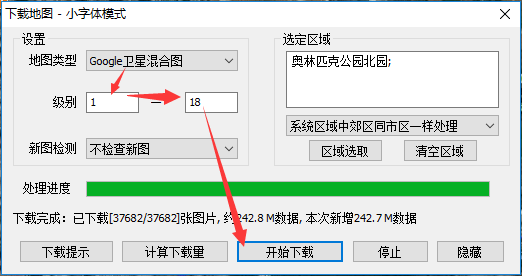
4. After downloading the map, we open the graphics settings window. We click the "Advanced" option at the bottom of the interface, then click the "Export to Image" option in the pop-up window, and then proceed to the next step.

5. We enter the interface for exporting to pictures. Next, we first set the map level and other options on the right side of the interface. After the settings are completed, we click the "Save as Picture" option at the bottom of the interface to enter the next step.
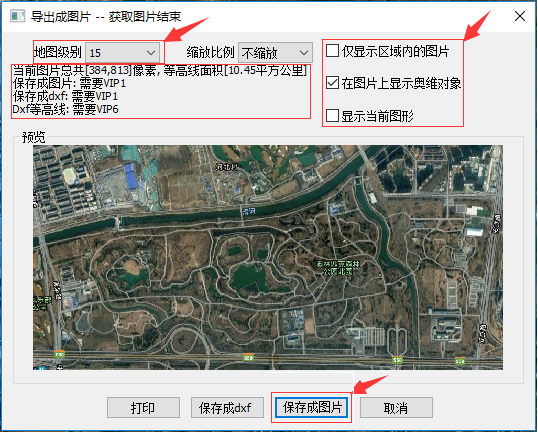
6. After we click the save as picture option, the warning window in the picture below will appear. We can read the interface prompts and then click the "I have been authorized" option, and then proceed to the next step.

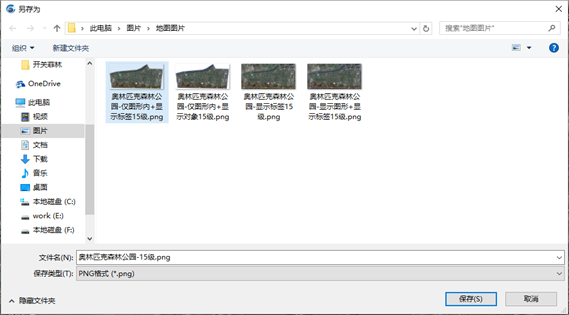
7. Next, the Save As window will pop up. Here we need to set the save path, format, name, etc. of the picture. After the settings are completed, we just click Save. When completed, we can see the picture in the set save location.
Frequently Asked Questions about Ovi Interactive Map Computer Version
How to import and export CAD files in Ovi interactive map?
1. First, we need to open the Aowei Interactive installed on the computermapAfter opening the software, we enter the software interface. Next, we drag a DXF file directly to the software map window, and the interface in the picture below will pop up.

2. After setting up, we click the Start Parsing option, and then wait for the parsing to complete before entering the import object interface in the figure below. As shown below.

3. We click Import to import the DXF file into the software, as shown in the figure below, prompting us that the import is successful.
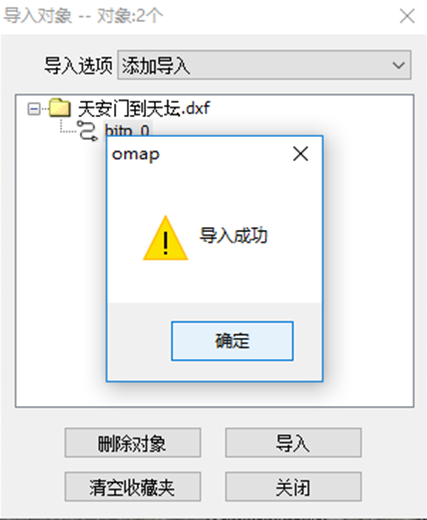
4. Next, we select the map or file to be exported, then right-click and click "Export" in the pop-up options to enter the get object interface as shown below.
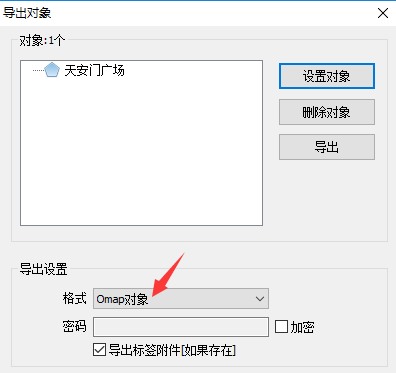
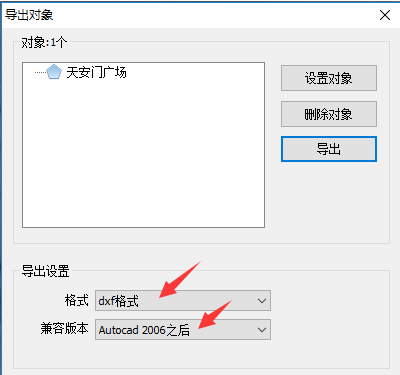
5. We set the export format in the export object interface. Here we can set the selected format to the "dxf format" of CAD. Next, we set the compatible CAD version.
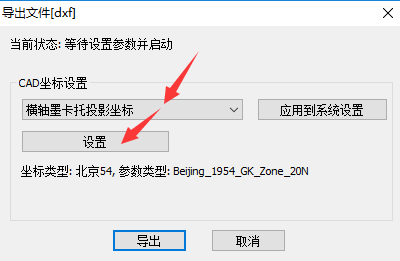
5. After the settings are completed, we click the "Export" option to enter the interface in the picture below. We can set multiple CAD coordinates. After the settings are completed, click Export.
6. Next, we just wait for the export to complete. After the export is completed, a prompt window will pop up to remind you that the export is complete. We just click OK. Next, you can find the exported file in the set save location.

Ovi interactive map PC version update log
1. Optimize the daily new picture purchase process
2. Other bug fixes and function optimizations
Huajun editor recommends:
The computer version of Ovi Interactive Map Browser is a very practical map software. It is not only easy to operate but also very powerful. It can help you plan and set up on the map. It also supports multiple platforms. The data you have on the computer can also be transferred to your mobile phone. It is very convenient. Friends in need can download it and experience it. This site also provides computer offline map software, Google satellite map downloader, China map puzzles, etc. for you to download.
Version: v10.3.8 | Update time: 2025-12-03
Similar recommendations


Latest updates






Ovi Interactive Map Review
-
1st floor Huajun netizen 2022-02-20 06:25:09Ovi interactive map browser software is very easy to use, downloads quickly and is very convenient!
-
2nd floor Huajun netizen 2022-02-11 18:10:14Ovi interactive map browser is awesome! 100 million likes! ! !
-
3rd floor Huajun netizen 2022-02-05 01:32:47The Ovi interactive map browser is not bad and downloads very quickly. I would like to give you a good review!
Recommended products










- Diablo game tool collection
- Group purchasing software collection area
- p2p seed search artifact download-P2P seed search artifact special topic
- adobe software encyclopedia - adobe full range of software downloads - adobe software downloads
- Safe Internet Encyclopedia
- Browser PC version download-browser download collection
- Diablo 3 game collection
- Anxin Quote Software
- Which Key Wizard software is better? Key Wizard software collection




