
-
Daemon Tools (elf virtual optical drive)
- Size: 47.19M
- Language: Simplified Chinese
- Category: virtual optical drive
- System:winall






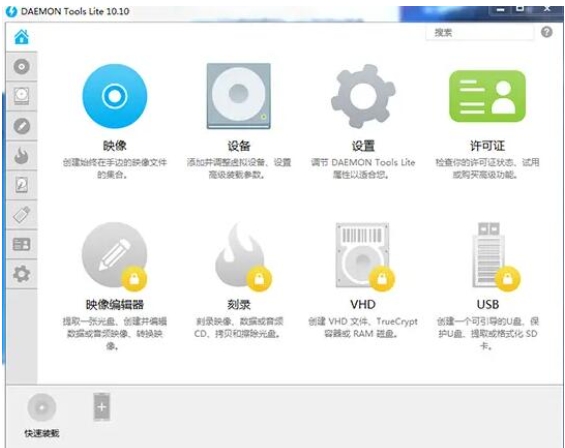
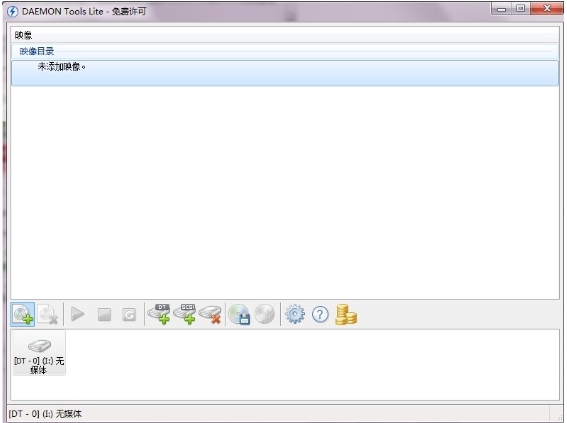
Daemon Tools (elf virtual optical drive) is a powerful virtual optical drive software. Its intuitive and easy-to-use interface, strong compatibility, efficient and stable performance and rich functions have become a powerful assistant for users to perform data backup, system installation, game running and other operations.
Software features
Efficient performance and resource optimization
High-speed operation: The virtual optical drive can run up to 200 times faster than the physical optical drive, playing audio and video files smoothly without lag.
Low memory usage: Supports asynchronous reading mechanism to avoid blocking the main thread and ensure stable system operation.
Compatibility and multi-language support
Widely compatible with operating systems: Compatible with 32-bit/64-bit Windows systems, including Windows 7, Windows 8, Windows 10, etc., to meet the needs of users in different environments.
Multi-language interface: Supports multi-language interface, including Simplified Chinese, making it convenient for users around the world.
Security and encryption features
Image encryption: Provides image encryption function to protect user data security and prevent unauthorized access and tampering.
Encrypted disc simulation: It can bypass disc protection mechanisms such as Safedisc and Securom, load the encrypted disc image to the virtual optical drive and run it directly.
Cloud sync function
Synchronize configurations and images across devices: The latest version integrates cloud synchronization function, users can synchronize configurations and images between different devices, making it easy to share and use the same virtual optical drive configuration and image files on different devices.
Software function
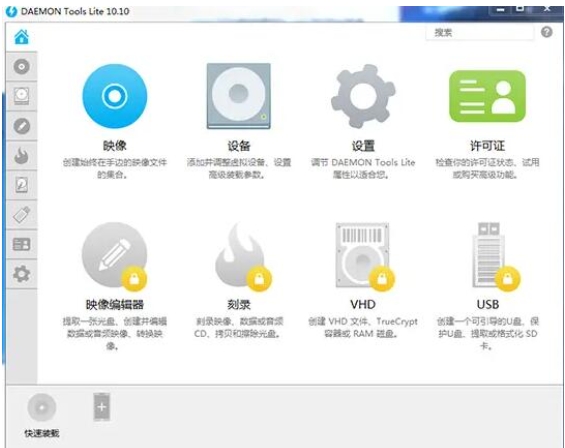
Multiple virtual optical drive management
Supports multiple optical drives running at the same time: The free version supports the creation of up to 4 virtual optical drives to meet the needs of users to run multiple optical disc applications at the same time, such as running games and installation programs at the same time.
Customize the drive letter of the virtual optical drive: Users can customize the drive letter of the virtual optical drive (such as "Virtual Drive D:") to easily distinguish different contents.
Image loading and unloading
Quickly load image files: Quickly load image files through the right-click menu or main interface. The loaded image file will be displayed as a virtual optical drive letter in the system resource manager, and users can directly access the contents.
Dynamically adjust the number of virtual optical drives: support uninstalling images, removing virtual drives, and flexibly manage virtual optical drive resources.
Image creation and editing
Create image files: Convert physical disc content to ISO, MDS and other formats, support selection of reading speed and save path, and facilitate backup of disc data.
Edit image files: The professional version supports image merging, compression, splitting and password protection to meet users' diverse processing needs for image files. For example, users can merge multiple image files into one, or compress image files to reduce their size.
Virtual hard drive support
Create virtual hard drive (VHD): Supports creating virtual hard drive and mounting disk image file, suitable for virtual machine environment or data backup. Users can mount a virtual hard disk in a virtual machine to run a specific operating system or application in the virtual machine.
Driver integration and maintenance
Automatically detect and install SPTD driver: Integrate SPTD driver technology to ensure efficient interaction with the bottom layer of the system and improve the performance and stability of the virtual optical drive.
Provides driver cleaning tools: such as the SPTD-Cleaner tool, which is used to resolve driver conflicts and ensure the normal operation of the system.
FAQ
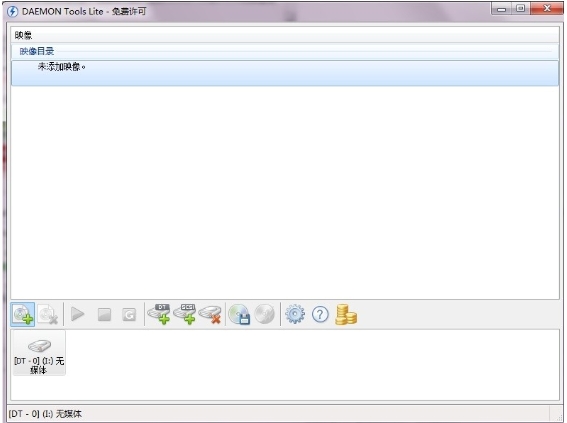
The image file cannot be run after being loaded.
Problem description:
After successfully loading the image file in Daemon Tools, the image file cannot be run in the virtual optical drive.
Possible causes and solutions:
Image file is damaged:
Try using other tools or methods to verify the integrity of the image file.
If the image file is damaged, you may need to re-download or obtain a new image file.
Virtual optical drive settings problem:
Make sure the virtual optical drive settings are correct, such as drive letter, file system type, etc.
In Daemon Tools, check the settings for the virtual optical drive and adjust if necessary.
Software or system compatibility issues:
Make sure Daemon Tools are compatible with your operating system and other software.
If there are compatibility issues, try updating Daemon Tools to the latest version, or contact the software developer for support.
Daemon Tools (elf virtual optical drive) update log:
1. Modify user-submitted bugs
2.Add new features
Huajun editor recommends:
Daemon Tools (elf virtual optical drive) is a very good virtual optical drive software. I secretly tell you that I also use this software, and I don’t tell others about it! Powerful, green and safe. Huajun Software Park also provides you with DAEMON Tools Ultra 5, Batch Butler, Batch Butler, etc. for you to download.
Version: 12.3.0.2363 | Update time: 2025-11-25
Similar recommendations







Latest updates


How to create a folder on Thunder Cloud Disk - How to create a folder on Thunder Cloud Disk
How to take screenshots in Video Pioneer? -How to take screenshots in Video Pioneer
Stickman War Legacy web version entrance-Stickman War Legacy online play
How does kimi generate PPT? -Kimi’s operation process for generating PPT
Peace Elite instant play entrance-Peace Elite web version online play entrance without login
Daemon Tools (Elf Virtual CD-ROM Drive) Review
-
1st floor Huajun netizen 2025-03-09 20:11:05Daemon Tools (elf virtual optical drive) is very useful, thank you! !
-
2nd floor Huajun netizen 2025-03-04 12:35:08The interface design of Daemon Tools (elf virtual optical drive) is very easy to use and has rich functions. I highly recommend it!
-
3rd floor Huajun netizen 2025-03-01 05:39:00Daemon Tools (elf virtual optical drive) software is very easy to use, the download speed is very fast, and it is very convenient!
Recommended products








- Diablo game tool collection
- Group purchasing software collection area
- p2p seed search artifact download-P2P seed search artifact special topic
- adobe software encyclopedia - adobe full range of software downloads - adobe software downloads
- Safe Internet Encyclopedia
- Browser PC version download-browser download collection
- Diablo 3 game collection
- Anxin Quote Software
- Which Key Wizard software is better? Key Wizard software collection




