
-
One-click conversion of Ghost image to WIM&ESD image tool
- Size: 7.8M
- Language: Simplified Chinese
- Category: Disk Utility
- System: Win All






The Ghost image one-click WIM&ESD image conversion tool is a tool designed for system administrators and IT professionals. It is designed to quickly convert GHO format image files generated by Ghost software into Microsoft WIM (Windows Imaging Format) or ESD (Electronic Software Download) format.
Software features
One-click operation: The graphical interface simplifies the process, and users only need to select the source file and target format to complete the conversion.
High compatibility: supports Win7 and above systems, adapts to multiple hard drives, hybrid hard drives (IDE/SATA/SCSI) and GPT/MBR partition tables.
Safe and reliable: the conversion process retains data integrity and supports NTFS partition anti-deletion protection to prevent misoperation or virus intrusion.
Efficient compression: Imagex core is used to achieve high compression rate, and the ESD format further optimizes storage space and reduces volume.
Green installation-free: pure green version, run directly after downloading, no installation or system residue is required.
Software function
Format conversion:
Convert GHO files to WIM format and support Microsoft DISM tool management (such as adding/deleting images).
Convert to ESD format to improve network deployment speed and is suitable for large enterprise environments.
Custom options:
Supports complete conversion (keep all files) or optimized conversion (filter useless files).
Customize the compression rate to balance storage space and conversion speed.
Batch processing: Supports batch conversion of multiple files to improve work efficiency.
Image management: Integrate image viewing, editing, and deletion functions to facilitate backup file management.
How to use
1. Supports operation in Win7 or above environment, but does not support WinXP;
2. The converted files are saved in the original image directory;
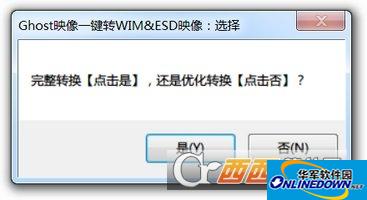
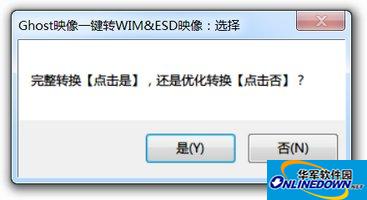
3. Complete conversion and direct conversion, optimized conversion and conversion after filtering out useless files;
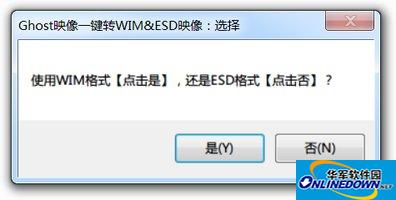
4. After selecting the format WIM or ESD, you can start one-click conversion.
Frequently asked questions and solutions
Conversion failed or error reported:
Reason: The source GHO file is damaged, the software version is too old, or the system permissions are insufficient.
Solution: Check the integrity of the GHO file, update to the latest version, and run the software as an administrator.
The file cannot be used after conversion:
Reason: The target format is incompatible with the deployment tool (such as using an old version of DISM to open the ESD file).
Solution: Confirm that the deployment environment supports the target format, or re-convert to a compatible format.
One-click conversion of Ghost image to WIM&ESD image tool update log:
1. Optimize content
2. The details are more outstanding and bugs are gone.
Huajun editor recommends:
The one-click conversion tool for Ghost image to WIM&ESD image is a good disk tool software. If you are interested, please download it and use it. I believe you will like it. Virtual optical drive tool, batch manager, and cloud machine manager are also good software and are recommended for students to download and use.
Version: 1.0.0.3 Green Free Edition | Update time: 2025-10-23
Similar recommendations






Latest updates





How to delete history in Video Pioneer? -How to delete history records by Video Pioneer
How to set the skin for Video Pioneer? -How to set skin for Video Pioneer
How to upgrade software in 360 Software Manager? -How to upgrade software in 360 Software Manager
How to draw a lottery in 360 Software Butler - How to draw a lottery in 360 Software Butler
Review of tool for converting Ghost image to WIM&ESD image with one click
-
1st floor Huajun netizen 2020-02-17 10:18:48The one-click conversion of Ghost image to WIM&ESD image tool has an easy-to-use interface design and rich functions. I highly recommend it!
-
2nd floor Huajun netizen 2020-01-28 06:12:53The tool software for converting Ghost image to WIM&ESD image with one click is very easy to use. The download speed is very fast and very convenient!
-
3rd floor Huajun netizen 2020-10-31 22:50:17The tool to convert Ghost image to WIM&ESD image with one click is super! 100 million likes! ! !
Recommended products
-

Hard disk chkdsk repair tool
-

Kingston USB disk repair tool 2012
-

MHDD hard drive detection tool
-

chkdsk disk repair tool
-

Hard drive low-level formatting tool under Windows
-

Secret Disk (hard disk encryption tool)
-

Hard drive partition magician
-
HD Tune (mobile hard drive repair)
-

Hard drive low-level formatting tool
-

Super Powerful Excel File Recovery Software
- Diablo game tool collection
- Group purchasing software collection area
- p2p seed search artifact download-P2P seed search artifact special topic
- adobe software encyclopedia - adobe full range of software downloads - adobe software downloads
- Safe Internet Encyclopedia
- Browser PC version download-browser download collection
- Diablo 3 game collection
- Anxin Quote Software
- Which Key Wizard software is better? Key Wizard software collection




