
-
Halo Assistant
- Size: 43.01M
- Language: Simplified Chinese
- Category: Utility tools
- System: Android
- Manufacturer:Guangzhou Jiatu Network Technology Co., Ltd.
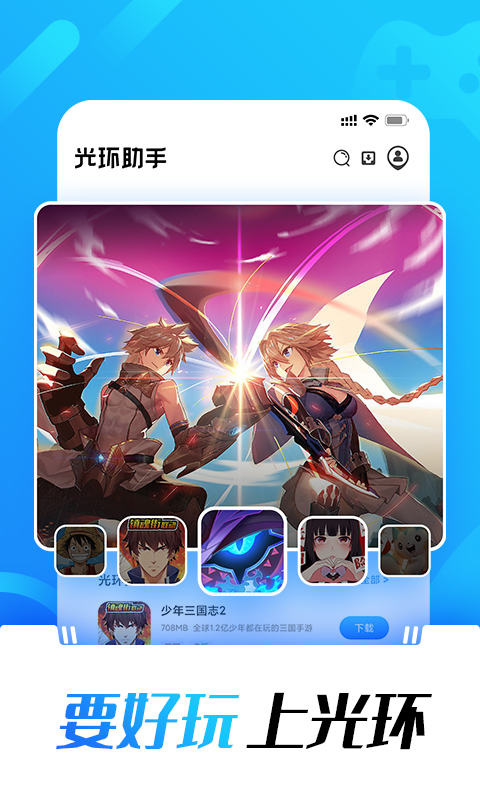
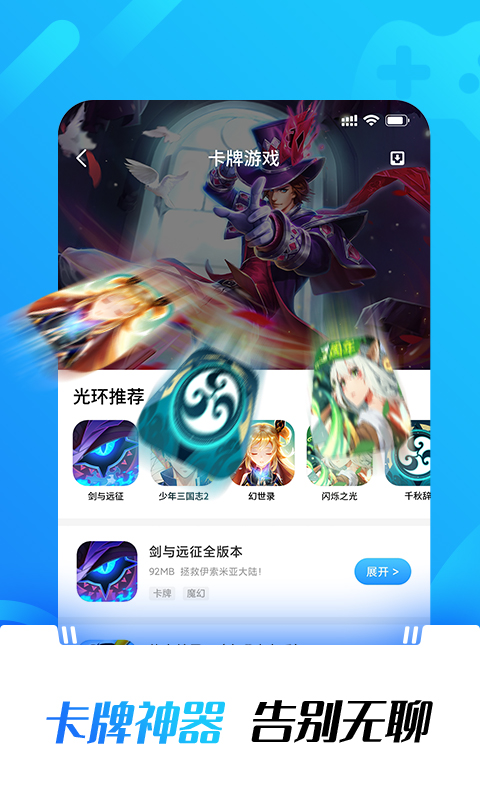
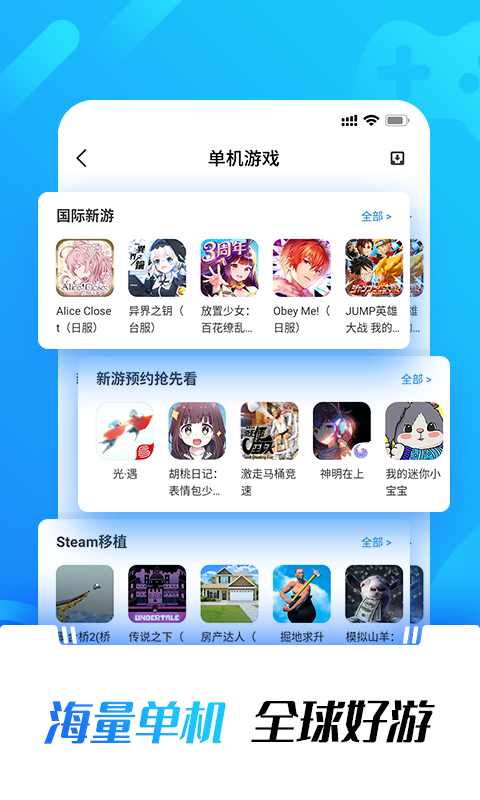
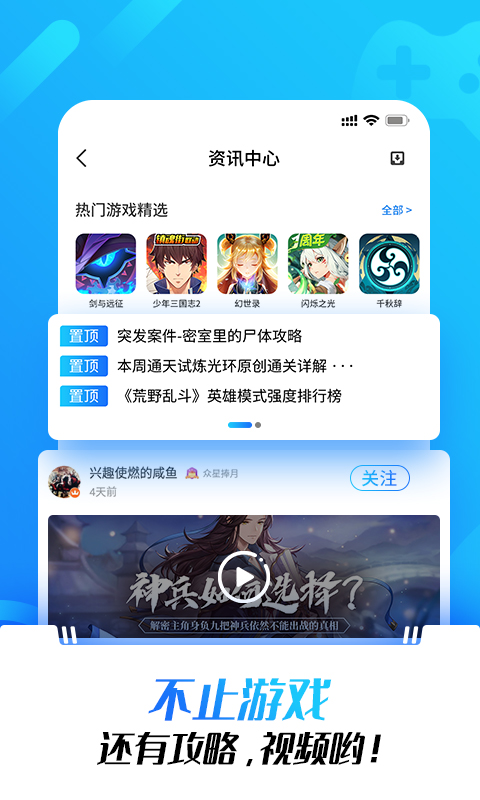
Halo AssistantThe official version of the APP is based on AndroidMobile game assistantTools, Halo Assistant APP can be implemented without rootgame accelerationIt also provides players with the latest game information, game strategies, and reviews. The Halo Assistant APP also provides game gift packages and server opening test information, making it the best one-stop service choice for mobile game players. Huajun Software Park provides you with the latest official version of Halo Assistant. If you are in need, please come to Huajun Software Park to download it!

Halo Assistant officially launched the cloud archiving function.
This function allows users to upload game archives independently, ensuring the safe storage of game progress and data, and effectively preventing archive loss.
In addition, users can access and use high-quality archives shared by other players to enjoy a richer and deeper gaming experience.
【Notes】
1. The cloud archive function is only available for games that support this function on the Changwan gaming platform.
2. Before trying to use the archive, please make sure the game has been completely exited to avoid unsuccessful archive operations.
3. Using the archive will overwrite the current game data. If users wish to retain their game data, please upload their own game archives first, and then use other archives. If you need to restore the original game data later, you can do so by using the game archives you uploaded.
4. Each game supports storing up to 5 archives in the cloud archive system. If this limit is exceeded, the user can choose to overwrite the previous archive and save it.
5. The cloud archiving function in the floating window only supports Play Assistant application version 1.5.1 and above.
[Cloud save location]
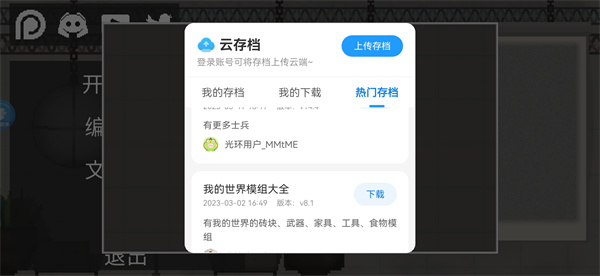
1. After starting a game with cloud archiving function, the user needs to click the [Cloud Archiving] option in the floating window to perform various operations related to cloud archiving.
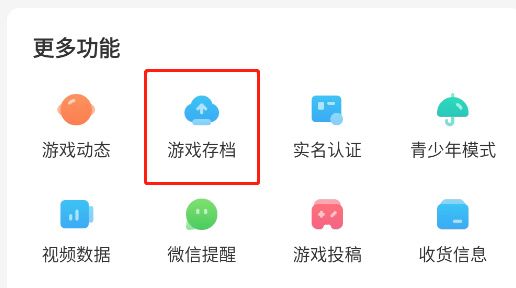
2. Users can also click the "My Halo" icon in the lower right corner of the screen, and then select "Game Archives" in "More Functions" to enter the cloud archive interface.
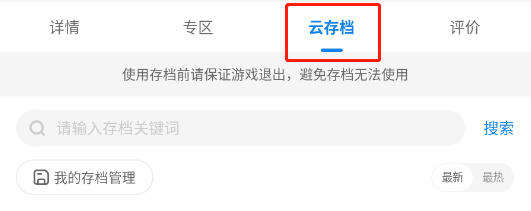
3. For games that support the cloud archive function, users can also directly access the cloud archive function in their details page.
【How to upload archive】
Method 1: After entering the game interface, the user needs to click the [Cloud Save] icon at the top of the screen. Subsequently, log in to your personal Halo account by entering the correct account information. After completing the login, the system will allow the user to upload the archive.
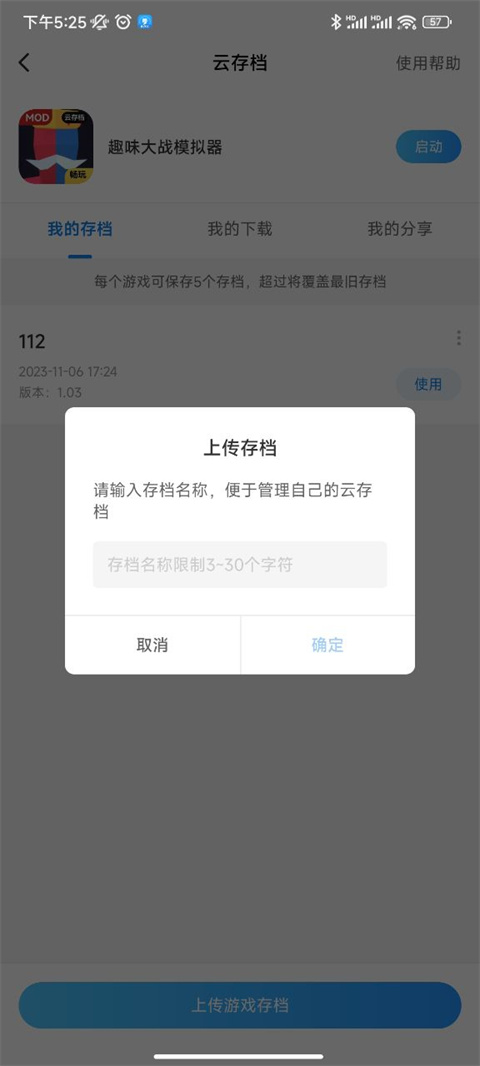
Method 2: In order to successfully upload the archive, the user needs to first start the game that supports the cloud archive function, and after playing the game for a period of time, exit the game normally. Then, click the game icon to enter the cloud archive management interface, find and click the "Add Archive" option in the interface. In this step, the user needs to enter a suitable name for the archive and click the "Upload" button to complete the upload process of the game archive.
【How to download archive】
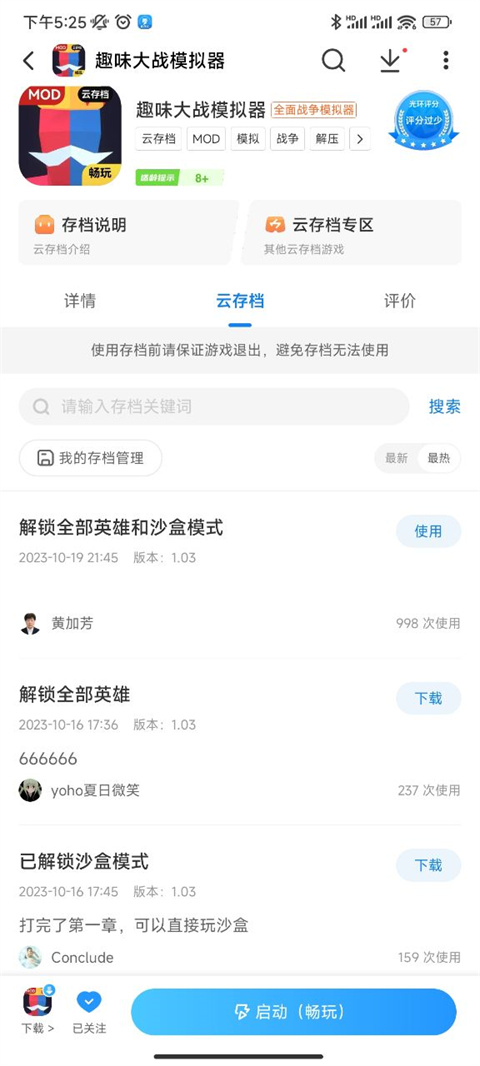
Method 1: After entering the game interface, the user needs to click on the [Cloud Archive] icon in the floating window, then select a popular archive area, select the required archive from it and download it. After the download is completed, the archive can be used in the game.
Method 2: First, users need to download and install a game that supports cloud archiving. After that, in the management list of Play Games, click the target game icon to enter the game's details page. In the details page, users should switch to the Cloud Archives tab, select the desired archive and click the Download button. Once the download is complete, click the "Use" button to apply the archive and wait for the game to load. After loading, click the Start Game button to enter the game and experience the downloaded archive content.
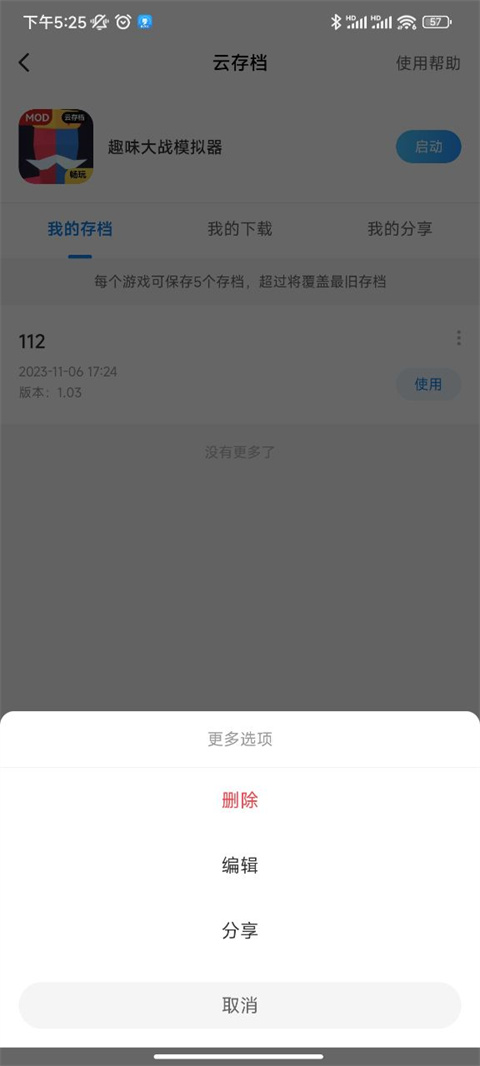
【How to share archive】
After entering My Archives, select the document you want to share and click Share. After entering the archive name and related description, you can share it successfully.
Q: Why is the game still not accelerating after I installed the Halo Assistant APP?
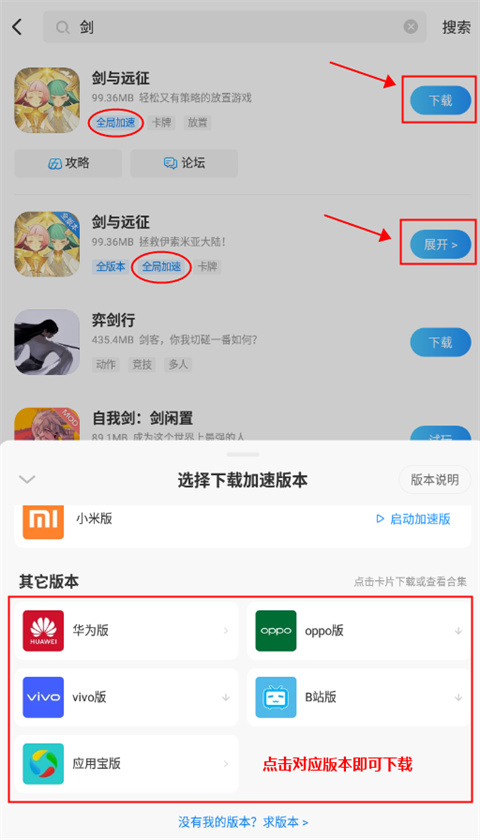
A: Please note that not all games can be downloaded on the Halo Assistant APP to directly obtain acceleration effects. You need to search for a specific game in Halo Assistant. If the game is marked with labels such as [Accelerated Edition/Global Acceleration/Combat Acceleration], it means that it supports the Halo accelerator function.
Q: How do I add an accelerator to the game I want to play?
A1: First, you need to search and download the game you want to play through the Halo Assistant APP. Enter [game name] in the search box and click the [Download] button next to the search result. Please note that only game versions marked with labels such as [Global Acceleration/Combat Acceleration] have built-in accelerator functions.
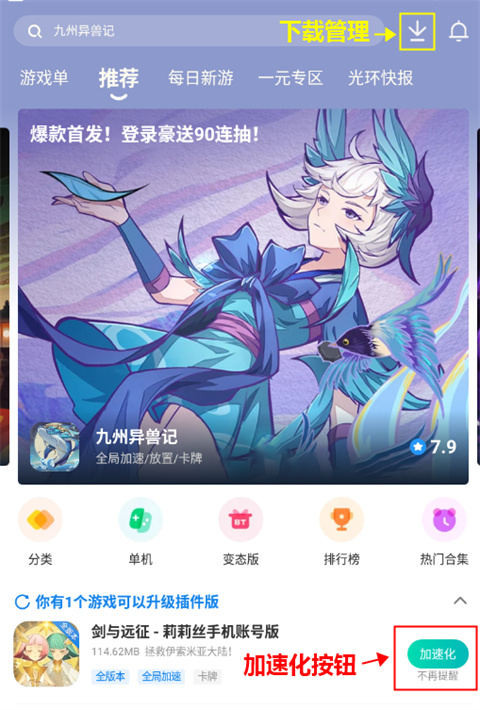
A2: If you have downloaded the game on other platforms, and the Halo Assistant APP also provides downloads of the same game and version, you can add an accelerator through the following steps: Open the Halo Assistant APP, click the [Accelerate] button (or enter [Download Management] to find the corresponding game and click Accelerate). If the [Accelerate] button is not displayed, it means that there is currently no game in the Halo Assistant APP that matches the version you have downloaded. At this time, you can submit your requirements in the feedback area.
Q: After installing [Halo Acceleration/Plug-in Game], how to activate the acceleration function?
A: After starting the game, you will see the [Halo Icon] in the game interface. Click this icon to use the acceleration feature in the Halo Accessibility Tool.
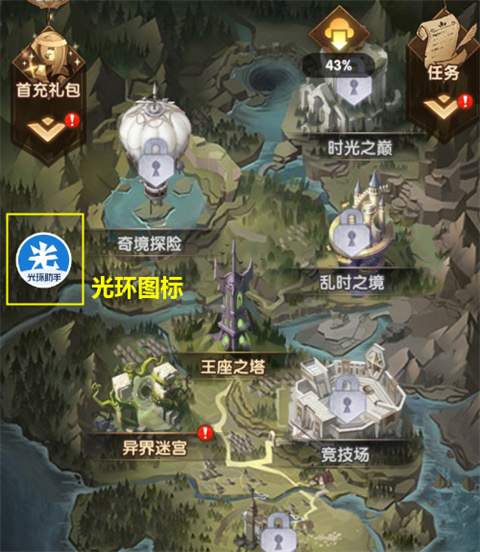
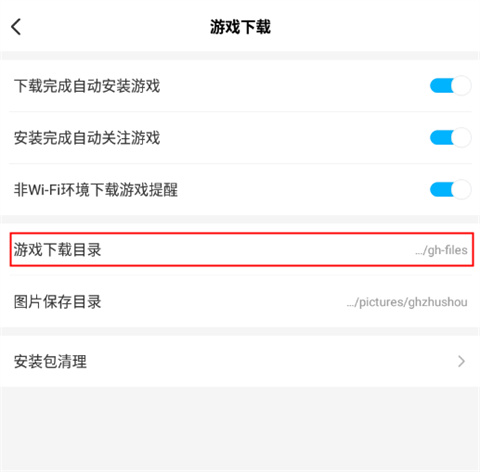
Q: Where is the download and save path for the Halo Assistant APP? How to quickly jump to this folder?
A: Please follow the steps below to quickly jump to the download and save path of the Halo Assistant APP:
1. Start the [Halo Assistant] APP.
2. Click [My Halo].
3. Enter the [Settings] page.
4. Click [Game Download].
5. Click [Game Download Directory] to jump to the corresponding folder.
Halo Assistant FAQ
Are all the games in Halo Assistant free?
The game in Halo Assistant is completely free, includingplug-inGame, please feel free to use it.
Where are the games downloaded by Halo Assistant saved?
The game APK package downloaded through Halo Assistant is saved in the gh-download folder of the memory card.
Why does it prompt a package parsing error when installing the game?
① It may be that there is a problem with the downloaded apk program itself. The compressed package of the program may be damaged during the download process. Usually, re-downloading can solve the problem.
② If re-downloading cannot solve the problem with the Android parsing package, it is most likely that the configuration parameters of your phone do not support this game, that is, the game version is incompatible with the system version, causing the parsing to fail. You can passFlash the machineDowngrade or upgrade the system to achieve compatibility.
How does Halo Assistant speed up gaming?
Method 1 (built-in acceleration):
Open Halo Assistant, enter the “Category” page, and select the “Game Acceleration” category.
Find a game that supports acceleration and click to start the game.
A floating ball will appear in the game. Click on the floating ball to select the acceleration multiple (such as 1.5 times, 2 times, etc.).
Method 2 (plug-in acceleration):
Search for the acceleration plug-in for the corresponding game in the "Plugin Area" of Halo Assistant and download it.
Start the game through Halo Assistant and the plug-in will automatically take effect.
How to use Halo Assistant?
Browse games: Find games on the homepage or categories, supporting MOD, international servers, emulator games, etc.
Download plug-ins: Download acceleration, linker and other tools in the "Plug-in Zone".
Community interaction: View guides, videos, and join discussion groups.
Manage games: Launch, update or uninstall games in "My Games".
Halo AssistantHow to play the game?
Start directly: Click the game icon in "My Games" to start.
Click and play: Some games support “click and play” without downloading.
Cloud archive function: Some games support uploading/downloading archives (need to operate in the floating ball or "My Halo").
Halo AssistantHow to download PUBG?
Open Halo Assistant and search for "PUBG".
Select the corresponding version (such as international server) and click "Download".
You can install it after completing the real-name authentication.
Halo AssistantHow to download genuine games?
Official channels: Download the genuine APP through app stores (such as Huawei and Xiaomi stores) or the official website of Halo Assistant.
Verify authenticity: Check the application signature or official website certification mark after installation.
Halo AssistantHow to open the game?
Enter "My Halo" and click "My Games".
Select the target game and click "Start".
Halo AssistantHow to modify real-name authentication?
Enter “My Halo” and click “Real-name Authentication”.
Select "Supplement and complete real-name information" and enter the new name and ID number.
Note: Only one modification is supported, please operate with caution.
Halo AssistantHow to retrieve my account?
Self-service retrieval: Verify identity through bound mobile phone number or email.
Manual appeal: Contact customer service (QQ: 800177318) and provide recharge records, character screenshots and other information.
Account freezing: If your account is bound by someone else, you can apply for freezing and submit evidence for appeal.
Halo AssistantWhat is the review of Halo Assistant?
Advantages: Provides rich game resources, practical acceleration functions, and active community interaction.
Disadvantages: Some games need to be used with accelerators, and there are many restrictions on real-name authentication modifications.
Halo AssistantHow to speed up games on other platforms?
Search for the acceleration plug-in for the target game in the Halo Assistant "Plug-in Zone".
After downloading the plug-in, launch the game through Halo Assistant (make sure the game is installed).
Some games require the use of VMOS virtual machines (such as Huawei special edition).
Halo Assistant Product Features
1. Game acceleration and auxiliary functions
ROOT-free global acceleration: supports real-time adjustment of speed (acceleration/deceleration/pause) in the game. Some versions are compatible with Android 5.1 and above systems, which does not affect game recharge.
Combat skip: For card games and other types of games, repeated combat processes can be skipped to improve efficiency.
2. Enrich game resources
Multi-version game download: Provides MOD, international server, and simulator versions of popular domestic and foreign games, and supports one-click installation and updates.
Click and play: Some games support direct experience without downloading, saving storage space.
3. Information and strategy services
Real-time game dynamics: push the latest game news, server opening information, test announcements, etc.
In-depth strategy review: covering graphic/video strategies, level analysis, and character evaluation of mainstream games to help players get started quickly.
4. Community interactive ecology
Q&A and discussion: Players can ask questions or share their experiences, and senior Vs will answer questions online.
Video Plaza: Includes game explanations, operation tutorials and other videos to provide an intuitive understanding of how to play the game.
Points and gift packs: You can get points for redemption rewards by signing in and downloading games, and receive popular game gift packs for free.
5. Practical tools and management
Game management: Automatically identify installed games and support one-click operations to start, update, and uninstall.
Cloud archive function: Some games support archive upload/download to ensure progress security.
Data-free transfer: Friends can transfer apps to each other to save data traffic.
6. Safety and adaptability
Official certification: passed the Ministry of Industry and Information Technology testing, safe and free of malicious plug-ins, and supports in-depth optimization of Hongmeng system.
Privacy Protection: No need for ROOT to run, reducing device risks.
7. Features
Game rankings: Recommend high-quality games based on popularity to help players discover new games.
Real-name authentication and account management: Supports one-time modification of real-name information, binding mobile phone number/email to ensure account security.

How to use Halo Assistant
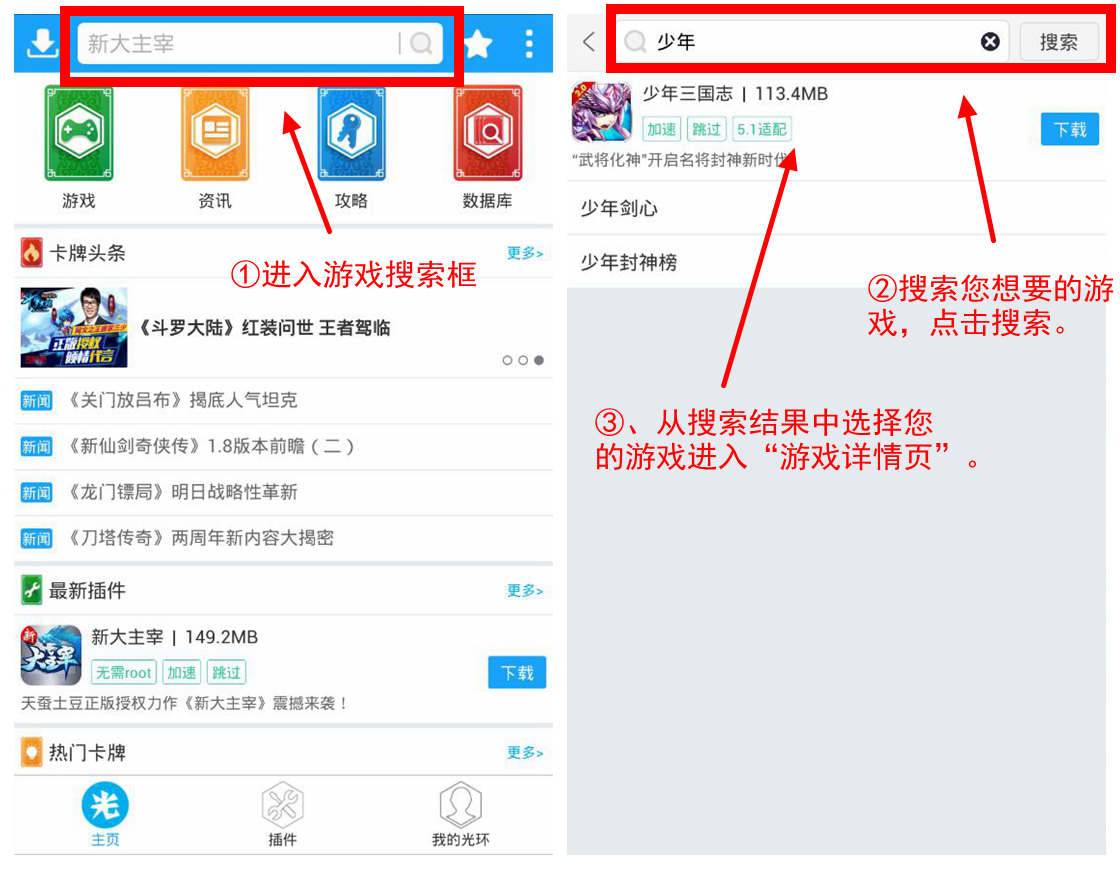
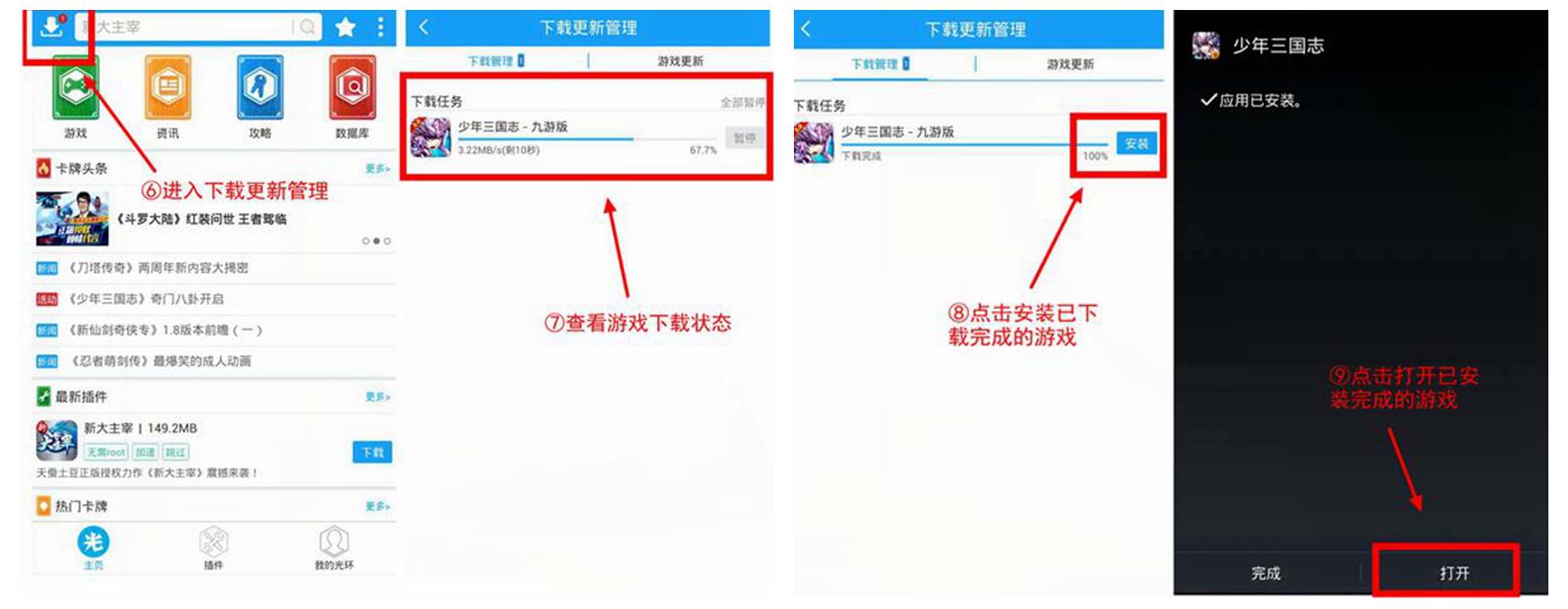
① Download and install the assistant on your phone from Huajun Software Park and run it. Click the search box above the assistant's "Home Page" to enter the search page. Search for the game name in the search box. If you want to query "Youth Three Kingdoms", enter "Youth". Select the game you want from the search options, such as "Young Three Kingdoms", and enter the game details page.
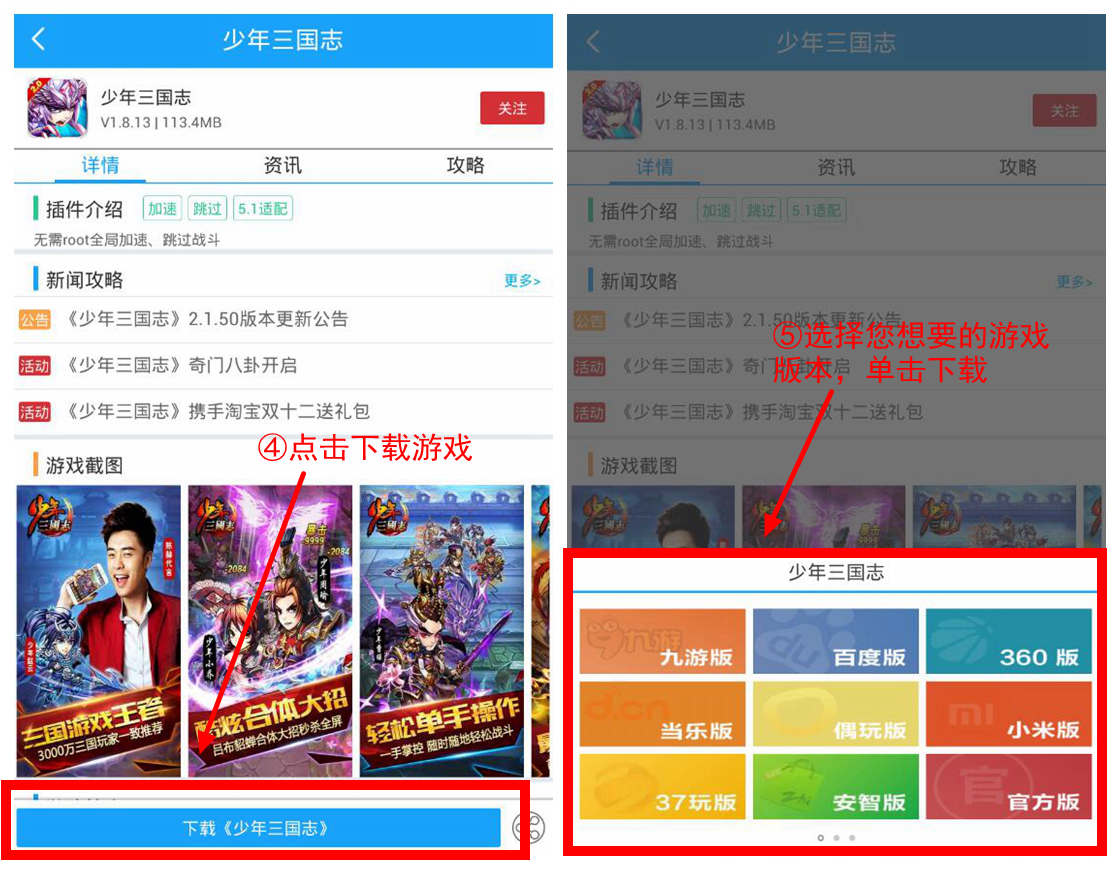
② Click "Download "Young Three Kingdoms" at the bottom of the game details page. Select the game platform you want and click the platform button to download.
③ Return to the assistant "Home Page" and click "Download" in the upper left corner to view the game being downloaded. When the game is downloaded, click the "Install" button to install it on your phone and open it.
Comparison of similar software with Halo Assistant
Chong Chong AssistantIt is a platform that provides free mobile game products and content services. Chongchong Assistant is committed to providing mobile game downloads, game information, game activities, game tools, and prop transactions for the majority of smartphone users. , strategy evaluation, player interactive community and other comprehensive mobile entertainment services.
game honeycombMobile game assistance is leading the market with ROOT-free black technology. Massive mobile game script assistance creates a path for efficiency upgrades. In addition to providing Naruto mobile game assistance, Ball Fighting assistance, King of Glory assistance, Onmyoji assistance, and A Chinese Ghost Story mobile game assistance, Game Honeycomb also provides computer version simulator services for various mobile games, which you would never expect without Game Honeycomb.
Halo Assistant update log
v5.38.8 version
1. Fix some known bugs
v5.38.6 version
1. The search section has been overhauled! Added support for comprehensive search
2. Reservation games support automatic downloading under wifi
v5.36.4 version
1. Added [Follow] section to the community
2. WeChat mini-game is online!
3. Optimize the experience and fix some known bugs
Huajun editor recommends:
The Halo Assistant software feels really good! The editor specially tested it for this purpose, and it is really great to use. Jianxin Rongtong, Batch Butler, Cloud Machine Manager, etc. are all very good software tested by the editor. Come and choose the one that suits you!
Version: 5.43.4 | Update time: 2025-10-23
Similar recommendations





Latest updates




How to log in to Halo Assistant? -How to log in to Halo Assistant
How to use Halo Assistant? -How to use Halo Assistant?
How to post in Halo Assistant? -How to post with Halo Assistant
How to install the game in Halo Assistant? -Halo Assistant installation game process?
How to enable acceleration in Halo Assistant? -How to activate acceleration in Halo Assistant?
How does Halo Assistant speed up the game? -How Halo Assistant speeds up the game
How does Halo Assistant speed up the game? -How does Halo Assistant speed up the game?
Halo Assistant Review
Recommended products







- Diablo game tool collection
- Group purchasing software collection area
- p2p seed search artifact download-P2P seed search artifact special topic
- adobe software encyclopedia - adobe full range of software downloads - adobe software downloads
- Safe Internet Encyclopedia
- Browser PC version download-browser download collection
- Diablo 3 game collection
- Anxin Quote Software
- Which Key Wizard software is better? Key Wizard software collection




