-
bloody battle in shanghai
- Size: 309.9M
- Language: Simplified Chinese
- Category: Game software
- System: Windows All






The latest version of bloody battle in ShanghaiIt is developed by Beijing Happy Yipai Technology Company and is very popular among military fans and game fans.shooting games. In the game you are aAnti-JapaneseThe leader of the civilian armed forces goes deep into the enemy's interior and engages in a bloody battle. All BOT actions in the Chinese version of the game in Shanghai are all done through action collection, and the combat effects are very exquisite. Historical stories are re-presented, and wonderful stories will be passed down forever. Come to Huajun Software Park to download it!
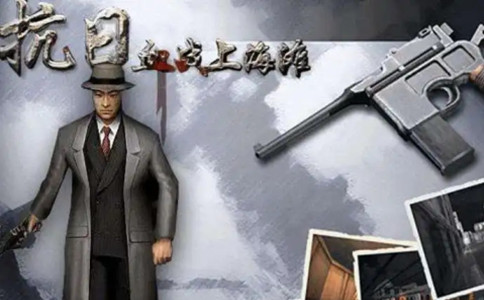
The latest game background of Bloody Battle in Shanghai
The main mission of "Blood Battle on the Beach" starts with 1937 With the Battle of Songhu in 2016 as the background, the player becomes Hua Chenglong, an anti-Japanese martyr, and goes deep into the Japanese-occupied urban area of Shanghai alone to perform a series of difficult special operations: from the Bund pier to sniping Japanese commanders and blowing up arsenals, to cooperating with the defenders to resist the Japanese siege in the Sihang Warehouse defense battle; from the banks of the Suzhou River to rescuing captured civilians, destroying biochemical laboratories, and going to the Japanese headquarters in Hongkou to seize the head of Admiral Kiyoshi Hasegawa. The entire process runs through multi-dimensional tasks such as street fighting, sniping, demolition, and hostage rescue. Players need to flexibly use more than ten historical firearms such as Mauser rifles, Thompson submachine guns, and bazooka rocket launchers to break through obstacles such as ninja raids, suicide bombers, and armored vehicle swarms in iconic scenes such as Nanjing Road, the racecourse, and the Japanese embassy, and ultimately defeat the Japanese army's "Shanghai Special Operations Plan" and gain critical time for the strategic shift of the Chinese army. The main plot is highly integrated with real historical elements such as the Sihang Warehouse Defense War and the Hongqiao Airport Incident. Through the perspective of Hua Chenglong's "lone hero", it shows the passionate struggle of the soldiers and civilians in the Battle of Songhu against the same enemy.
Cheats for the latest version of Shanghai Battle in Shanghai
After entering the Shanghai Anti-Japanese Blood War game, press the "~" key in the upper left corner of the keyboard to open the console, enter the following command, and press Enter.
god_off turns off invincibility
god_on turns on invincibility
haveallweapon has all weapons
ammonolimitExisting weapons have unlimited bullets
addammo refills existing weapons with ammunition
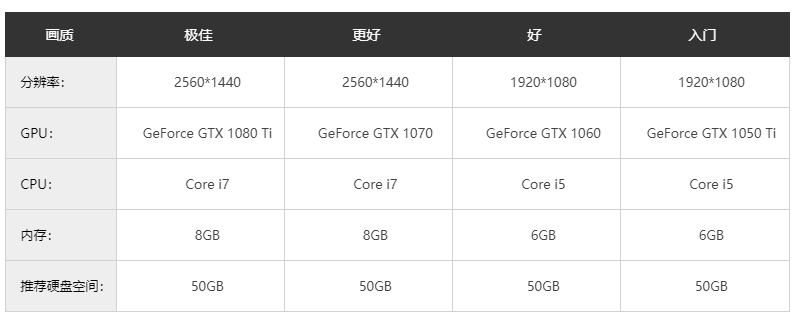
Configuration requirements CPU graphics card memory hard disk system recommended configuration
Installation instructions for the latest version of Battle in Shanghai
Be careful to turn off the anti-virus software when starting the game or decompressing the game to prevent accidental killing of free DVD files.
1. Use WINRAR software to decompress the game to the hard drive
2. Start the game
Instructions for starting the game on Win10 system:
Create a shortcut to shanghai.exe, right-click the shortcut and select Properties, add a parameter -windows (there is a space before -) in the target program, enter the game in window mode, set the image display to 1024768 in the game, then set the screen to 1024768 resolution in the computer display settings, click the windowed shortcut to play, it will be full screen. (This is an old game. If it is not full screen, the mouse will easily pop out)
Frequently Asked Questions about the latest version of Battle in Shanghai
How to open full screen in Bloody Battle on Shanghai Beach
The game runs in full screen mode by default. If it does not display in full screen, try the following:
Make sure your computer resolution is compatible with the game (800×600 or 1024×768 recommended).
Before starting the game, adjust the resolution in the computer's "Display Settings" and then enter the game.
What about the bloody battle in Shanghai?Change gun/switch weapon
Shortcut key operation: directly press the number keys (1 - 6) to switch weapons, such as:
1: Mauser pistol
2: Chinese formal rifle
3: Thompson submachine gun
4: Bazooka Rocket Launcher
5: Gas bomb
6: Dagger (melee)
Mouse wheel: Some versions support rolling the mouse wheel to switch weapons.
What about the bloody battle in Shanghai?Set unlimited lives
Achieved through cheats:
Press the ~ key during the game (some versions require pressing the Insert key) to open the console.
Enter the cheat code god and press Enter to turn on the invincible mode (unlimited lives).
Note: You need to switch to the English input method, and some versions need to turn off the Chinese input method.
What about the bloody battle in Shanghai?Enter cheat code
Once in the game, press the ~ or Insert key to open the console.
Enter the following cheat code (case sensitive):
god: invincible mode
ammo: unlimited ammunition
kill: Instantly kill all enemies in the current scene
fly: flight mode (needs to move with the direction keys)
goto [level name]: jump directly to the level (such as goto beach)
Press the Enter key after input to take effect.
What about the bloody battle in Shanghai?Cheating
In addition to cheats, this can be achieved through modifiers or modifying game files:
Modifier tools:
Use tools such as Cheat Engine to search for health and ammunition values in the game memory and modify them.
Steps: Start the modifier → Load the game → Search for the initial value → Change the value and search again → Locate the address and modify it.
Modify configuration file:
Find the user.ini file in the game directory and modify the relevant parameters (such as MaxHealth = 999).
Risk warning: It may cause the game to crash or the save file to be damaged.
What about the bloody battle in Shanghai?Switch to window mode
The game does not have built-in windowing options and requires the use of third-party tools:
DxWnd tool:
Download and install DxWnd.
Open the tool → click "Add" → select the main game program (such as BloodInShanghai.exe).
Check "Windowed" in the settings and adjust the window size (800×600 is recommended).
After clicking "Save", launch the game via DxWnd.
Compatibility settings:
Right-click the game shortcut → select "Properties" → switch to the "Compatibility" tab.
Check "Run in compatibility mode" (like Windows XP) and try checking "Disable full screen optimization".
Recommended software similar to Battle in Shanghai
Red Alert 2: Glory of the Republic
The Chinese version of Red Alert 2: Glory of the Republic is a game MOD made by players of "Red Alert 2". The latest version of Red Alert 2: Glory of the Republic adds the "People's Liberation Army" unit, supplements relevant plots, and more countries and maps to make it more playable. The gameplay of Red Alert 2: Glory of the Republic is varied, and players can join different camps to fight.Download address:http://softwaredownload4.com/soft/201265.htm
Dynasty Warriors 5
"Dynasty Warriors 5" is an action role-playing game. The game "Dynasty Warriors 5" not only contains real historical figures from the Three Kingdoms period, but also some characters from fictional novels, allowing you to truly experience the history of the Three Kingdoms. In the Dynasty Warriors 5 game, you can freely choose levels and game modes, allowing you to experience different weapons.Are you very interested in Jiang's life path?
Download address:http://softwaredownload4.com/soft/577848.htm
Bloody Battle in Shanghai latest version update log
1: Brand new interface, refreshing, simple and efficient
2: Performance is getting better and better
Special instructions:
Hello, the software you are about to use is an auxiliary tool and may be intercepted and checked by major anti-virus software. This software may have risks, please pay attention to avoid it. If you want to continue using it, it is recommended to close various anti-virus software before use.
Attached is the password to decompress the software package: softwaredownload4.com
Huajun editor recommends:
This site has also prepared a variety of related software for you, such as: God General World Modifier, .NET, Batch Butler, etc. You need to go to the editor of Huajun Software Park to satisfy you!
Version: Latest version | Update time: 2025-11-20
Similar recommendations






Latest updates



Bloody Battle on the Beach Review
Recommended products







- Diablo game tool collection
- Group purchasing software collection area
- p2p seed search artifact download-P2P seed search artifact special topic
- adobe software encyclopedia - adobe full range of software downloads - adobe software downloads
- Safe Internet Encyclopedia
- Browser PC version download-browser download collection
- Diablo 3 game collection
- Anxin Quote Software
- Which Key Wizard software is better? Key Wizard software collection




