
-
Tomato mouse pointer
- Size: 63.24M
- Language: Simplified Chinese
- Category: keyboard mouse
- System: Win All






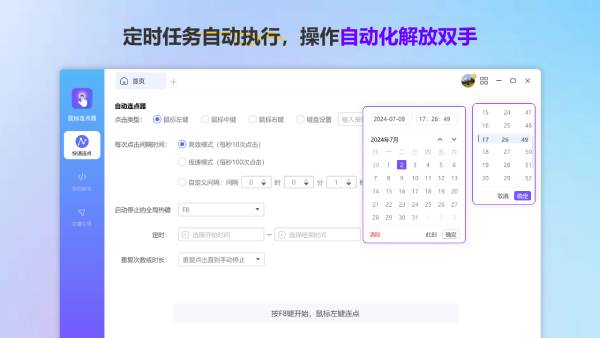
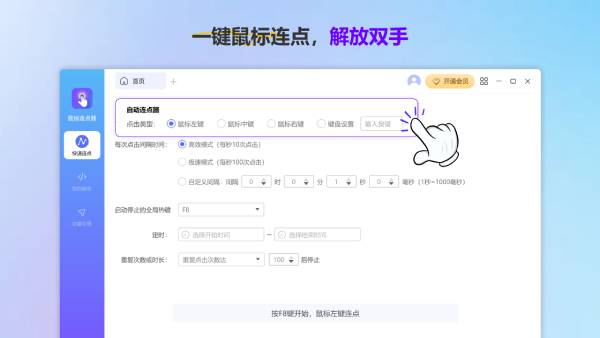
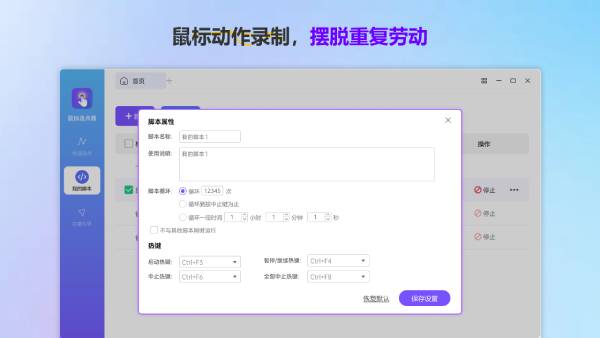

Tomato Mouse Connector is an automatic clicking software designed to improve work efficiency. It supports functions such as quick connection, mouse action recording and playback, custom mouse macro scripts, automatic execution of scheduled tasks, etc. It is suitable for gamers, online shopping experts and workers in various industries. It can significantly improve efficiency and save time and effort. Friends who like Little Tomato Mouse Connector, please come to Huajun Software Park to download and experience it!

Highlights of Little Tomato Mouse Connector
Office automation:
Mouse clicks can be automated during data processing or repetitive office operations, saving time and labor.
Supports repetitive tasks such as batch form submission, data entry, and automatic web page refresh to improve work efficiency.
Programming and Design:
In programming or design work, improve work efficiency and accuracy by recording and executing mouse action scripts.

Features of Little Tomato Mouse Connector
Game assistance:
In role-playing games, it can help players quickly complete repetitive tasks such as killing monsters and collecting, and improve game efficiency.
In game scenarios that require high-frequency clicks, such as automatic monster killing, skill upgrades, etc., it can reduce hand fatigue and improve the gaming experience.
Online shopping:
During limited-time sales events on e-commerce platforms, you can quickly click the purchase button to increase the success rate of the purchase.

Tomato mouse pointer function
One-click mouse connection:
It can achieve up to 1,000 clicks per second, easily perform continuous clicks, and significantly improve work and game efficiency.
Supports quick setting of mouse connection points, suitable for playing games, online shopping, ticket grabbing and other scenarios. Quickly connect points with one click, worry-free.
Mouse action recording and playback:
Automatically record and play back mouse movements, saving time on repetitive operations and helping users handle tedious tasks easily.
Supports mouse click recording and hot key recording to meet diverse needs.
Custom mouse macro script:
Create and execute exclusive mouse macro scripts according to personal needs to quickly complete complex tasks.
Script editing is easy and quick to get started, even beginners can easily edit scripts, and more intimate tutorials help you get started quickly.
Scheduled tasks are automatically executed:
Set scheduled tasks, automatically perform operations, free your hands, and easily enjoy automated workflows.
Multiple connection modes:
Supports multiple modes such as scheduled connection and random connection to meet different needs.
Hotkey settings:
Hot keys can be set to quickly start or stop connecting points, making the operation more convenient.
Compact and lightweight:
The software is small and does not occupy memory, runs smoothly and will not affect other computer programs.

Frequently Asked Questions about Little Tomato Mouse Connector
The connecting speed is inaccurate
Cause of the problem: System performance, background program or settings issues may cause unstable connection speed.
Solution: Close unnecessary background programs and optimize system performance. Check the connection speed setting to make sure the value is within a reasonable range. If the problem persists, try restarting the software or computer.
Hotkey not working
Cause of the problem: The hotkey may conflict with other programs, or may not be set correctly.
Solution: Check the hotkey settings to make sure they do not conflict with hotkeys from other programs. Try changing the hotkey combination, or restarting the software for the settings to take effect.
Mouse action recording is inaccurate
Cause of the problem: Moving the mouse too fast during recording, system delays, or software setting issues may lead to inaccurate recording.
Solution: Keep the mouse moving steadily while recording and avoid moving too fast or too slowly. Check your system latency settings to ensure the software is accurately capturing mouse movements. If the problem persists, try recording again or adjusting software settings.
Little Tomato Mouse Connector update log:
1. The details are more outstanding!
2. BUG gone without a trace
Huajun editor recommends:
Children's shoes, Little Tomato Mouse Connector can definitely meet your needs. From the software interface to the software functions, it is absolutely eye-catching. Everyone is welcome to download and use it! This site also has similar software See9 Computer Mouse Automatic Point Connector, Batch Butler, and Cloud Machine Manager!
Version: 1.0.0.18 | Update time: 2025-12-01
Similar recommendations







Latest updates



How to create a folder on Thunder Cloud Disk - How to create a folder on Thunder Cloud Disk
How to take screenshots in Video Pioneer? -How to take screenshots in Video Pioneer
Stickman War Legacy web version entrance-Stickman War Legacy online play
How does kimi generate PPT? -Kimi’s operation process for generating PPT
Peace Elite instant play entrance-Peace Elite web version online play entrance without login
Little Tomato Mouse Connector Review
-
1st floor Huajun netizen 2025-01-13 19:38:58The interface design of Little Tomato Mouse Connector is very easy to use and has rich functions. I highly recommend it!
-
2nd floor Huajun netizen 2025-01-10 22:42:25The Little Tomato Mouse Connector software is very easy to use, the download speed is very fast, and it is very convenient!
-
3rd floor Huajun netizen 2025-01-14 13:41:32Tomato Mouse Connector is awesome! 100 million likes! ! !
Recommended products









- Diablo game tool collection
- Group purchasing software collection area
- p2p seed search artifact download-P2P seed search artifact special topic
- adobe software encyclopedia - adobe full range of software downloads - adobe software downloads
- Safe Internet Encyclopedia
- Browser PC version download-browser download collection
- Diablo 3 game collection
- Anxin Quote Software
- Which Key Wizard software is better? Key Wizard software collection




