
-
Flying
- Size: 20.9M
- Language: Simplified Chinese
- Category: Collaborative office
- System: win7 and above







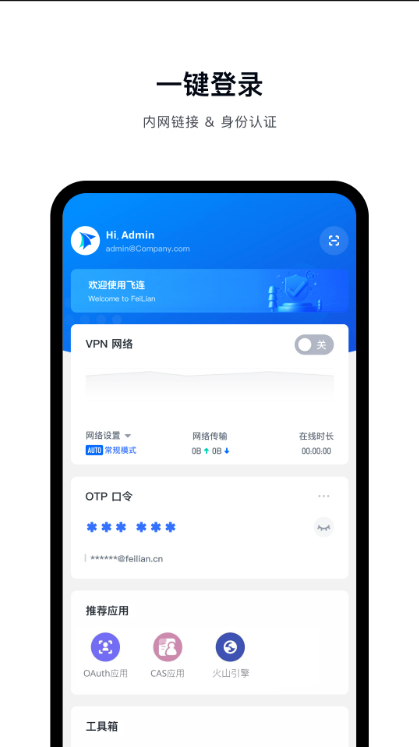
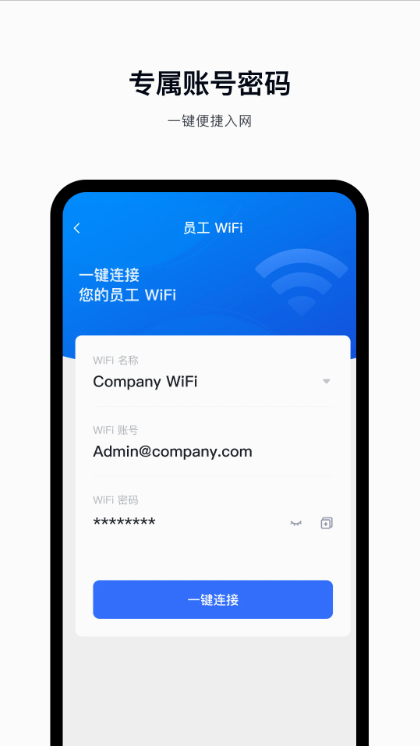
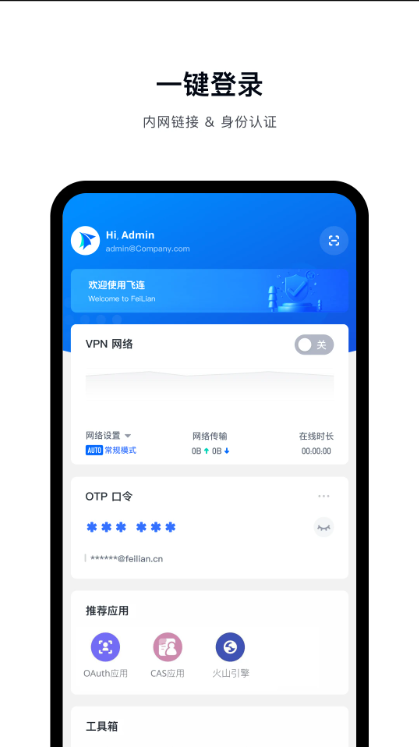
Feilian app is a must-have tool for enterprise offices. It supports risk detection, network diagnosis, network management and other functions, bringing users a more convenient and safer network management experience, making enterprise offices more efficient and easier.Huajun Software Park provides you with Felian download, come and experience it!
FlyLink software introduction
Feilian is a digital office platform developed by Beijing Volcano Engine Technology Co., Ltd., focusing on providing enterprises with safe and efficient remote office solutions. Its core positioning is "one person, one account, covering all scenarios". It realizes secure access to internal networks through privatized deployment, and integrates functions such as identity authentication, authority control, and risk detection to meet the hybrid office needs of enterprises.
Features of Felian software
Zero-trust security architecture: Implement the "zero-trust" security concept with the All in One architecture, build continuous trusted authentication around identity, network, and terminals, comprehensively evaluate the security of the access environment through 200+ factors, and dynamically adjust user permissions based on security levels, which can effectively deal with problems such as lack of decentralized account management and large business exposure.
Comprehensive terminal security protection: It integrates security baseline, terminal anti-virus, data leakage prevention, and peripheral management and control. The security capabilities cover Windows, Mac, iOS, Android, Linux and other systems, and can comprehensively protect the security of all types of computers and mobile phone terminals.
Global Office Acceleration: It has 100+ high-quality network nodes around the world, provides global POP points and bandwidth resources, and helps customers with global office networking. It can realize multi-cloud VPC networking in minutes, allowing remote office, branch access, etc. to be connected with one click, providing efficient network support for enterprises going overseas and other scenarios.
Integrated management: Integrating identity, terminal, and network management capabilities into one, it can complete device discovery, asset identification, registration authentication, permission management, etc. in one stop, making digital office simpler, more efficient, and easier to implement.
Adapt to a variety of application scenarios: For specific fields such as the game industry, we can provide solutions that adapt to their business, such as providing dark watermarks, OCR auditing and identification capabilities for image files such as game original paintings. At the same time, it can also meet the needs of various scenarios such as daily office work, remote office work, and partner network access.
FlyLink software functions
Identity and application governance: Covers account lifecycle management and can update identities in real time; supports flexible multi-factor authentication and account security policies; can integrate identity directories, etc.; also has application gateway, API access control, application discovery, workbench login and other functions to achieve identity-centric application access management.
Office networking and access: Provide stable virtual private network (VPN) function and support dynamic access control with minimum permissions. At the same time, for short-term network access needs such as external personnel's visits, we provide account and authority management solutions with multiple authentication methods to achieve safe and efficient network access management.
Unified terminal management: It can visually manage terminal assets and automatically learn network access device information. It supports self-service and automated software distribution, and can also automatically group devices according to their attributes, implement differentiated management and control, and improve the efficiency of terminal asset management.
Data security protection: Focusing on sensitive data definition and forensic traceability, we strengthen the protection of applications, peripherals and other leakage channels through screen watermarks, screenshots and other methods. At the same time, it can monitor the terminal security status in real time and automatically disconnect abnormal terminals to protect enterprise data security.
Secure access to multi-cloud applications: It can be connected to domestic and foreign mainstream cloud platforms to achieve account hosting, and can log in to cloud services through Felink authorization, supporting one-click login. It can uniformly manage access permissions, automatically update permissions based on employee identity status, and set differentiated security policies for different types of devices to achieve secure cloud asset access.
FAQ
The network page does not display the tab: The client network page does not display the VPN or employee Wi-Fi tab. The reason may be that the user does not have the corresponding permissions or has been downgraded to use the network. You can check the relevant permission configuration and network access details in the management background to troubleshoot.
The network status display is incorrect: Felian client prompts that it is not connected to the network. It may be that the intranet does not allow the relevant domain names and needs to allow specific domain names and ports 80 and 443.
Installation steps
Special note: The installation package provided by Huajun Software Park contains Android emulator and softwareAPK file, the computer version needs to install the emulator first, and then install the APK file.
1. First download the installation package from Huajun Software Park. The software package contains an emulator exe installation program and an APK file and unzip them. First click on the exe program to install the emulator.

2. Double-click the "Tencent Mobile Game Assistant.exe" file to enter the installation interface. Users can click "Install" to select the system's default installation address for installation, or click "Custom Installation" to select the installation path. Custom installation is recommended here.

3. Wait for the Tencent Mobile Game Assistant emulator to be installed, and then click "Start Now" to open the emulator.

4. Enter the main interface of the simulator, click the icon in the upper right corner and select the "Local APK Installation" button.

5. In the pop-up window, click the decompressed APK file, and then click Open.

6. Afterwards, the software will enter the installation process. You need to wait for a moment. After the software installation is completed, it will appear in my software list. Click the icon and double-click to open it.

Felian update log
1. Sweep the bug out and carry it out to the end
2. The most stable version ever
Huajun editor recommends:
Feilian is a very good software that can solve a lot of troubles. This site also provides Meituan Manager, China Education News, Cloud Machine Manager, etc. for you to download.
Version: 2.2.20 | Update time: 2025-10-23
Similar recommendations




Latest updates


How to set the font for Toutiao today? -How to set font in Toutiao
How to register for Toutiao? -How to register for Toutiao
How does Toutiao publish news? -How to publish news in Toutiao today
How to find the cover of Toutiao today? -How to find the cover of Toutiao today
How to choose self-pickup in Xiaomi Mall? - Choose the self-pickup method in Xiaomi Mall
How to pay in installments at Xiaomi Mall? -How to pay in installments in Xiaomi Mall
How to check Xiaomi Mall User Agreement? -How to view the Xiaomi Mall User Agreement on Xiaomi Mall
Felian comments
Recommended products






- Diablo game tool collection
- Group purchasing software collection area
- p2p seed search artifact download-P2P seed search artifact special topic
- adobe software encyclopedia - adobe full range of software downloads - adobe software downloads
- Safe Internet Encyclopedia
- Browser PC version download-browser download collection
- Diablo 3 game collection
- Anxin Quote Software
- Which Key Wizard software is better? Key Wizard software collection




