
-
iTop Easy Desktop
- Size: 36.63M
- Language: Simplified Chinese
- Category: desktop assistance
- System: Winall






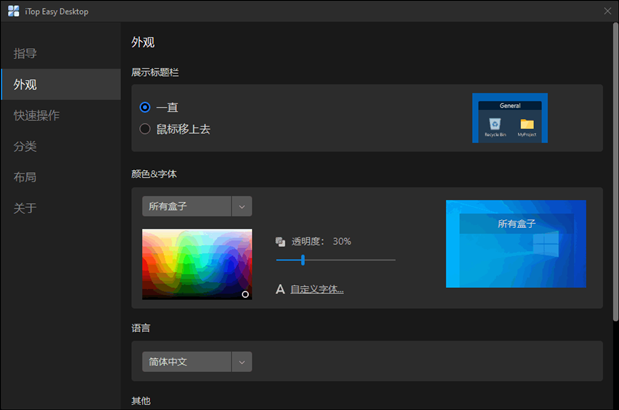
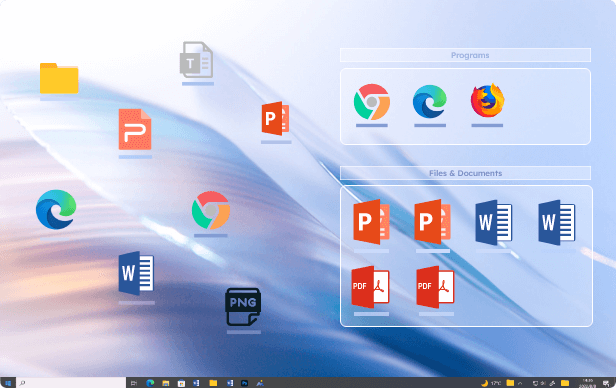
iTop Easy DesktopIt is a free desktop icon organization tool that allows you to flexibly control your WindowsDesktopproject and get things back to normal at any time. Easily organize and organize your desktop to increase your efficiency and productivity. Use With iTop Easy Desktop, you can automatically group icons, allowing you to remember, navigate, and associate icon positions more efficiently and intuitively through rules you create than with regular Windows Desktop has the advantage. Huajun Software Park provides you with free download of iTop Easy Desktop2025. Friends who like iTop Easy Desktop come to Huajun Software Park to download and experience it!
iTop Easy DesktopSoftware Highlights
The interface is simple and intuitive: the operation process is simple, even first-time users can get started quickly without complicated configuration.
Low resource usage: The software is lightweight, efficient, runs smoothly, and does not place additional burden on the computer.
Highly personalized: Supports customizing box appearance, layout, fonts and file classification rules to meet the personalized needs of different users.
Pure and ad-free: It is completely free and has no bundled ads, providing a pure user experience and highly praised by users.
iTop Easy Desktop softwareFeatures
Icon grouping and automatic organization
Create transparent boxes: Users can create multiple transparent boxes (boxes) on the desktop, manually drag icons, files, and folders into different boxes for classification, and support unlimited creation.
Automatic grouping rules: By setting the corresponding relationship between file types and boxes (for example, documents are classified into the "work" box, pictures are classified into the "album" box), automatic classification is achieved and manual operations are reduced.
Customized appearance: Each box can be customized with name, position, size, transparency, color and font to meet personalized needs.
Quick search and global positioning
Shortcut key to bring up the search bar: Press Windows key + F3 to quickly bring up the search box. Enter keywords to locate desktop items in seconds. The search speed is comparable to professional tools (such as Everything).
AI auxiliary functions: Some versions integrate AI chat functions (requires Internet connection), support file content summary, translation, knowledge Q&A, etc., to improve search practicality.
Multi-page desktop management
Expand desktop space: Supports setting up multiple desktop pages. Users can place different types of files into different pages and quickly manage them by switching pages to avoid desktop congestion.
Wallpapers and beautification functions
Dynamic/static wallpaper library: Provides rich wallpaper resources, including daily updated Bing wallpapers, solid color backgrounds and dynamic effects, and supports customized playlists and playback methods.
Taskbar transparency: You can set the taskbar to be transparent and match it with wallpaper to create an integrated and beautiful interface.
Practical widgets: Supports adding clock, weather, system monitoring, notes and other widgets, and supports top display to enrich desktop functions.
Privacy protection and security
Private box encryption: Create a private box with a password. To view, delete or modify files, you need to enter the correct password and associated email verification to ensure the security of important documents.
Hide icons with one click: Double-click a blank area of the desktop to hide all icons, double-click again to restore the display, and quickly create a temporary clean desktop.
Folder mapping and quick access
Folder mirroring: Map any folder on the hard disk to the desktop box, and directly operate files in the box. The effect is the same as entering the source folder, avoiding desktop clutter.
Shortcut creation: Supports the creation of shortcuts to applications or files and places them directly on the desktop for quick access.
Software features
Intelligent classification and organization
Automatic grouping: Automatically group desktop icons into transparent "boxes" based on file type (such as documents, pictures, videos) or custom rules to reduce manual operations.
Multi-box management: Supports the creation of multiple transparent box groups. Users can customize the name, color, transparency and size to achieve refined classification.
Private box encryption: Provides password protection function, creates an encrypted box to hide sensitive files, and requires password verification for deletion or access to ensure privacy and security.
Extremely fast search and convenient operation
Global search: Use the shortcut key (default Alt+S or Win+F3) to bring up the search box, which supports quick retrieval of all files and is as fast as third-party tools (such as Everything).
Hide icons with one click: Double-click a blank area of the desktop to hide all icons, and double-click again to restore them, keeping the interface clean.
Hotkey quick access: Supports custom hotkeys to directly call desktop icons or files without switching windows.
Personalization and beautification
Dynamic/static wallpapers: Provides a rich wallpaper library, supports customized backgrounds or dynamic effects, and improves the desktop visual experience.
Taskbar transparency: You can set the taskbar to be transparent and match it with wallpaper to create an integrated and beautiful interface.
Widget support: Add useful widgets such as clock, weather, system monitoring, notes, etc., and support top display.
Cross-platform and compatibility
Compatible with Windows 10/11 64-bit system, easy to install, no complicated configuration required.
Supports multi-page desktop, users can switch between different pages to expand usage space.
FAQ
Desktop icons suddenly disappear
Check the display settings: right-click an empty space on the desktop, select "View" → "Show desktop icons" and make sure the option is checked.
Restart the service: End the iTopEasyDesktop.exe process through Task Manager and then restart the program.
Restore the default configuration: delete the configuration folder (path: C:Users[username]AppDataRoamingiTopEasyDesktop) and restart the software.
Update or reinstall: Download the latest version, overwrite the installation or uninstall and reinstall.
iTop Easy Desktop software update log
1. Optimize content
2. The details are more outstanding and bugs are gone.
Huajun editor recommends:
iTop Easy Desktop is a software that is easy to operate, powerful and easy to use. You can download it and try it. Everyone is welcome to download. This site also provides desktop sticky notes (Sticky Memo), AcerGridVista desktop split-screen tool, dark blue simple calendar, etc. for you to download.
Version: 3.0.0.86 | Update time: 2025-12-03
Similar recommendations





Latest updates




iTop Easy Desktop Review
-
1st floor Huajun netizen 2022-11-15 15:01:00The overall feeling of iTop Easy Desktop is good and I am quite satisfied with it. The installation and operation are very smooth! It went very smoothly following the installation step-by-step guide!
-
2nd floor Huajun netizen 2022-11-21 22:45:12iTop Easy Desktop is not bad, the download is very fast, I would like to give you a good review!
-
3rd floor Huajun netizen 2022-10-25 22:24:30iTop Easy Desktop is convenient, practical and powerful. The software is very easy to use!
Recommended products








- Diablo game tool collection
- Group purchasing software collection area
- p2p seed search artifact download-P2P seed search artifact special topic
- adobe software encyclopedia - adobe full range of software downloads - adobe software downloads
- Safe Internet Encyclopedia
- Browser PC version download-browser download collection
- Diablo 3 game collection
- Anxin Quote Software
- Which Key Wizard software is better? Key Wizard software collection




