
-
OPPO cross-screen interconnection
- Size: 188.65M
- Language: Simplified Chinese
- Category: media management
- System: win7 and above






The latest version of OPPO cross-screen interconnection is a remote screen casting tool specially launched for OPPO. OPPO cross-screen interconnection official version can help users connect OPPO mobile phones and computers, and cast the content on the mobile phones to the computer, making it easier for users to view and manage. OPPO's cross-screen interconnection software can establish connections between mobile phones and multiple different terminal devices to meet users' diverse screen projection needs. Friends who like OPPO cross-screen interconnection, come to Huajun Software Park to download and experience it!
OPPO cross-screen interconnection software features
Seamless collaborative experience
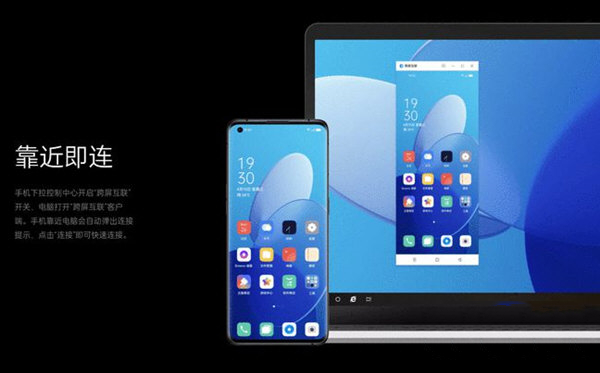
Near-field protocol connection: Quick connection is achieved through Wi-Fi Direct, Bluetooth and other protocols. When the mobile phone is close to the computer, a connection prompt will automatically pop up, and pairing can be completed with a click.
Automatic status synchronization: When you log in to the same account and the device is close, a connection is automatically established, and manual connection to nearby devices is supported.
Efficient transmission performance
Extremely fast transmission: Officially claimed that the transmission speed can reach 45MB/s, and the actual measurement of 1GB file transmission is about 25 seconds, which is close to the wired transmission efficiency.
Stable network dependence: 5GHz Wi-Fi or Wi-Fi 6 environment is required to reduce latency and ensure smooth operation.
Multi-tasking parallel processing
Multi-window operation: Supports running three mobile application windows at the same time on the computer, such as searching for materials and recording strategies at the same time, improving multi-tasking efficiency.
Application relay: Applications used on mobile phones can be seamlessly switched to computers or tablets to continue operation, supporting "one-touch Internet" quick relay.
Open ecological concept
User-centered design: Break down ecological barriers, respect users’ freedom of choice of devices, and avoid forced binding of devices of the same brand.
Underlying technology innovation: Through core technology optimization, cross-brand equipment compatibility and efficient collaboration are achieved.
OPPO cross-screen interconnection software functions
Cross-device communication and application relay
Seamless application switching: Applications can be seamlessly switched between mobile phones and computers and tablets, such as browsing the web on a mobile phone and continuing reading on a computer.
Call and message synchronization:
Answer incoming mobile phone calls on the computer and support switching to computer audio for calls.
The computer receives and processes mobile phone notifications (such as WeChat and text messages) to avoid frequent device switching.
Tablet communication sharing: Tablets can share the communication capabilities of mobile phones to make and receive calls, send and receive text messages, use data to access the Internet and enhance positioning.
File transfer and editing
Drag and drop transfer: Drag and drop with the mouse to transfer files across devices, supporting image, video, document and other formats.
Direct editing and saving: Open mobile files (such as Word, Excel) directly on the computer for editing, and automatically synchronize to the mobile phone after saving.
Shared clipboard: Content copied on the mobile phone can be directly pasted on the computer, and vice versa. Text, pictures, files, etc. are supported.
Live screen sharing and manipulation
Screen projection: The mobile phone screen is projected to a computer or tablet in real time, supports touch operation, has low latency, and is suitable for presentations or remote assistance.
Synchronization of photos and screenshots: Photos or screenshots taken on the phone are automatically synchronized to the computer and support quick saving or drag and drop for use.
Cross-end calls and mutual transmission
Cross-end calls: New features allow you to answer incoming calls from your mobile phone directly on your computer and switch audio devices (such as computer speakers or headphones).
Cross-end mutual transfer: Supports sending files to the computer through OPPO mutual transfer without connecting to a PC, suitable for quickly sharing large files (such as videos and pictures).
Other useful functions
Remote control: remotely control the mobile phone through the computer, suitable for demonstration or operating mobile phone applications.
Device management: Monitor the status of connected devices (such as power, storage space), and support file classification browsing and quick access.
Parental control: Some versions support network access restrictions for home devices to protect user privacy.
OPPO cross-screen interconnection installation steps
1. Download the installation package from Huajun Software Park, unzip it, and double-click the exe program
2. Enter the installation interface, check "I have read..." and click Custom Installation

3. Click "Browse" to select the installation path, and click Install Now

How to use OPPO cross-screen interconnection
FAQs about OPPO cross-screen interconnection
What should I do if I can’t connect?
Solution:
Make sure the computer has the 64-bit version of Windows 10 v1903 or above installed, and has a built-in wireless network card that supports Wi-Fi Direct function. Bluetooth must support 4.1 and above.
Try changing to a more stable network environment, such as a home or company private network.
Turn off the VPN on your phone, because the VPN may establish a private network on the public network for encrypted communication, preventing the phone from detecting computers on the same LAN.
Restart Bluetooth and Wi-Fi on your phone and computer, and then try connecting again.
If it is a desktop computer, consider using a laptop or consult OPPO official customer service to confirm whether the cross-screen interconnection function is supported.
OPPO cross-screen interconnection update log
1.Fix several bugs;
2. Optimize detailed issues;
Huajun editor recommends:
It is highly recommended to download OPPO cross-screen interconnection. Who knows who uses it? Anyway, I have already used it. In addition, Paracraft Creative Space, Silencer Magician, and Cloud Machine Manager are also good software. Welcome to click to download and experience it!
Version: 14.0.5.180 latest version | Update time: 2025-10-23
Similar recommendations





Latest updates




OPPO cross-screen interconnection review
Recommended products
-

tap lightly
-

VideoStudio Pro X8
-

VideoStudio X7 (Corel VideoStudio)
-

Simplified musical notation software
-

Corel VideoStudio Pro X8
-

Realtek HD audio manager (Realtek HD audio)
-
Realtek HD audio manager (Realtek HD audio)
-
Realtek HD audio manager (Realtek HD audio)
-
Realtek HD audio manager (Realtek HD audio)
-
Realtek HD audio manager (Realtek HD audio)
- Diablo game tool collection
- Group purchasing software collection area
- p2p seed search artifact download-P2P seed search artifact special topic
- adobe software encyclopedia - adobe full range of software downloads - adobe software downloads
- Safe Internet Encyclopedia
- Browser PC version download-browser download collection
- Diablo 3 game collection
- Anxin Quote Software
- Which Key Wizard software is better? Key Wizard software collection




