Many netizens currently use the software yy voice, so how should we find friends during the use process? The following editor will share the steps to find friends with yy voice, hoping to help everyone.
1. First open yy voice and log in to your yy voice account;
2. After logging in, find the "Search" button in the lower right corner of the yy voice interface and open it;
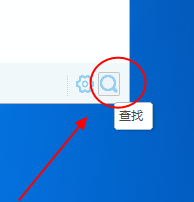
3. In the pop-up window, you can see the function of finding friends. In addition, you can also find channels, Y groups, games, etc.;

4. Enter the other party’s YY number or nickname in the “Find Y Friend” interface, and then click “Search”. After the search is completed, find the friend you want to add, click “+Friend”, and you will become friends after the other party agrees.
Friends who still don’t understand the steps to find friends using yy voice, don’t miss this article brought by the editor.