
Hot search terms: 360 Security Guard Office365 360 browser WPS Office iQiyi Huawei Cloud Market Tencent Cloud Store
Hot search terms: 360 Security Guard Office365 360 browser WPS Office iQiyi Huawei Cloud Market Tencent Cloud Store

Video playback Storage size: 17.82 MB Time: 2024-10-29
Software introduction: 1. Online on-demand: With the help of our proprietary technology, we can achieve extremely fast analysis and ensure smooth and fast playback on mobile phones. 3. High-definition products...
The PC version of Recommended Movies is a classic and easy-to-use free software for watching dramas. So how do you hide the player in the PC version of Recommended Movies? How to hide the player in the PC version of recommended movies? Let the editor give you the answer below!

How to hide the player in the PC version of Recommended Movies?
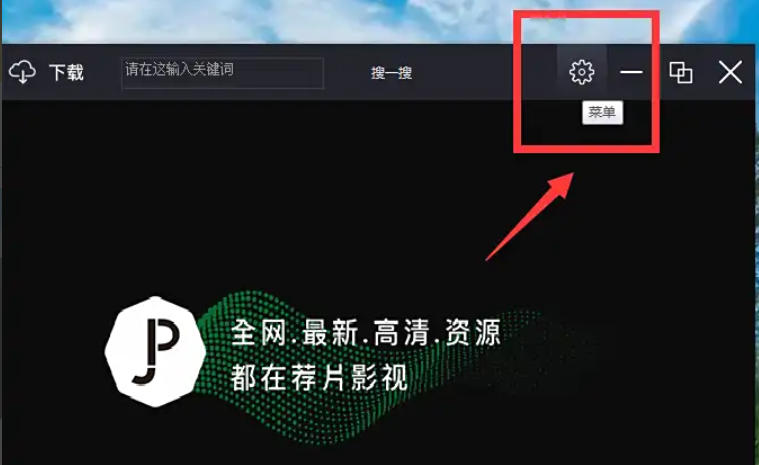
1. Open the recommended movie player and click the "Menu" icon in the upper right corner of the main interface.
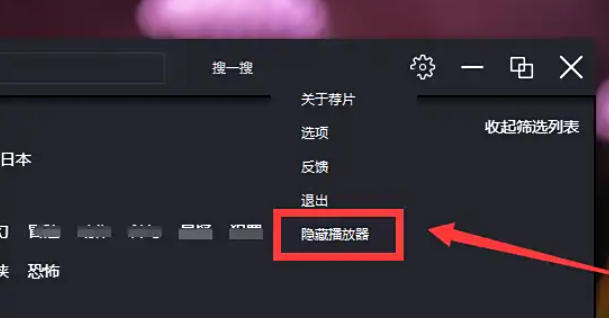
2. In the pop-up menu, find and click the "Hide Player" option to hide the player. At this time, the player icon on the taskbar will also be automatically hidden.
The above are the recommended movies compiled by Huajun editor for you. How to hide the player in the PC version? I recommend a method to hide the player in the computer version of the movie. I hope it can help you.

 How to draw a lottery in 360 Software Butler - How to draw a lottery in 360 Software Butler
 Microsoft Edge browser
 Steam
Steam
 Tencent Video
 WPS Office
 iQiyi
iQiyi
 Sohu video player
 Lightning simulator
 MuMu emulator
 Eggman Party
 What to do if there is no sound after reinstalling the computer system - Driver Wizard Tutorial
 How to switch accounts in WPS Office 2019-How to switch accounts in WPS Office 2019
 How to clear the cache of Google Chrome - How to clear the cache of Google Chrome
 How to fire bullets in scratch-How to fire bullets in scratch


