
Hot search terms: 360 Security Guard Office365 360 browser WPS Office iQiyi Huawei Cloud Market Tencent Cloud Store
Hot search terms: 360 Security Guard Office365 360 browser WPS Office iQiyi Huawei Cloud Market Tencent Cloud Store

web browsing Storage size: 1.56 MB Time: 2021-05-17
Software introduction: It is a web browser developed by Microsoft based on open source projects and other open source software. Microsoft Edge browser adds...
Microsoft Edge is a new generation of smart browser launched by Microsoft, based on the Chromium core, bringing a faster and more secure Internet experience. It supports cross-platform synchronization and can be seamlessly connected between Windows, macOS, iOS and Android devices. Edge is deeply integrated with the Microsoft ecosystem and has built-in Copilot AI assistant, which provides functions such as intelligent search, content summary, and writing assistance. Its features include: efficient vertical tabs, immersive reading mode, powerful privacy protection (such as tracking protection and password monitoring), and exclusive integrated PDF reading and editing tools. Whether it is office efficiency or entertainment experience, Edge can provide smooth and stable browsing services, making it an ideal choice for modern digital life. Next, let the editor of Huajun explain to you how to set up the homepage on edge and how to set up the homepage on edge!
first step
Left-click the Microsoft Edge browser icon in the lower left corner of the screen (or the fixed location on the taskbar) to start the browser.

Step 2
After the browser opens, find the three horizontal dots icon ("...") in the upper right corner of the page (the "Settings & More" menu). Click the icon with the left mouse button to bring up the drop-down menu.

Step 3
In the drop-down menu, find and left-click the Settings option (usually near the bottom of the menu).

Step 4
In the navigation bar on the left side of the settings page, find and left-click [On startup] (some versions may display as "Start, Home, and New Tabs"). The page setup options at startup will be displayed on the right.

Step 5
In the "On startup" settings, find the [Open the following page] option (or similar expression). The current homepage settings will be displayed below, click the [Add New Page] button (or directly edit the existing URL box).

Step 6
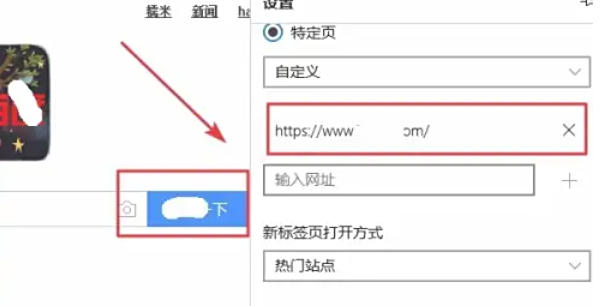
In the pop-up input box, double-click (or single-click) the left mouse button to activate the cursor and enter the URL you want to set as the homepage (such as https://www.example.com). After completing the input, press the Enter key on the keyboard or click on the blank space outside the input box to confirm.
Step 7
Make sure the URL you entered appears in the home page list. Close the browser, then reopen Microsoft Edge and check whether it automatically jumps to the homepage you set.
The above is compiled for you by the editor of HuajunofHow to set the homepage of Edge and how to set the homepage of Edge. I hope it can help you!

 How to draw a lottery in 360 Software Butler - How to draw a lottery in 360 Software Butler
 How to collect software in 360 Software Manager - How to collect software in 360 Software Manager
Microsoft Edge browser
 Steam
Steam
 Tencent Video
 WPS Office
 iQiyi
iQiyi
 Sohu video player
 Lightning simulator
 MuMu emulator
 Eggman Party
 What to do if there is no sound after reinstalling the computer system - Driver Wizard Tutorial
 How to switch accounts in WPS Office 2019-How to switch accounts in WPS Office 2019
 How to clear the cache of Google Chrome - How to clear the cache of Google Chrome
 How to fire bullets in scratch-How to fire bullets in scratch


