Hot search terms: 360 Security Guard Office365 360 browser WPS Office iQiyi Huawei Cloud Market Tencent Cloud Store
Hot search terms: 360 Security Guard Office365 360 browser WPS Office iQiyi Huawei Cloud Market Tencent Cloud Store

Wubi input Storage: 127MB Time: 2022-09-14
Software introduction: Universal Wubi Input Method is an input method software specially designed for Wubi input enthusiasts. The download and installation of Universal Wubi Input Method is dedicated to providing users...
Many people don’t know how to manually create words using the Universal Five-stroke Input Method? The article brought to you today is about how to manually create words using the Universal Five-stroke Input Method. If you still don’t know, let’s learn it with the editor.
The first step: We need to use the shortcut key "Ctrl+Shift" to switch to the universal Wubi input method;
Step 2: Then we open "Manual Word Creation" in the "Main Menu" on the status bar, as shown in the figure below:
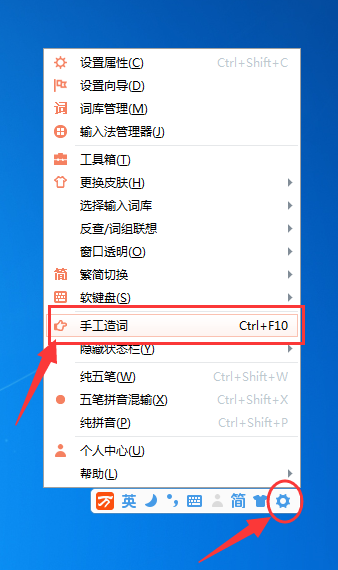
Step 3: At this time, we can also use the shortcut key "Ctrl+F10" to directly open "Manual Word Creation";
Step 4: Next, we enter the phrase we want to set (within 35 words) in the "entry" of the pop-up window. After the input is completed, the shortcut key for typing this phrase will be given in the encoding. Of course, we can also customize it;

Step 5: Finally, after we complete the settings, just click "OK". Then enter the shortcut keys just set in the universal Wubi input, and you can directly type the set phrases.
The above is the entire content of how to manually create words using the universal Wubi input method brought to you by the editor. I hope it can help you.

 How to collect software in 360 Software Manager - How to collect software in 360 Software Manager
 How does 360 Software Manager evaluate software - How does 360 Software Manager evaluate software?
 Microsoft Edge browser
 Steam
Steam
 Tencent Video
 WPS Office
 iQiyi
iQiyi
 Sohu video player
 Lightning simulator
 MuMu emulator
 Eggman Party
 What to do if there is no sound after reinstalling the computer system - Driver Wizard Tutorial
 How to switch accounts in WPS Office 2019-How to switch accounts in WPS Office 2019
 How to clear the cache of Google Chrome - How to clear the cache of Google Chrome
 How to fire bullets in scratch-How to fire bullets in scratch