
Hot search terms: 360 Security Guard Office365 360 browser WPS Office iQiyi Huawei Cloud Market Tencent Cloud Store
Hot search terms: 360 Security Guard Office365 360 browser WPS Office iQiyi Huawei Cloud Market Tencent Cloud Store

audio playback Storage size: 119.98 MB Time: 2022-10-09
Software introduction: It is a well-established domestic music playing platform. Kugou Music has established cooperative relationships with many domestic and foreign companies and institutions, and has a library of tens of millions of genuine songs, available below...
Many netizens have just come into contact with the Kugou Music app, and it may not be easy to use it. Below, the editor has shared relevant articles about music editing with Kugou Music. I hope all interested friends can come and learn together.
First, open Kugou Music software and enter the main interface.
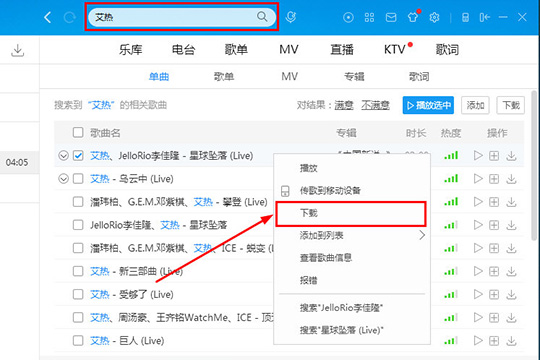
Enter the name of the song you want to edit or the name of the singer in the search bar above, and then relevant search results will appear. Users can find the song they need here, right-click it, and in the newly appeared column, select the "Download" option to enter the download interface.
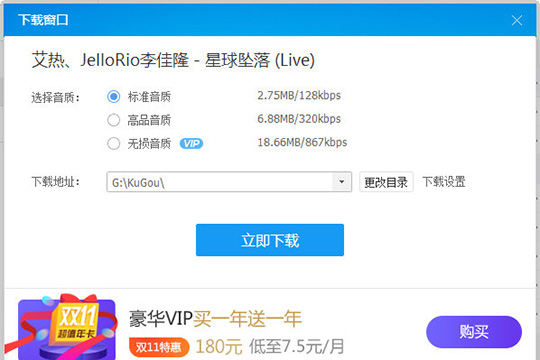
After that, the download window interface will appear, where you can select the desired song sound quality. Here, "High Quality Sound" is selected by default for downloading. Then select a suitable download address. If necessary, you can also enter the download settings to set up. Finally, click "Download Now" to start downloading.
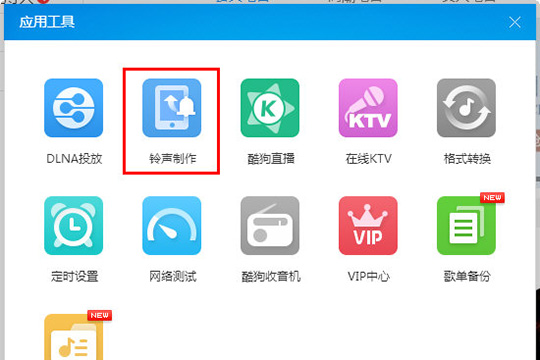
After the download is complete, click the "Tools" icon option in the upper right corner

After opening the pop-up interface of the application tool, click on the "Ringtone Production" option. Although it is a ringtone production tool, it can still help you edit songs and music.
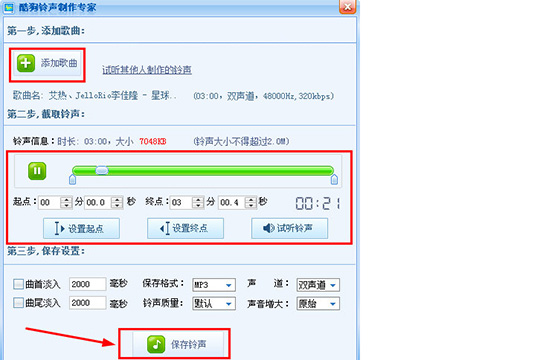
After entering the song ringtone production interface, you can add the song you just downloaded. Click "Add Song" to open the directory you just selected. Then select the length of the intercepted song. You can choose to set the starting point and end point. You can see the current duration above. After all settings are completed, click "Save Ringtone" to complete all operations.
Come and learn the detailed operation process of editing music with Kugou Music. It will definitely help everyone.

 How to add background music in python-How to add background music in python
 How to configure environment variables in python - How to configure environment variables in python
 How to run python - How to run python
 How to create a project in python - How to create a project in python
 How to make a blue sky background with scratch-How to make a blue sky background with scratch
 Microsoft Edge browser
 Steam
Steam
 Tencent Video
 WPS Office
 iQiyi
iQiyi
 Sohu video player
 Lightning simulator
 MuMu emulator
 Eggman Party
 What to do if there is no sound after reinstalling the computer system - Driver Wizard Tutorial
 How to switch accounts in WPS Office 2019-How to switch accounts in WPS Office 2019
 How to clear the cache of Google Chrome - How to clear the cache of Google Chrome
 How to fire bullets in scratch-How to fire bullets in scratch
