
Hot search terms: 360 Security Guard Office365 360 browser WPS Office iQiyi Huawei Cloud Market Tencent Cloud Store
Hot search terms: 360 Security Guard Office365 360 browser WPS Office iQiyi Huawei Cloud Market Tencent Cloud Store

Pinyin input Storage size: 158.18 MB Time: 2017-10-27
Software introduction: Sogou input method is a well-known input method launched by Sogou and has a high market share. Sogou input method base...
Many people don’t know how to use Sogou Input Method to delete words that I often type in? The article I bring to you today is about how to use Sogou Input Method to delete words that I often type in. If you still don’t know, let’s learn it with the editor.
1. Move the mouse to the floating window of Sogou Input Method, then right-click the mouse and select Set Properties in the pop-up window.
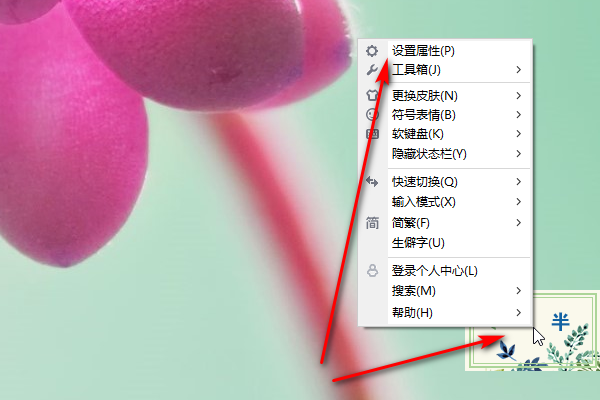
2. After opening the page, select Wubi Dictionary Management (if you are typing in commonly used Pinyin, it will be displayed as Pinyin Dictionary).

3. After opening the page, click Clear Vocabulary.
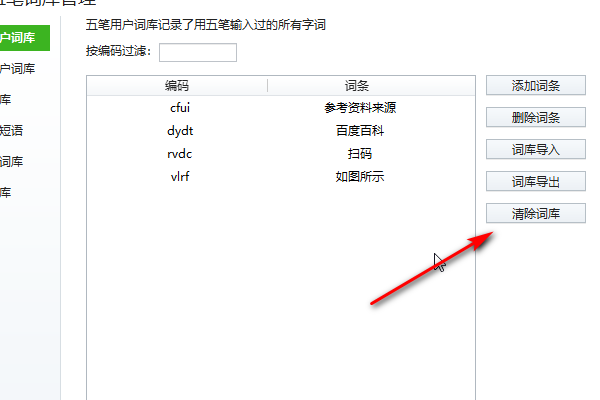
4. Click OK in the pop-up window.

5. Click OK in the pop-up window, and the thesaurus will be deleted successfully.

The above is how to delete all the words I often enter using the Sogou input method. I hope it can be helpful to everyone!

 How to upgrade software in 360 Software Manager? -How to upgrade software in 360 Software Manager
 Microsoft Edge browser
 Steam
Steam
 Tencent Video
 WPS Office
 iQiyi
iQiyi
 Sohu video player
 Lightning simulator
 MuMu emulator
 Eggman Party
 What to do if there is no sound after reinstalling the computer system - Driver Wizard Tutorial
 How to switch accounts in WPS Office 2019-How to switch accounts in WPS Office 2019
 How to clear the cache of Google Chrome - How to clear the cache of Google Chrome
 How to fire bullets in scratch-How to fire bullets in scratch


