
Hot search terms: 360 Security Guard Office365 360 browser WPS Office iQiyi Huawei Cloud Market Tencent Cloud Store
Hot search terms: 360 Security Guard Office365 360 browser WPS Office iQiyi Huawei Cloud Market Tencent Cloud Store

Internet TV Storage size: 174.39 MB Time: 2022-04-11
Software introduction: Tencent Video (QQLive) is an online video media platform and video player. Tencent video player software can seamlessly respond to multiple platforms 24 hours a day...
When some friends use Tencent Video to watch TV series, in order to save time, they will set up to skip the opening and ending of the credits and only watch the story content inside. However, it is very troublesome to manually click on each episode. How to set up automatic operation? Below, the editor will share the basic steps for setting up Tencent Video to automatically skip the beginning and end of the title sequence.
1. Start Tencent Video and click the [Main Menu] button in the upper right corner of the program interface.
2. Under [Main Menu], click to select the [Settings] option.
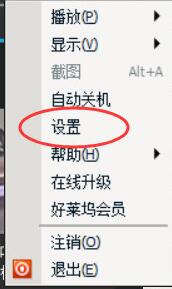
3. In the [Settings] interface, click to select [Playback Settings]--[Smart Playback]--[Skip opening and ending titles]--[Apply] options to complete the settings.

Above, I have shared with you the basic steps for setting up automatic skipping for Tencent Video. Friends in need should hurry up and read this article.

 How to draw a lottery in 360 Software Butler - How to draw a lottery in 360 Software Butler
 How to collect software in 360 Software Manager - How to collect software in 360 Software Manager
 Microsoft Edge browser
 Steam
Tencent Video
Steam
Tencent Video
 WPS Office
 iQiyi
iQiyi
 Sohu video player
 Lightning simulator
 MuMu emulator
 Eggman Party
 What to do if there is no sound after reinstalling the computer system - Driver Wizard Tutorial
 How to switch accounts in WPS Office 2019-How to switch accounts in WPS Office 2019
 How to clear the cache of Google Chrome - How to clear the cache of Google Chrome
 How to fire bullets in scratch-How to fire bullets in scratch


