
Hot search terms: 360 Security Guard Office365 360 browser WPS Office iQiyi Huawei Cloud Market Tencent Cloud Store
Hot search terms: 360 Security Guard Office365 360 browser WPS Office iQiyi Huawei Cloud Market Tencent Cloud Store

Pinyin input Storage size: 106.51 MB Time: 2021-04-21
Software introduction: iFlytek Input Method is an input method software that creates a unique new handwriting experience on the computer. iFlytek Input Method has won many domestic and foreign awards...
In the process of using the input method, in order to avoid repeated operations, many netizens will choose to set shortcut keys for use. So how to set shortcut keys for iFlytek input method? Let’s take a look at the related operation methods below.
1. First use the shortcut key "Ctrl+Shift" to switch out the iFlytek input method, and open the "Settings" interface in the "Common Settings" in the status bar, as shown in the figure:
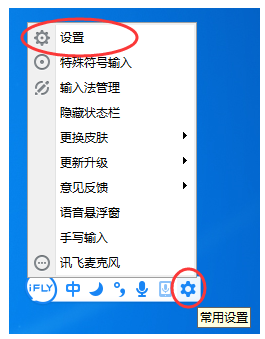
2. You can modify the shortcut keys in the "Shortcut Key Settings" in the settings interface.

Above, I have shared with you the steps for setting shortcut keys for iFlytek input method. Friends in need should hurry up and read this article.

 How to add background music in python-How to add background music in python
 How to configure environment variables in python - How to configure environment variables in python
 How to run python - How to run python
 How to create a project in python - How to create a project in python
 How to make a blue sky background with scratch-How to make a blue sky background with scratch
 Microsoft Edge browser
 Steam
Steam
 Tencent Video
 WPS Office
 iQiyi
iQiyi
 Sohu video player
 Lightning simulator
 MuMu emulator
 Eggman Party
 What to do if there is no sound after reinstalling the computer system - Driver Wizard Tutorial
 How to switch accounts in WPS Office 2019-How to switch accounts in WPS Office 2019
 How to clear the cache of Google Chrome - How to clear the cache of Google Chrome
 How to fire bullets in scratch-How to fire bullets in scratch
