
Hot search terms: 360 Security Guard Office365 360 browser WPS Office iQiyi Huawei Cloud Market Tencent Cloud Store
Hot search terms: 360 Security Guard Office365 360 browser WPS Office iQiyi Huawei Cloud Market Tencent Cloud Store

translation software Storage size: 2.38 MB Time: 2014-03-09
Software introduction: Google translator translates web pages Google translator (google translate) highlights Translate road signs, menus, and conversations in real time to help users communicate with locals...
There must be some novice friends who don’t know how to use the Google Translate app, but don’t worry, today I will explain how to use Google Translate in detail. I hope it can help everyone.
Open any website with an English page.
Then click the translate button in the upper right corner of the browser.
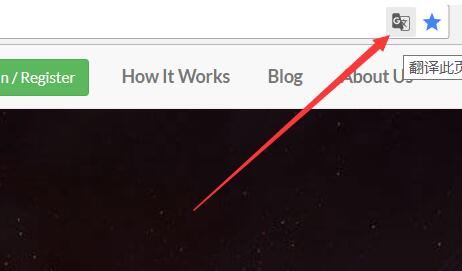
A translation prompt will pop up, click to confirm the translation.
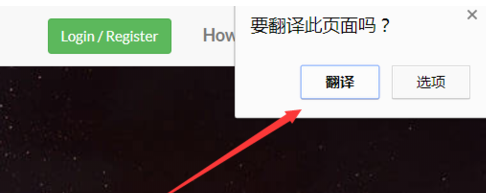
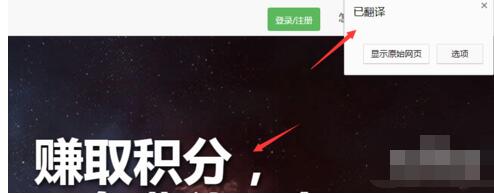
Make sure that the translated web page will be translated into Chinese by default, and the translation option will become translated.
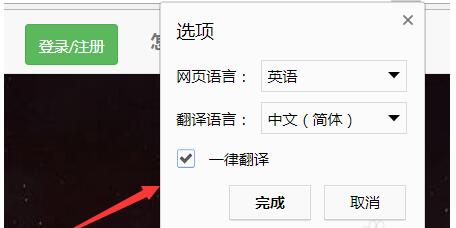
In addition to translating English web pages, you can also translate the languages of other countries by clicking the Translate web page button, and the pop-up menu clicks Options --- Change Language.
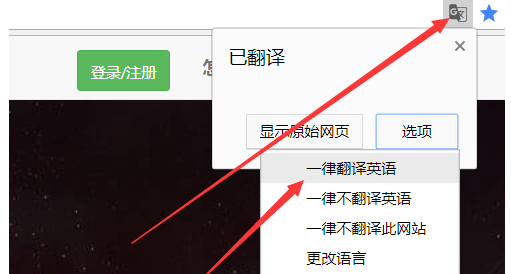
In the pop-up translation options window, select the language of the translated web page. The default selection here is English. You can change English to other languages. Just select Simplified Chinese as the target language.
Above, I have shared with you the detailed process of using Google Translate. Friends in need should hurry up and read this article.

 How to draw a lottery in 360 Software Butler - How to draw a lottery in 360 Software Butler
 How to collect software in 360 Software Manager - How to collect software in 360 Software Manager
 Microsoft Edge browser
 Steam
Steam
 Tencent Video
 WPS Office
 iQiyi
iQiyi
 Sohu video player
 Lightning simulator
 MuMu emulator
 Eggman Party
 What to do if there is no sound after reinstalling the computer system - Driver Wizard Tutorial
 How to switch accounts in WPS Office 2019-How to switch accounts in WPS Office 2019
 How to clear the cache of Google Chrome - How to clear the cache of Google Chrome
 How to fire bullets in scratch-How to fire bullets in scratch


