
Hot search terms: 360 Security Guard Office365 360 browser WPS Office iQiyi Huawei Cloud Market Tencent Cloud Store
Hot search terms: 360 Security Guard Office365 360 browser WPS Office iQiyi Huawei Cloud Market Tencent Cloud Store

Compression and decompression Storage size: 1.56 MB Time: 2009-02-04
Software introduction: 7z decompression software) compression software encryption 7-zip (7z decompression software) features Open source and free Completely free and open source (based on...
7-Zip is a free high compression ratio compression software that not only supports the unique 7zip file format, but also supports various other compressed file formats, including ZIP, RAR, CAB, GZIP, BZIP2 and TAR formats. The compression ratio of this software is 30-50% higher than that of ordinary ZIP files.

Here's how to install 7zip (or p7zip) in Linux.
Install 7zip on Debian, Ubuntu or Linux Mint systems
There are three 7zip packages in Debian-based distribution systems.
p7zip: Contains 7zr (the smallest 7zip archive tool), which can only handle the native 7z format.
p7zip-full: Contains 7z, supports 7z, LZMA2, XZ, ZIP, CAB, GZIP, BZIP2, ARJ, TAR, CPIO, RPM, ISO and DEB formats.
p7zip-rar: Contains a plug-in that can decompress RAR files.
It is recommended to install the p7zip-full package (not p7zip) as this is the most complete 7zip package and it supports many archive formats. In addition, if you want to process RAR files, you also need to install the p7zip-rar package. The reason for making it a separate plug-in package is because RAR is a proprietary format.
Let Ubuntu 12.10 support RAR and 7Z file decompression http://www.linuxidc.com/Linux/2012-11/74223.htm
$ sudo apt-get install p7zip-full p7zip-rar
Install 7zip on Fedora or CentOS/RHEL systems
Two 7zip packages are provided on Red Hat-based distribution systems.
p7zip: Contains the 7za command, supports 7z, ZIP, GZIP, CAB, ARJ, BZIP2, TAR, CPIO, RPM and DEB formats.
p7zip-plugins: Contains the 7z command, additional plugins that extend the 7za command (e.g. to support extraction of ISO formats).
On CentOS/RHEL systems, you need to ensure that the EPEL repository is available before running the following command, but on Fedora systems, no additional repository is required.
$ sudo yum install p7zip p7zip-plugins
Note that unlike Debian-based distribution systems, Red Hat-based distribution systems do not provide RAR plug-ins, so you cannot use the 7z command to extract and decompress RAR files.
Create or extract archive files using 7z
Once the 7zip software is installed, you can use the 7z command to pack and unpack various archive files. The 7z command uses different plug-ins to assist in processing archive files of corresponding formats.
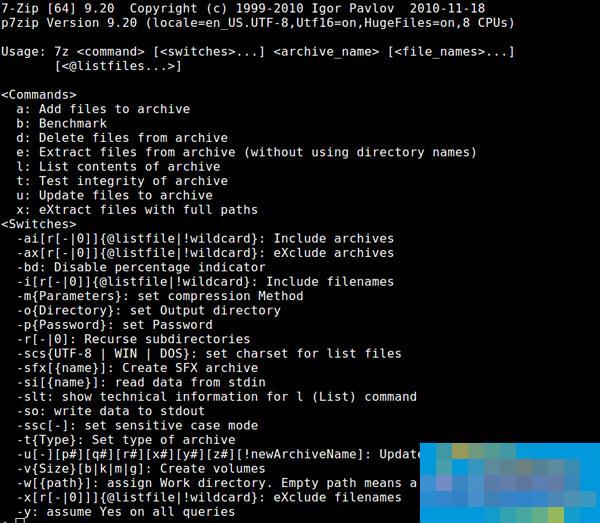
Use the "a" option to create an archive file, which can create files in 7z, XZ, GZIP, TAR, ZIP and BZIP2 formats. If the specified archive file already exists, it will "append" the file to the existing archive instead of overwriting the original archive file.
$ 7z a "archive-filename" "list-of-files"
Use the "e" option to extract an archive file. The extracted files will be placed in the current directory. Extraction supports many more formats than creation supports, including 7z, XZ, GZIP, TAR, ZIP, BZIP2, LZMA2, CAB, ARJ, CPIO, RPM, ISO, and DEB.
$ 7z e "archive-filename"
Another way to unpack is to use the "x" option. Unlike the "e" option, it uses the full path to extract the contents of the archive.
$ 7z x "archive-filename"
To see a list of archived files, use the "l" option.
$ 7z l《archive-filename》
To update or delete archive files, use the "u" and "d" options respectively.
$ 7z u "archive-filename" "list-of-files-to-update"
$ 7z d "archive-filename" "list-of-files-to-delete"
To test the integrity of the archive, use:
$ 7z t "archive-filename"
The above is a detailed introduction by Huajun editor on how to install and use 7-Zip in Linux systems. If you want to know more about how to use 7-Zip, please visit Huajun Software Park.

 How to upgrade software in 360 Software Manager? -How to upgrade software in 360 Software Manager
 Microsoft Edge browser
 Steam
Steam
 Tencent Video
 WPS Office
 iQiyi
iQiyi
 Sohu video player
 Lightning simulator
 MuMu emulator
 Eggman Party
 What to do if there is no sound after reinstalling the computer system - Driver Wizard Tutorial
 How to switch accounts in WPS Office 2019-How to switch accounts in WPS Office 2019
 How to clear the cache of Google Chrome - How to clear the cache of Google Chrome
 How to fire bullets in scratch-How to fire bullets in scratch


