
Hot search terms: 360 Security Guard Office365 360 browser WPS Office iQiyi Huawei Cloud Market Tencent Cloud Store
Hot search terms: 360 Security Guard Office365 360 browser WPS Office iQiyi Huawei Cloud Market Tencent Cloud Store

network sharing Storage size: 8.7MB Time: 2016-03-07
Software introduction: WIFI Sharing Wizard is a very good free WiFi sharing software. Download the WiFi Sharing Wizard and you can turn it into a wireless hotspot with one click and set it up. Other settings...
What should I do if a 1002 error occurs in the wifi sharing wizard? The wifi sharing wizard is an Internet tool that can provide users with free wifi hotspots. Whether they are laptops or mobile phones, they can connect and surf the Internet at will. But sometimes the wifi sharing wizard will have 1002 and 1203 code errors, resulting in the inability to use wifi. So how should we solve this problem? The following editor will introduce to users in detail the reasons and solutions for the 1002 error in the wifi sharing wizard. Please see below for details!
Introduction to the reasons for the 1002 error in the wifi sharing wizard:
Code 1203 is because your virtual network card is abnormal. That is, the network card starting with Microsoft is called a virtual network card.
Free WiFi startup failed: 1002 The wireless network card does not support the WiFi hotspot function:
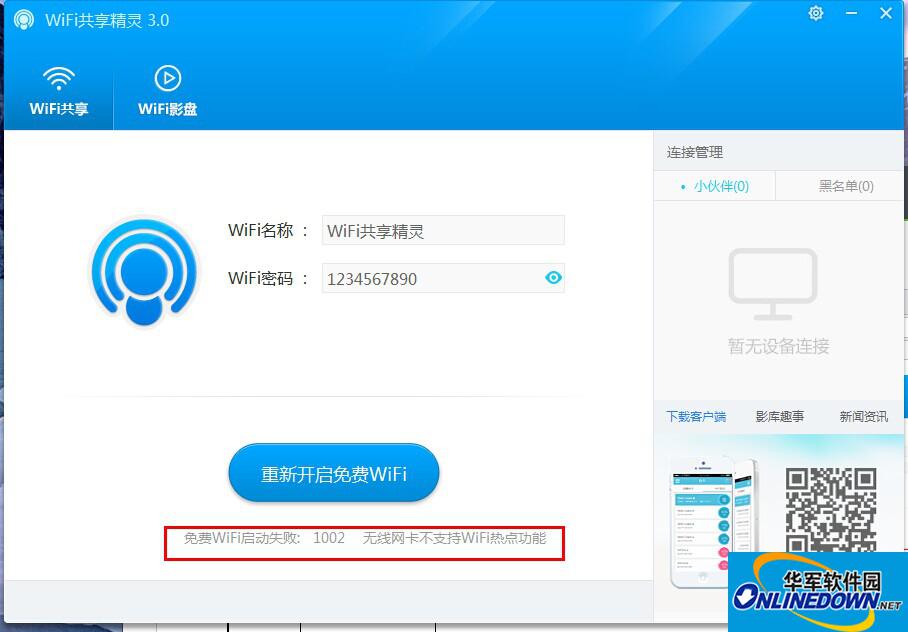
Solution to 1002 error in wifi sharing wizard:
If your wireless network card is turned on normally, please determine whether your laptop
Does the wireless network card support software sharing?
How can I tell if my wireless network card supports software sharing?
View method: Right-click Computer (My Computer)-Manage-Device Manager-Network Adapter, as shown in Figures 1, 2, 3, and 4:
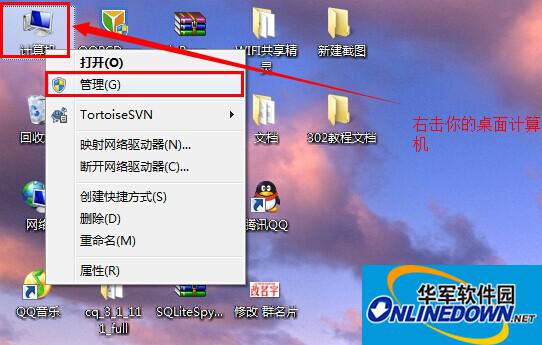
(Figure 1)
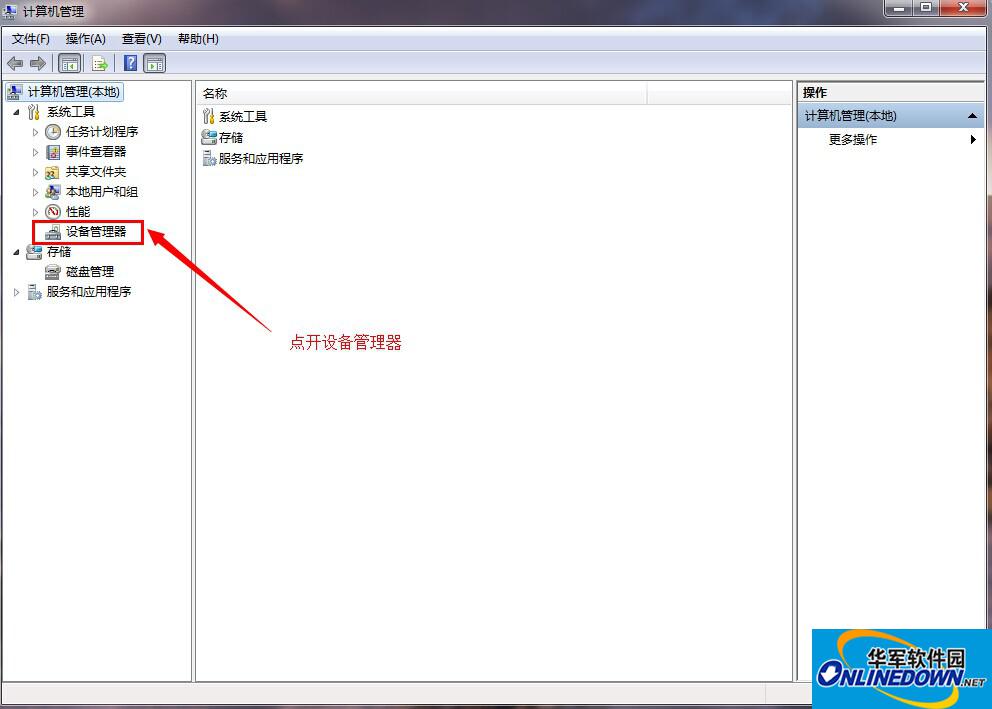
(Figure 2)
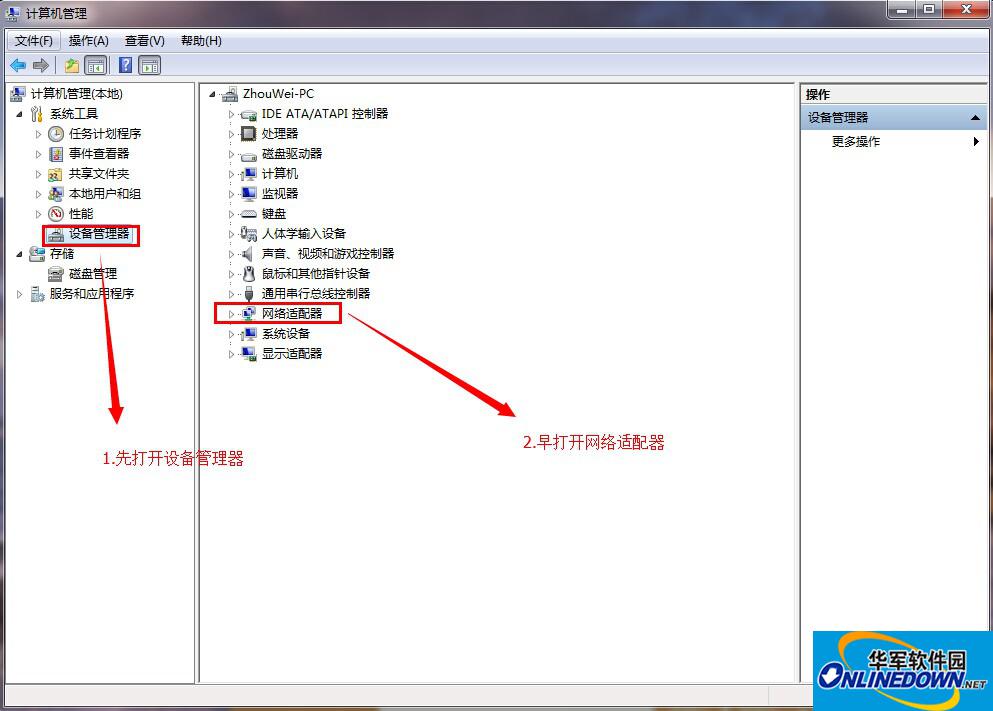
(Figure 3)
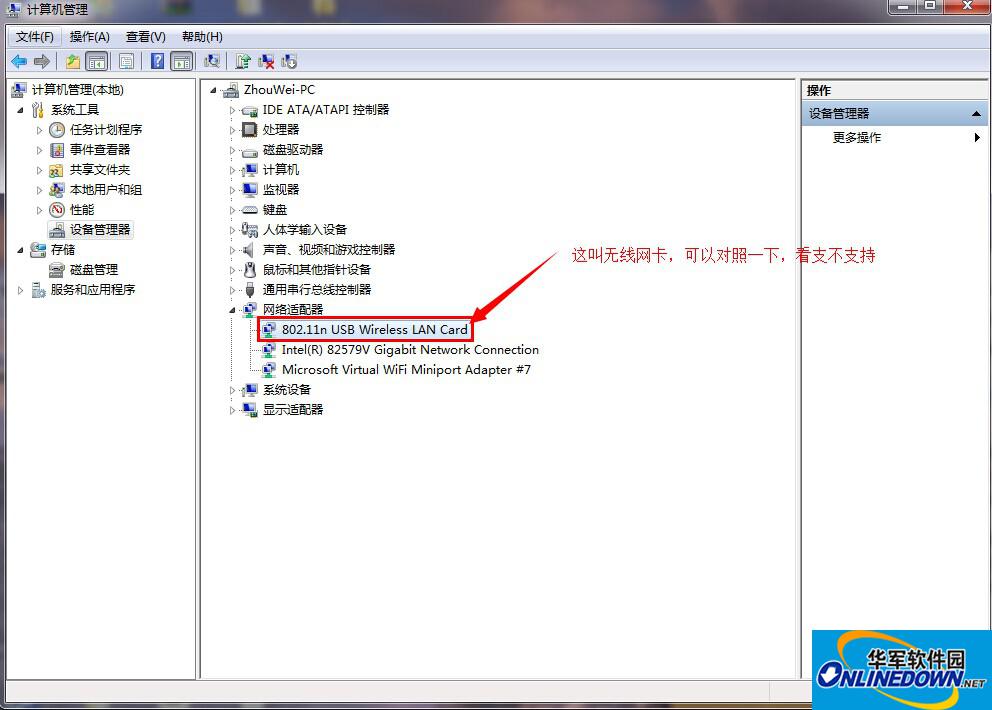
(Figure 4)
Note: Please do not use the Sharing Wizard on your laptop when wireless Internet access is available. The network card is unstable, and few network cards are stable enough to support wireless Internet access and share the network at the same time.
The 1002 error code will also appear when using the WiFi Sharing Wizard to connect the laptop to the Internet wirelessly.
Warm reminder: The following network cards will cause you to be unable to access the Internet using wifi:
AR9287, AR928X, AR938x, AR9485WB-EG, AR9580, AR5006X, AR956X,
IntelWireless-N 2200, R8188, B802.11N, AR9285
Belkin F5D7050UK, D-Link AirPlus G DWL-G122, Gigabyte GA-WPKG 802.11g,
Realtek RTL8187, Zydas ZD1211
Intel WiFi Link 1000, Intel WiFi Link 5300, Intel WiFi Link 5100,
Intel WiMAX/WiFi Link 5350, Intel WiMAX/WiFi Link 5150
Intel PRO/Wireless 3945ABG, Intel Wireless WiFi Link 4965AGN, Broadcom 4935 (soft AP is not supported)
The above is the reason and solution for the 1002 error code in the wifi sharing wizard introduced by the editor to users. I hope it can help everyone!
The editor recommends:
The solution to the problem that the wifi sharing wizard cannot detect the wireless network card
What should I do if my mobile phone cannot find a hotspot with WiFi Sharing Wizard?
How to solve the problem that wifi sharing wizard error code 80070425 cannot be started

 How to add background music in python-How to add background music in python
 How to configure environment variables in python - How to configure environment variables in python
 How to run python - How to run python
 How to create a project in python - How to create a project in python
 How to make a blue sky background with scratch-How to make a blue sky background with scratch
 Steam
Steam
 Tencent Video
 WPS Office
 iQiyi
iQiyi
 Sohu video player
 Lightning simulator
 MuMu emulator
 Eggman Party
 WPS Office 2023
 What to do if there is no sound after reinstalling the computer system - Driver Wizard Tutorial
 How to switch accounts in WPS Office 2019-How to switch accounts in WPS Office 2019
 How to clear the cache of Google Chrome - How to clear the cache of Google Chrome
 How to fire bullets in scratch-How to fire bullets in scratch
