
Hot search terms: 360 Security Guard Office365 360 browser WPS Office iQiyi Huawei Cloud Market Tencent Cloud Store
Hot search terms: 360 Security Guard Office365 360 browser WPS Office iQiyi Huawei Cloud Market Tencent Cloud Store

Electronic photo album Storage size: 31.4MB Time: 2021-01-19
Software introduction: MTV electronic photo album official version The official version of MTV electronic photo album is a very practical tool for making electronic photo albums. MTV electronic photo album can store data...
MTV electronic photo album production high-definition electronic photo album graphic tutorial:
1. Download a song you like and save the music download to your computer.
2. Run the MTV electronic photo album and choose to make a karaoke photo album or an ordinary electronic photo album according to your preference. For example, if you choose to make an ordinary electronic photo album, the software prompts you to add music and LRC lyrics to display subtitles in the first step, as shown in Figure 1:
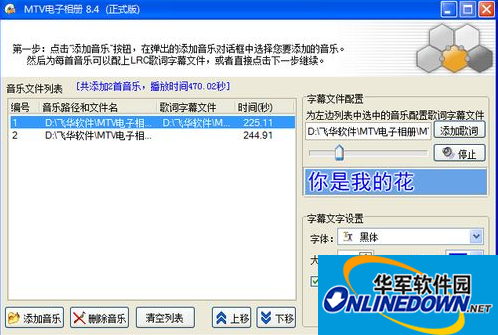
(Figure 1)
3. After adding the songs and lyrics, in the next step, you can add the text information displayed in the title of the entire album. You can freely set the time, color and size of the text display, as shown in Figure 2:
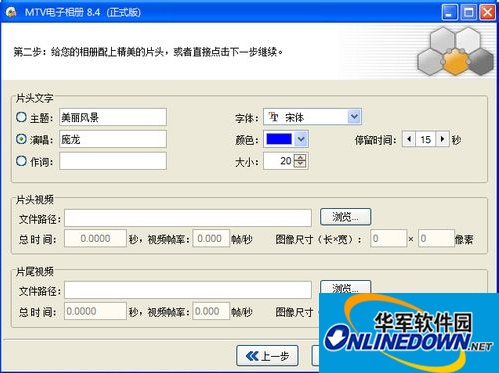
(Figure 2)
4. You can preview and view the special effects during photo transition, and freely set the photo stay display time and transition change time;
5. Add photos. Since the electronic photo album produced displays the lyrics and subtitles corresponding to the song, the number of photos is affected by the song playback time. It is recommended to add the number of photos according to the song playback time to achieve the same effect of the photos and song playback. You can also add different types of frames to your photos, as shown in Figure 3:
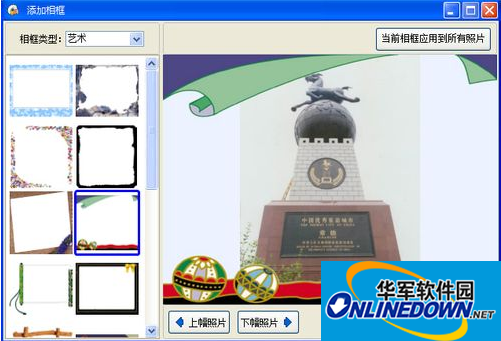
(Figure 3)
6. After adding the photos, the next step is to select the output video format. If the digital photos you take are very high-pixel, it is recommended that you can output high-definition 720p or high-definition 1080p. This can output high-definition video format and protect the clarity of your original photos. However, if you want to play it in a disc player, you can choose to output DVD. After selecting the path to save the electronic photo album video, click the "Generate Album" button to create and output your electronic photo album.
You can use players such as QQ Video or Baofeng Video to play the produced videos, or you can use burning software such as NERO to burn the output VCD/SVCD/DVD videos into VCD/SVCD/DVD video discs and play them directly on disc players and other devices, as shown in Figure 4:
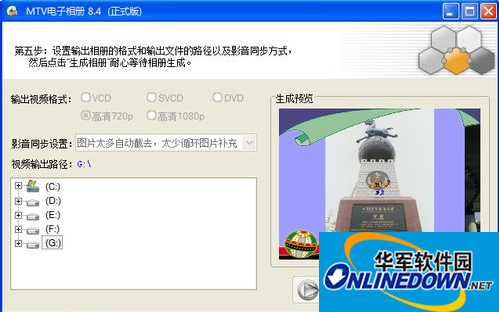
(Figure 4)
The above is the tutorial introduced by the editor for users to use mtv electronic photo album to create high-definition electronic photo album. I hope it will be helpful to everyone!

 How to upgrade software in 360 Software Manager? -How to upgrade software in 360 Software Manager
 Microsoft Edge browser
 Steam
Steam
 Tencent Video
 WPS Office
 iQiyi
iQiyi
 Sohu video player
 Lightning simulator
 MuMu emulator
 Eggman Party
 What to do if there is no sound after reinstalling the computer system - Driver Wizard Tutorial
 How to switch accounts in WPS Office 2019-How to switch accounts in WPS Office 2019
 How to clear the cache of Google Chrome - How to clear the cache of Google Chrome
 How to fire bullets in scratch-How to fire bullets in scratch


